Fallout 4 Wheel Menu
⚪ Last updated 2019⚠️ Install Order · 2 steps
Install in this order, then this mod last — most mods fail to load without their framework and dependencies in place.
Preview
🔍 Analysis
- 👍 1.5% endorsement rate — high engagement, a strong quality signal
- 🏆 #36 of 110 User Interface mods in this game by downloads
📋 About This Mod
FALL UI CONVERSION HERE
Requirements:
1) F4SE (0. 6. 8 or greater)
2) DEF_UI (Or Horizon since it includes DEF_UI)
3) Mod Configuration Menu (Otherwise you won't be able to set hotkey to open/close menu)
4) Sorting mod (Or Horizon) (optional, but without it you'll be restricted in various menu categories)
Installation/Usage:
1) Install via mod manager/manually
1.a) If installing manually copy one of the presets from presets/ directory to Interface/WHEEL_MENU/conf.xml
2) Open MCM, configure hotkey for menu
3) Press hotkey to open/close the menu (Or press d-pad down on gamepad)
Configuring Wheel Menu:
1) See Interface/WHEEL_MENU/conf.xml . This file should be self-explained to modify. To leverage tag patterns, you must have sorting mod installed. Otherwise use category pattern to perform default menu sorting based on item keywords.
Keyboard/mouse navigation:
1) W/S - select prev/next item in the list (removed in 1. 3. 1, use mouse scroll)
2) E - Use/equip current highlighted item in the list
3) Up/Down keys - select prev/next item in the list
4) Left/Right - select next/previous menu (left counterclockwise, right clockwise)
5) Mouse wheel inside item list - scroll
6) Mouse wheel outside of item list - select next/prev item (similar to quick loot menu)
Gamepad navigation/controls:
1) D-Pad (left) down - Open Menu
2) B (O) - close menu
3) left stick left/right or d-pad left/right - switch menu
4) left stick up/down or d-pad up/down - select next/prev item
5) A (X) - use/equip item
Included Presets:
1) For vanilla game (Not recommended, use sorting mod/horizon)
2) For VIS-G Item Sorting mod mod
3) For Valdcil's Item Sorting Mod
4) For Horizon overhaul
Non vanilla presets (horizon, valdacil's, etc...) are for English version of game. If your sorting mod translates sorting tags, e.g. (Aid) Stimpak -> (Ayuda) Stimpak or (Помощь) Стимпак (or to whatever name it changes), you must edit conf.xml and change values according your translated names. Possible exception - Horizon preset due to unique symbols only (like (+)) names
Menu is too small/big for you? Set the scaling in the MCM configuration
Common problems:
Q: Mod is being displayed in MCM, i was able to set hotkey, but on keypress nothing happens
A: Common source of this problem - you have wrong/incomplete installation of F4SE. Reinstall F4SE. Data directory from F4SE archive MUST be copied to your game directory, this is not optional. Also make sure you're running game through f4se_loader.exe
Q: Still doesn't work after reinstalling/co
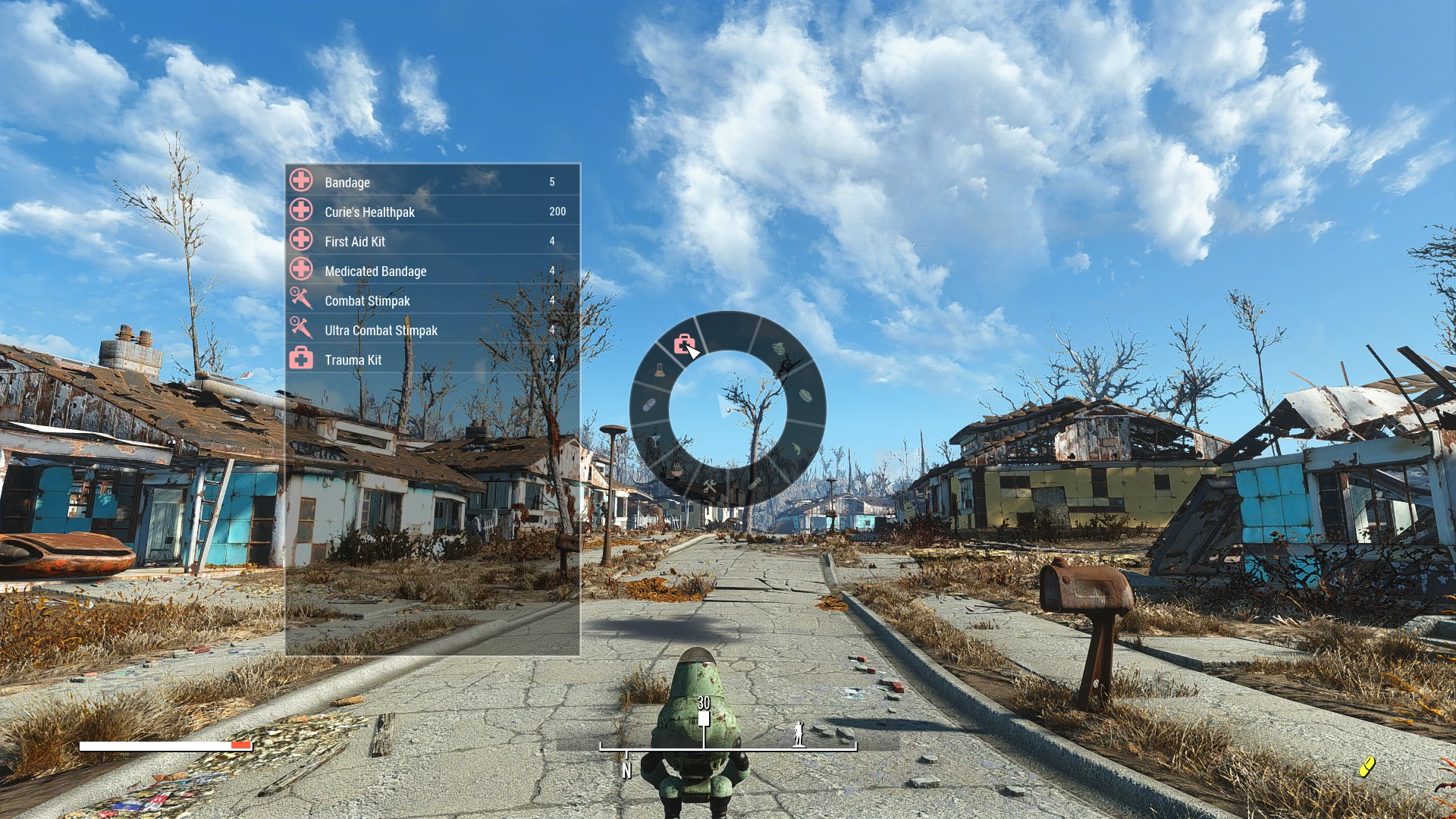
Fallout 4 Wheel Menu adds a customizable radial menu for quick access to items like chems, food, grenades, and mines. It slows time when opened instead of pausing, offering a smoother alternative to the Pip-Boy. With over 10,000 endorsements and 680,000 downloads, it's a popular UI enhancement for players who want faster item management.
✨ Key Features
📊 Pros & Cons
✅ Pros
- Huge community trust with 10,086 endorsements and over 680k downloads.
- Configurable sections let you tailor the wheel to your playstyle.
- Time-slowing effect keeps combat flowing without full pause breaks.
⚠️ Cons
- Last updated in 2019, so may have compatibility issues with newer game updates or DLC.
- Time-slow mechanic might not suit players who prefer a true pause for inventory management.
For Fallout 4 players who want faster access to chems, grenades, and food without opening the Pip-Boy. Ideal for action-oriented builds that rely on quick item usage during combat. Skip if you prefer a full pause or don't use many consumables.
💡 Beginner Tips
- Check the mod's configuration options to assign your most-used items to the wheel for quick access.
- Since the mod slows time, practice using it in combat to get used to the timing without pausing.
- If you use other UI mods, test for conflicts by enabling this mod last in your load order.
📊 Mod Details
- Game
- Fallout 4 Mods
- Author
- devpieron
- Version
- 1.5.0
- Downloads
- 680,206
- Endorsements
- 10,086
- Category
- User Interface
- Created
- 12/31/2018
- Updated
- 3/20/2019
🧩 Commonly Used Together
Users add these mods to the same collections — a real compatibility signal, not an AI guess.
🔧 How to Install Fallout 4 Mods
Download from Nexus.
📖 Full step-by-step install guide for Fallout 4 →
Visit the official mod page for specific installation instructions for this mod.
🎮 Need cheat codes or console commands? Check ur gaming wiki for Fallout 4 commands, item IDs, and more.
Keep browsing — more Fallout 4 mods await