Emote Dogma - Emotes for player and NPCs
🟢 Updated this monthPreview
🔍 Analysis
- 👍 1.2% endorsement rate — high engagement, a strong quality signal
- ✅ Updated 94 days after the latest game patch — actively maintained
- 🏆 #20 of 125 Miscellaneous mods in this game by downloads
📋 About This Mod
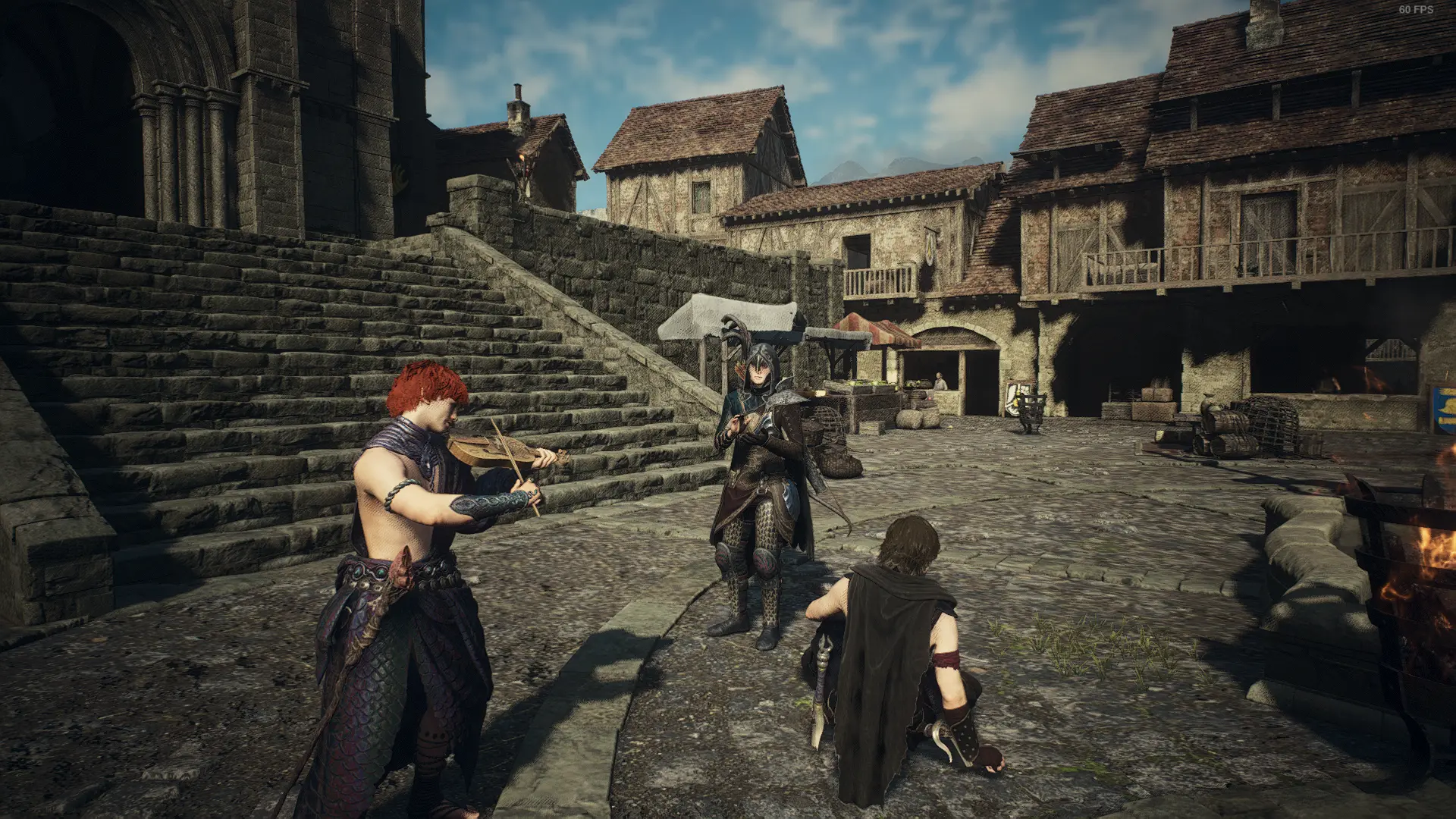
Emote Dogma allows you to play more than 2000 animations on the player character, any of your pawns, or any NPC you want. It also comes with 9 predefined neat gestures. All the animations are played by pressing hotkeys which you can change to your liking.
Choose who performs the gesture
You can choose to play the animations on the Arisen, pawns or NPCs through the script UI. You can, of course, play the animations on several characters at the same time. To play it on a specific NPC, you need to type in their character ID. To find out an NPCs character ID, open the REFramework menu and go to DeveloperTools -> GameObjectsDisplay and click the "Enabled" checkbox. This will let you see the ID of any NPC you look at. You can also look the map in the enemy dump file in the downloads section. You can cache up to 4 NPC to play animations on.
You can also run animations on enemies and other non-human creatures. Normal animations, Extra animations and Gestures work on Human and Beastren enemies while only Custom Gestures work on other Non-Human enemies. Their Character IDs must be available in the NPC IDs list (or the Available Characters list) for the animations to run. Click the Refresh List button on the list if you don't see the enemy / creature Character IDs.
Since Custom Gestures also contain animations for Non-Human and Non-Beastren creatures, you will have to select compatible animations for the type of character you wish to run on. (for example: Human / Beastren animations will most likely only work on Humans / Beastrens.)
Default gestures
You have access to 9 gestures that you can set hotkeys for. You can also play them by clicking the buttons in the UI.
Custom gestures
You can also set your own Custom Gestures.
More than 2000 animations to choose from
With Emote Dogma, you can play essentially every animation in the game. Choose from one of the available animation lists, then choose whatever animation you want! There's also a search filter since there are lots of animations on each list. There are two big groups here, which I've named "Normal animations" and "Extra animations". In reality, every animation in the game should be in both groups. It's just that they use different methods for setting the animations.
-
[]Normal animations: I don't guarantee that every animation will work, as many are intended to be used only by NPCs. Also, not every animation works for the full party, some only work for player and main pawn, while others only work for side pawns. Some may even crash the game (I've taken out a few that do already). Generally speaking, anything under "Liv" and "Job" lists should work fine. The others are a mixed bag. Also, these animations come with full effects, so if you use the godsbane stabbing animation, you will actually die. If you use the sealing phial animation, you'll actually seal NPCs, etc.[/]
[]Extra animations: these seem to work all the time, but sometimes cancel too early. Using the "Prevent motion on player and pawns" checkbox (see next section) can help with that. They don't come with all effects, for example using the sealing phial animation will not seal NPCs, but using the godsbane still kills you.[/]
Freeze characters and stop them from cancelling the animations
There are a few additional tools, allowing you to prevent any actions from cancelling the animations you set with the mod, and letting you freeze each party member or NPC individually to get them in the exact position you want them to be in. This expands the possibilities for photo shoots beyond measure!
Teleport NPCs to you or to whatever location you want
You can move any of the characters you can play animations on to a certain place (or by a certain amount), for even more control. The "Copy position" button gets the current coordinates of the character you have selected to play animations on (best to use this with only one character selected). You can also rotate the characters using pitch, yaw, roll angles.
Note that you can only teleport NPCs that have been loaded in.
Custom Poses
Create custom poses by moving your character
Emote Dogma lets you play one of 9 default emotes on your character, pawns, or NPCs, with access to over 2000 animations. A versatile emote mod for Dragon's Dogma 2 players who want to express themselves or trigger NPC reactions. With 335 endorsements and frequent updates, it's a community favorite.
✨ Key Features
📊 Pros & Cons
✅ Pros
- Huge variety with over 2000 animations to pick from.
- Works on both your character and NPCs, so you can mess with pawns.
- Solid community backing with 335 endorsements and 25k downloads.
⚠️ Cons
- Requires understanding of how to trigger animations; might be overwhelming for casual users.
- Potential compatibility issues with other mods that alter animation or pawn behavior.
For Dragon's Dogma 2 players who want to add roleplay flair or just goof around with emotes. Great for content creators looking to spice up videos. Skip if you're not into cosmetic or social features.
💡 Beginner Tips
- Check if the mod requires a mod manager like Vortex or Fluffy Mod Manager for easier installation.
- Test emotes on your character first before trying on NPCs to get the hang of the controls.
- Look for keybind settings in the mod configuration to quickly access your favorite emotes.
📊 Mod Details
- Game
- Dragonsdogma2 Mods
- Author
- Nickesponja and squirchupuff
- Version
- 3.5.45
- Downloads
- 28,921
- Endorsements
- 361
- Category
- Miscellaneous
- Created
- 6/3/2024
- Updated
- 9/28/2026
🧩 Commonly Used Together
Users add these mods to the same collections — a real compatibility signal, not an AI guess.
🔧 How to Install Dragon's Dogma 2 Mods
Download from Nexus Mods.
📖 Full step-by-step install guide for Dragon's Dogma 2 →
Visit the official mod page for specific installation instructions for this mod.
🎮 Need cheat codes or console commands? Check ur gaming wiki for Dragon's Dogma 2 commands, item IDs, and more.
Keep browsing — more Dragon's Dogma 2 mods await