DD2 Save Manager
⚪ Last updated 2024Preview
🔍 Analysis
- 👍 2.9% endorsement rate — high engagement, a strong quality signal
- 🏆 #7 of 125 Miscellaneous mods in this game by downloads
📋 About This Mod
What is it?
DD2 Save Manager will keep track of your saves and allow you to set them as active as you play the game, virtually giving you infinite save slots.
It is based on my original DDDA Save Manager, but updated to work with Dragon's Dogma 2. I intend to open-source the tool and add more features over time after I had the time to clean it up.
Installation
After extracting, simply run the DD2SaveManager.exe. It will require administrator rights in order to make it possible to read into protected folders (especially the C-drive is filled with those, where most people install Steam) and access the registry.
The tool is available in a few flavors.
- The standalone copy is a bigger download, but will run on almost any Windows machine.
- The portable copy is a smaller download, but requires the . NET 8. 0 Runtime to run.
Usage
After the first launch, your Steam-path will be automatically retrieved from the registry. If no Steam profiles are found, it will instead ask you where your saves are located.
The tool is portable. After the first start, it will create a "DD2SaveManager.json"-file aside of the executable, this file will contain all settings, mind you it is PC specific!
UI Buttons:
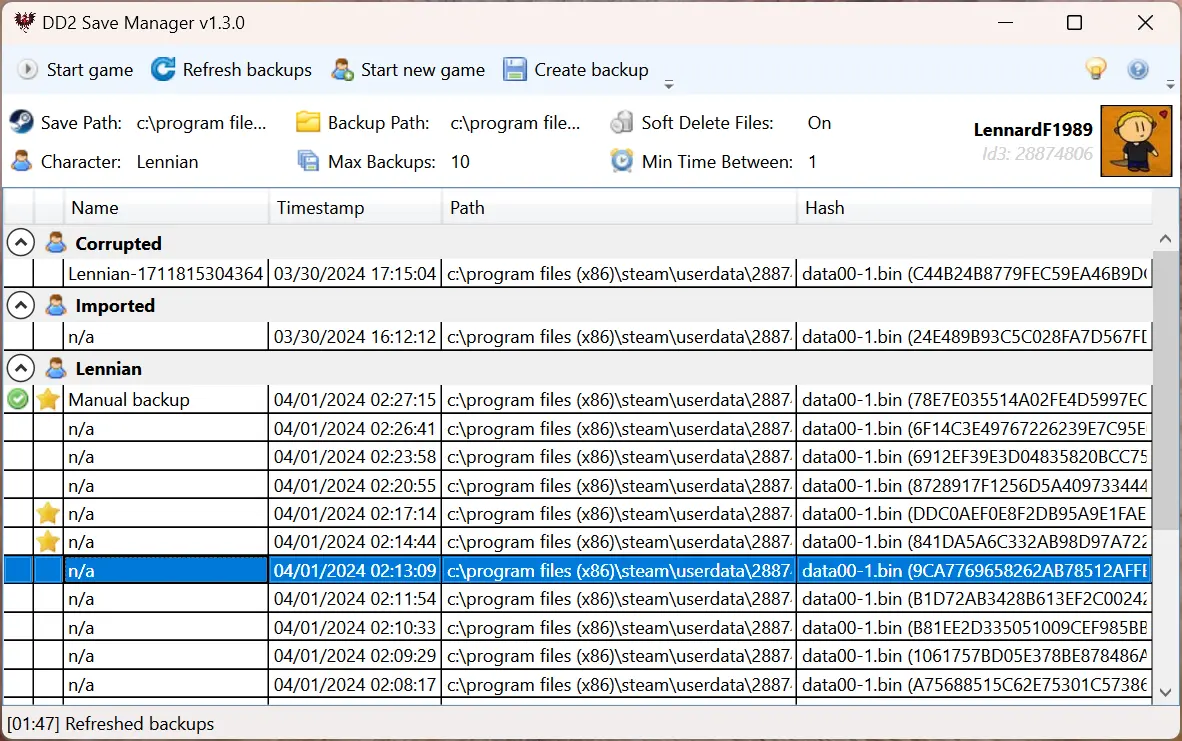
- Refresh Saves = Will check for new saves/backups and add them to the list.
- Start new game = Remove the existing save files so the game starts without any, forcing you to start a new game.
- Create save = Create a manual save based on the latest save files, regardless if it was already backed up before.
UI Options (Steam profile specific)
- Save Path = Path where the game will store the saves, by default this will be somewhere in your Steam installation directory.
- Backup Path = Path where DD2 Save Manager will store your backups.
- Character = Consider this to be a category for your saves that is assigned whenever a backup is made.
- Max Saves = Number of saves (per character, excluding favorites) to keep, the oldest one is deleted if it exceeds this maximum. Set this to 0 to never automatically delete any save.
- Min Time Between = Since the game is pretty save-happy, you can use this to set to the number of minutes that has to be between the new and previous save. Set this to 0 to always backup any save.
- Double click a save = Set the save as active
- Double click a character name = Change the character
The following hotkeys work when the DD2 Save Manager is focused:
- F5 = Refresh saves
- Delete = Delete selected save(s)
- Enter = Set selected save as active
- Escape = Deselect everything
- F2 = Rename selected save(s)
- B = Set selected save(s) as favorite
Other notes:
- Hold CTRL to select multiple saves.
- You can right-click a save (or multiple saves) for more options, for exam
DD2 Save Manager is a utility mod for Dragon's Dogma 2 that tracks your saves and lets you switch between them, effectively giving you unlimited save slots. It's for players who want more control over their save files, with 1,982 endorsements and 69,255 downloads, last updated in June 2024.
✨ Key Features
📊 Pros & Cons
✅ Pros
- Community-approved with 1,982 endorsements and 69k downloads — clearly a go-to for save management.
- Solves a real problem: the game's limited save slots are a pain, and this gives you unlimited flexibility.
- Lightweight and focused — does one thing and does it well, no bloat.
⚠️ Cons
- Last updated in June 2024 — might not be compatible with the latest game patches, so check before using.
- No detailed instructions in the description — you'll have to figure out the setup on your own.
- Requires manual file placement or mod manager setup, which might be tricky for modding newbies.
For Dragon's Dogma 2 players who want to experiment with different choices or keep multiple playthroughs without losing progress. Also great for completionists who like to have a save before major decisions. Skip if you're fine with the default save system.
💡 Beginner Tips
- Make sure to back up your original save files before using the manager, just in case.
- If you're using a mod manager like Vortex, check if it supports this mod for easier installation.
- Test the manager with a throwaway save first to understand how it works before relying on it.
📊 Mod Details
- Game
- Dragonsdogma2 Mods
- Author
- Lennard Fonteijn
- Version
- 1.4.0
- Downloads
- 69,255
- Endorsements
- 1,982
- Category
- Miscellaneous
- Created
- 3/22/2024
- Updated
- 6/9/2024
🔧 How to Install Dragon's Dogma 2 Mods
Download from Nexus Mods.
📖 Full step-by-step install guide for Dragon's Dogma 2 →
Visit the official mod page for specific installation instructions for this mod.
🎮 Need cheat codes or console commands? Check ur gaming wiki for Dragon's Dogma 2 commands, item IDs, and more.
Keep browsing — more Dragon's Dogma 2 mods await