Named Saves
🟡 Updated this year⚠️ Install Order · 6 steps
Install in this order, then this mod last — most mods fail to load without their framework and dependencies in place.
Preview
🔍 Analysis
- 👍 0.5% endorsement rate
- 🏆 #29 of 100 User Interface mods in this game by downloads
📋 About This Mod
Info
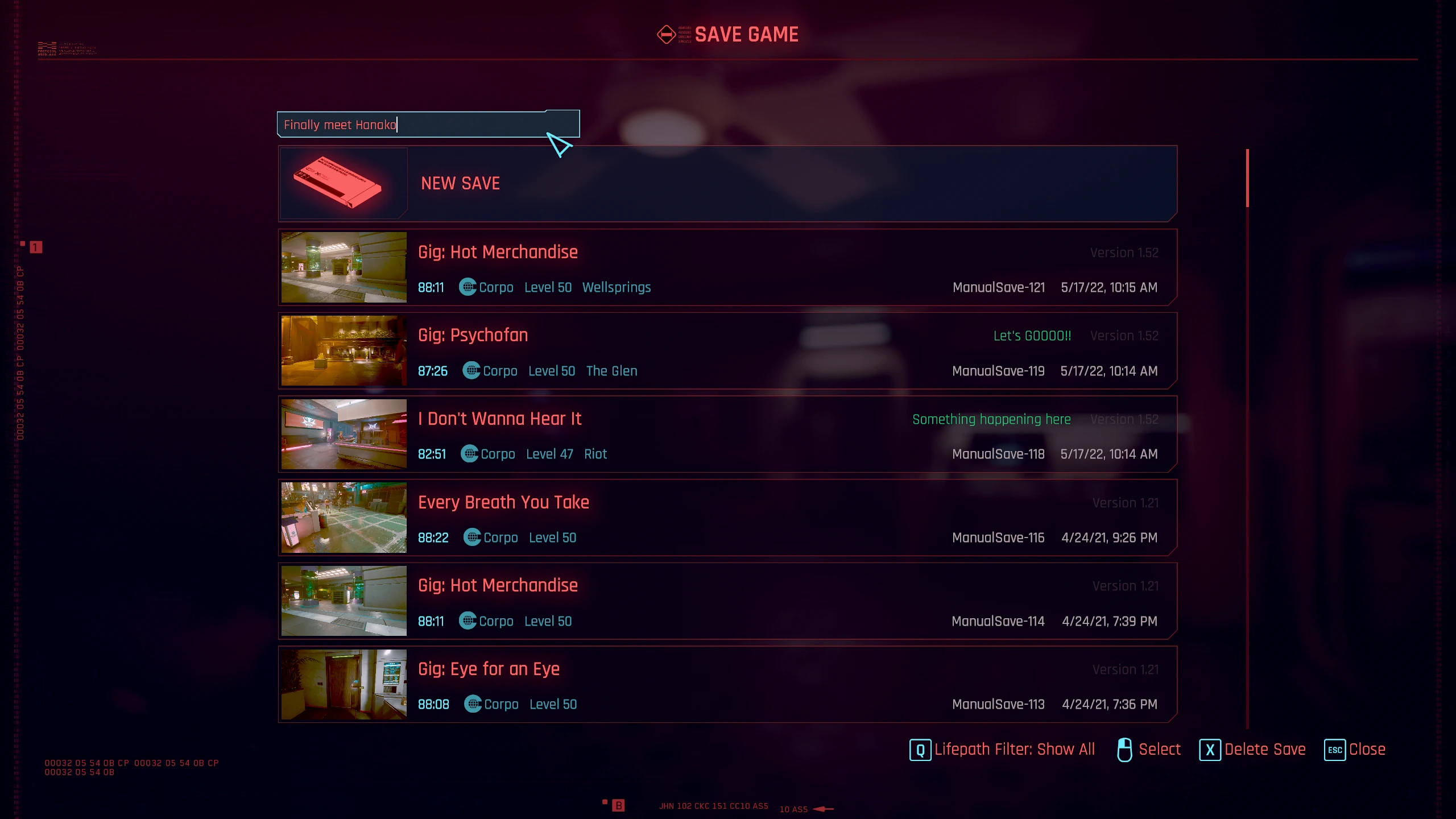
Adds simple text input field to game saving menu which allows you to assign any custom text note to the newly created save. Works for manual saves only.
How to install
-
[]Download and install all required files
[
]Download the mod archive and unpack it to the game folderHow to uninstall
-
[]Delete Cyberpunk 2077\r6\scripts\NamedSaves folder
[
]Delete Cyberpunk 2077\red4ext\plugins\NamedSaves folderCredits
-
[]jekky for the redscript compiler
[
]WopsS for RED4ext[]psiberx for codeware lib
[]e256 and Unseen Unit for testing
[]CP77 modding discord
My mods
[]Virtual Atelier Delivery
[]Cutscene Weapon Swapper
[]Revised Backpack
[]Deus Ex Themed Palette
[]HUD Painter
[]Stash and Backpack Search
[]Metro Pocket Guide
[]Quickhack Hotkeys
[]Wannabe Edgerunner
[]Stash Filters
[]Immersive Timeskip
[]Faster Iguana Hatch
[]Real Vendor Names
[]Mark To Sell
[]Stand Still Please
[]Vehicle Pack - Basic
[]Vehicle Pack - Corpo
[]Vehicle Pack - Utility
[]Vehicle Pack - Gangs
[]Mizutani Shion Targa MZT
[]Named Saves
[]Virtual Car Dealer
[]Virtual Atelier
[]Enhanced Craft
[]No Scanner Time Dilation
[]Custom Map Markers
[]Sleeves
[]Toggle Quest Tags
[]Improved Minimap Zoom
[]Hide Read Shards
[]Smarter Scrapper
[]Reduced Loot
[]Limited HUD
[]HUDitor
[]Always First Equip
[]No Camera Auto Centering
[]Holster By Hotkey
[]Limited Fast Travel
[]Game Time Tweaks
[]Muted Markers
[]Yet Another UI Recolor
[]Game Time Tweaks
[]No Intro Videos[/si
-
[]jekky for the redscript compiler
-
[]Delete Cyberpunk 2077\r6\scripts\NamedSaves folder
Named Saves is a lightweight UI mod that lets you attach custom text notes to manually created save files. With nearly 4,000 endorsements and over 750,000 downloads, it's a proven quality-of-life tool for players who want to keep their save slots organized. Last updated in January 2026, it remains actively maintained.
✨ Key Features
📊 Pros & Cons
✅ Pros
- Huge community trust (3,905 endorsements) — this is a must-have for save organizers.
- Over 759,000 downloads show it's widely used and stable.
- Lightweight and focused — does one thing well without bloating your UI.
⚠️ Cons
- Only works for manually created saves — auto-saves and quicksaves don't get notes.
- No screenshots or detailed feature list in the description, so you're flying blind on visuals.
- Requires the base game's save system; if you use mods that alter save behavior, compatibility isn't guaranteed.
For players who juggle multiple playthroughs or like to keep their save slots labeled with context like 'before dragon fight' or 'experimental build.' Skip if you only rely on auto-saves or don't care about save organization.
💡 Beginner Tips
- Since it's a UI mod, make sure your mod manager is set to load it after any other UI overhauls to avoid conflicts.
- Test with a manual save first to see how the note interface appears before relying on it for important saves.
- If you use a mod manager, enable the mod and launch the game once to confirm it appears in the save menu.
📊 Mod Details
- Game
- Cyberpunk 2077 Mods
- Author
- DJ_Kovrik
- Version
- 2.6.4
- Downloads
- 759,488
- Endorsements
- 3,905
- Category
- User Interface
- Created
- 5/17/2022
- Updated
- 1/8/2026
🧩 Commonly Used Together
Users add these mods to the same collections — a real compatibility signal, not an AI guess.
🔧 How to Install Cyberpunk 2077 Mods
Download from Nexus.
📖 Full step-by-step install guide for Cyberpunk 2077 →
Visit the official mod page for specific installation instructions for this mod.
🎮 Need cheat codes or console commands? Check ur gaming wiki for Cyberpunk 2077 commands, item IDs, and more.
Keep browsing — more Cyberpunk 2077 mods await