redscript
🟠 Updated over a year ago⚠️ Install Order · 6 steps
Install in this order, then this mod last — most mods fail to load without their framework and dependencies in place.
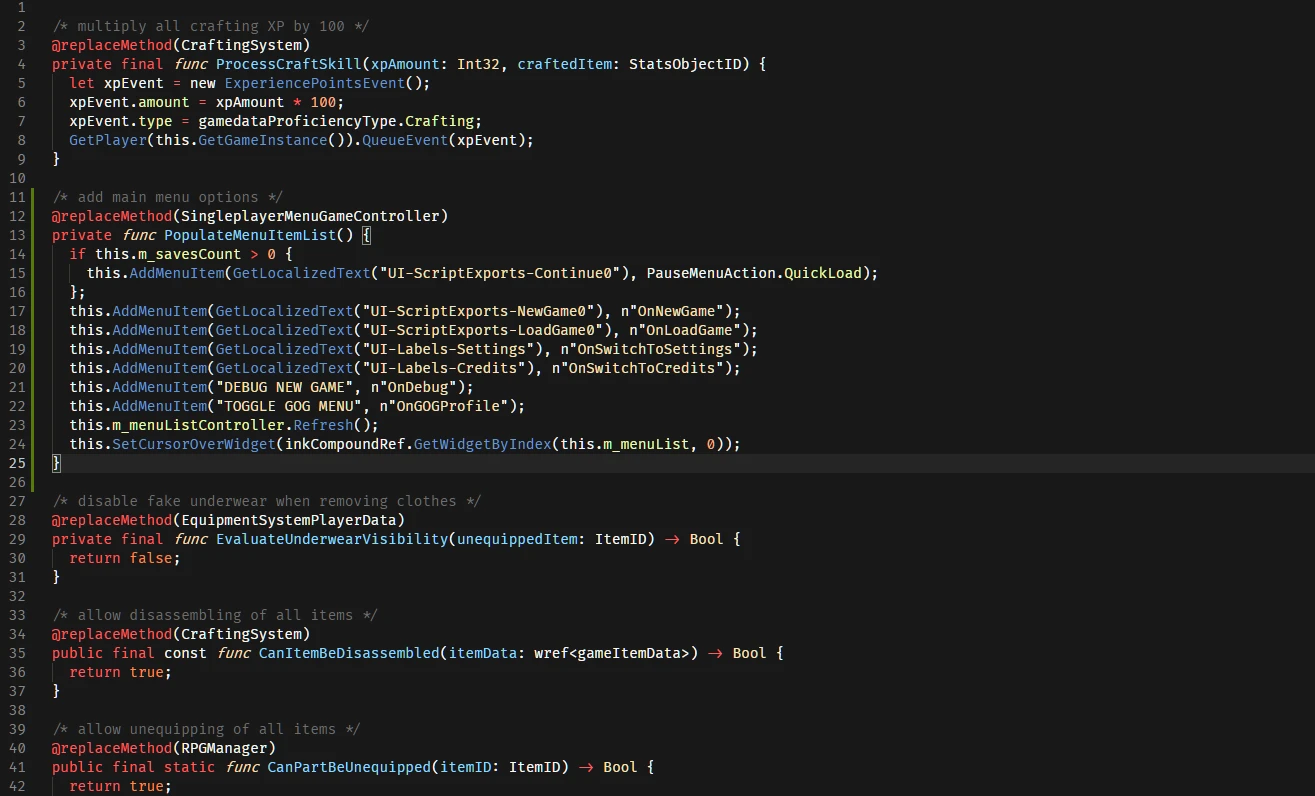
Preview
🔍 Analysis
- 👍 1.4% endorsement rate — high engagement, a strong quality signal
- 🏆 #4 of 44 Modders Resources mods in this game by downloads
📋 About This Mod
REDSCRIPT
This is a script compiler that can be integrated with the game and used to add/replace game scripts.
Source code available here.
INSTALLATION
You'll need to download the archive available in the 'Files' tab and extract it in the main 'Cyberpunk 2077' directory.
You should end up with the following files in the game directory:
- Cyberpunk 2077\engine\tools\scc.exe
- Cyberpunk 2077\engine\config\base\scripts.ini
NOTE FOR REDMOD USERS
There is a known compatibility issue with REDmod. To use redscript with REDmod you should to install either RED4ext (recommended) or cybercmd. Do not install both. Once installed, the REDmod compatibility should be resolved.
NOT WORKING?
If you are not sure if it's working or have any other issues, you should look for a log file at 'Cyberpunk 2077\r6\logs\redscript.log'.
This log file should end with 'Output successfully saved to ...' if the mods were applied successfully.
If the log file contains any errors or warnings, you can post them here to help with debugging.
If the log file isn't there, redscript has not been installed correctly.
UNINSTALLING
The compiler saves a copy of the game scripts in a file 'Cyberpunk 2077\r6\cache\final.redscripts.bk'.
If you wish to uninstall redscript you can just remove the files you downloaded (scc.exe and scripts.ini) and replace the existing 'final.redscripts' with the backed up 'final.redscripts.bk' file.
redscript is a compiler for Cyberpunk 2077 scripts, serving as a foundational tool for modders. With 161,483 endorsements and 11.3 million downloads, it's a massively popular resource that enables script-based modding. Last updated September 2025, it remains actively maintained and essential for the modding community.
✨ Key Features
📊 Pros & Cons
✅ Pros
- Community-approved with 161,483 endorsements—this is the gold standard for CP2077 modding tools.
- 11.3 million downloads means it's battle-tested and practically required for script mods.
- Regular updates (last one September 2025) keep it compatible with the game's patches.
⚠️ Cons
- It's a modder's resource, not a plug-and-play mod—casual players won't get direct gameplay changes.
- Requires some technical know-how to use effectively; not for the faint of heart.
- No detailed feature list in the description, so you'll need to check the docs or community guides for specifics.
For Cyberpunk 2077 modders who want to create or use script-based mods. If you're a player who just wants to install mods, you'll likely need this as a dependency, but you won't interact with it directly. Skip if you're not interested in modding—this is a tool, not a gameplay mod.
💡 Beginner Tips
- Check if the mods you install list redscript as a dependency—you'll need it installed first.
- Place redscript in your Cyberpunk 2077 directory as per the mod's instructions, usually in the 'bin/x64' folder.
- After installing, launch the game once to let the compiler run, then check for any error logs if mods don't work.
📊 Mod Details
- Game
- Cyberpunk 2077 Mods
- Author
- jac3km4
- Version
- 0.5.31
- Downloads
- 11,264,321
- Endorsements
- 161,483
- Category
- Modders Resources
- Created
- 2/7/2021
- Updated
- 9/5/2025
🔗 Required By 29 Mods
These mods list this mod as a dependency.
🧩 Commonly Used Together
Users add these mods to the same collections — a real compatibility signal, not an AI guess.
🔧 How to Install Cyberpunk 2077 Mods
Download from Nexus.
📖 Full step-by-step install guide for Cyberpunk 2077 →
Visit the official mod page for specific installation instructions for this mod.
🎮 Need cheat codes or console commands? Check ur gaming wiki for Cyberpunk 2077 commands, item IDs, and more.
Keep browsing — more Cyberpunk 2077 mods await