Immersive Timeskip
🟡 Updated this year⚠️ Install Order · 6 steps
Install in this order, then this mod last — most mods fail to load without their framework and dependencies in place.
Preview
🔍 Analysis
- 👍 0.6% endorsement rate
- 🏆 #5 of 100 User Interface mods in this game by downloads
📋 About This Mod
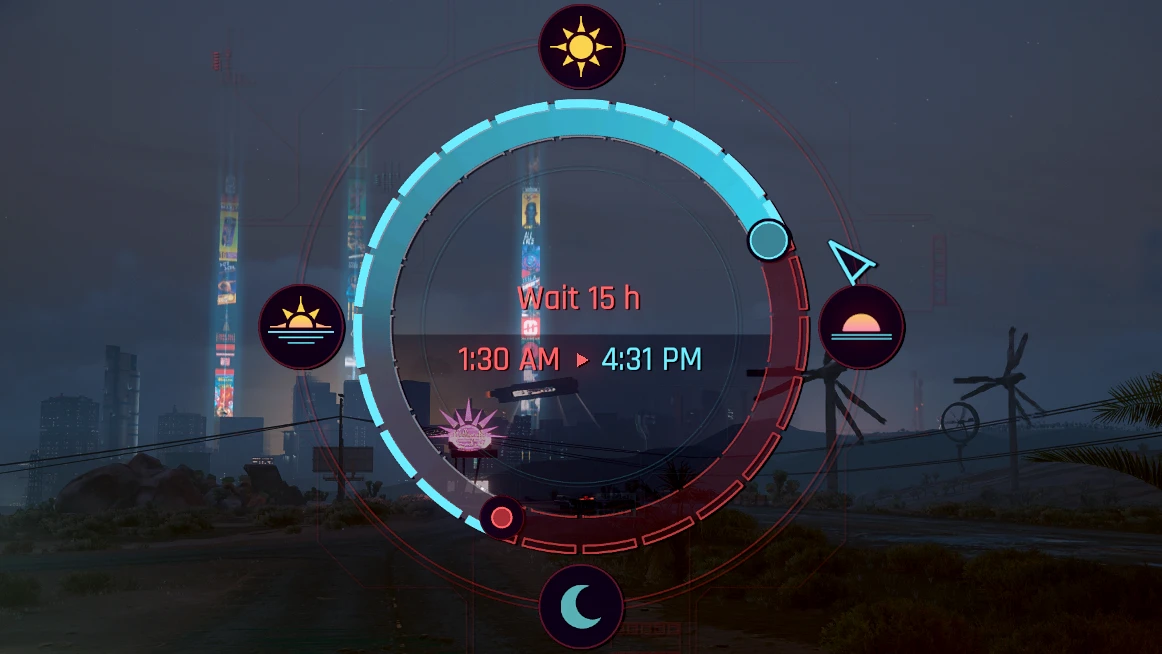
Adds a new hotkey to call customized timeskip widget which allows to fast forward the time still seeing the world around you.
If you want to use the modded widget for the default timeskip menu as well then enable related option in r6\scripts\ImmersiveTimeskip\Config.reds file.
Demo video
39F8DMtyac4
Hotkeys
Press O (its o, not zero) for keyboard or Right Pad for controller, can be configured from the mod settings menu.
If you press the hotkey again when timeskip is active then it will be stopped immediately.
How to install
Install all required files, unpack the mod into the game directory
How to uninstall
-
[]Delete the Cyberpunk 2077\r6\input\ImmersiveTimeskip.xml file
[
]Delete the Cyberpunk 2077\r6\scripts\ImmersiveTimeskip folderCredits
-
[]e256 for testing
[
]rmk1234 for custom quickslots mod compatibility fixes[]Cyberpunk modding discord peeps for all the awesome tools
[]The mod inspired by The Witcher 3 Friendly Meditation from Wasteland Ghost ヘ( ^_^)ノ
My mods
[]Virtual Atelier Delivery
[]Cutscene Weapon Swapper
[]Revised Backpack
[]Deus Ex Themed Palette
[]HUD Painter
[]Stash and Backpack Search
[]Metro Pocket Guide
[]Quickhack Hotkeys
[]Wannabe Edgerunner
[]Stash Filters
[]Immersive Timeskip
[]Faster Iguana Hatch
[]Real Vendor Names
[]Mark To Sell
[]Stand Still Please
[]Vehicle Pack - Basic
[]Vehicle Pack - Corpo
[]Vehicle Pack - Utility
[]Vehicle Pack - Gangs
[]Mizutani Shion Targa MZT
[]Named Saves
[]Virtual Car Dealer
[]Virtual Atelier
[]Enhanced Craft
[]No Scanner Time Dilation
[]Custom Map Markers
-
[]e256 for testing
Immersive Timeskip by DJ_Kovrik lets you use the vanilla timeskip widget in a more immersive way, enhancing the UI without overhauling it. With 11,297 endorsements and 2.0M downloads, it's a popular, lightweight quality-of-life mod for players who want a more natural time-skip experience.
✨ Key Features
📊 Pros & Cons
✅ Pros
- Huge adoption: 2.0M downloads and 11K endorsements show it's a go-to for many players.
- Does exactly what it says—no bloat, just a more immersive timeskip widget.
- Last updated recently (Jan 2026), so it's actively maintained.
⚠️ Cons
- Description is vague—no details on what 'immersive' actually changes, so you're going in blind.
- UI mods can clash with other UI overhauls; you'll need to test compatibility yourself.
For players who want a subtle, immersive tweak to the timeskip widget without a full UI overhaul. If you're a purist who likes vanilla-plus mods, this is right up your alley. Skip if you're looking for major UI changes or if you already use a comprehensive UI mod that might conflict.
💡 Beginner Tips
- If you use other UI mods, install this one last and test in-game to avoid conflicts.
- Check the mod's comments section for any known compatibility notes with popular UI overhauls.
- Since it's a simple widget tweak, you can easily toggle it off if you don't like the feel.
📊 Mod Details
- Game
- Cyberpunk 2077 Mods
- Author
- DJ_Kovrik
- Version
- 2.2.2
- Downloads
- 1,987,713
- Endorsements
- 11,297
- Category
- User Interface
- Created
- 8/31/2022
- Updated
- 1/8/2026
🧩 Commonly Used Together
Users add these mods to the same collections — a real compatibility signal, not an AI guess.
🔧 How to Install Cyberpunk 2077 Mods
Download from Nexus.
📖 Full step-by-step install guide for Cyberpunk 2077 →
Visit the official mod page for specific installation instructions for this mod.
🎮 Need cheat codes or console commands? Check ur gaming wiki for Cyberpunk 2077 commands, item IDs, and more.
Keep browsing — more Cyberpunk 2077 mods await