1.6 Neon Rims Color Control
⚪ Last updated 2022⚠️ Install Order · 7 steps
Install in this order, then this mod last — most mods fail to load without their framework and dependencies in place.
Preview
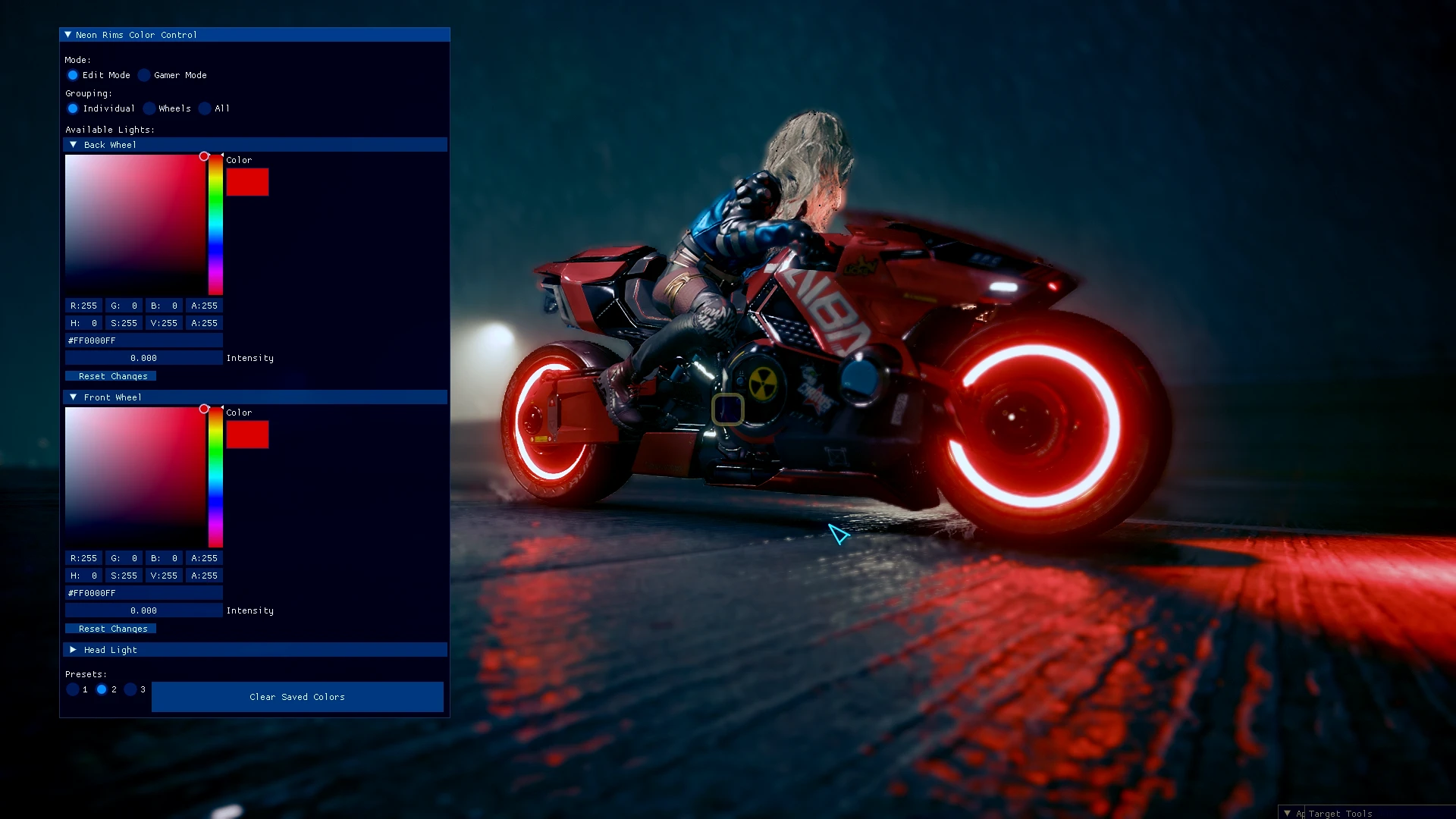
🔍 Analysis
- 👍 1.0% endorsement rate
- 🏆 #19 of 206 Vehicles mods in this game by downloads
📋 About This Mod
The mod created
by MaximiliumM
> Makes the mod compatible with 1. 6 (special thanks to KeanuWheeze)
> Fixes rims appearances changed in 1. 6 (ie: no "Wheels" option for Jackie's Arch)
+ Added ability to change both wheels or all lights at once
+ Added Gamer Mode
+ Added ability to change Head Light colors
+ Added Presets and hotkeys to change them
+ Added Reset Changes button
+ Added user data export to support future versions
> Unfortunately, this version will wipe saved lights. We're sorry.
- Removed Underglow Mix 2 for being too subtle
Change the colors of the neon rims for every bike. Save your combinations for every appearance separately.
Compatible with mods altering bikes, unless they specifically remove neon rims.
CET IS REQUIRED
The mod uses a vanilla mechanic available since patch 1. 5. To activate it you need to press the horn button.
If nothing works, check the keybindings if you have the horn assigned.
xX_G4MER_M0DE_Xx
now available!
"Gamer Mode" option will transition through your saved presets in a set interval.
You can now save up to 3 color combinations for neon rims, head lights and underglow (for ARCH)
Set hotkeys under "Bindings" in CET for easy access, or pick Gamer Mode for automatic rotation.
Intuitive, user friendly UI
With the save feature you can assign the best combination for every appearance
Use your favorite appearance changer to change the style
Share screenshots of your creations under the images section!
Installation:
Extract the . 7z and put the contents into the main game folder.
Default game folder location for:
Steam:
C:\Program Files (x86)\Steam\steamapps\common\Cyberpunk 2077
Epic:
C:\Program Files\Epic Games\Cyberpunk 2077
Gog:
C:\Program Files (x86)\GOG Galaxy\Games\Cyberpunk 2077
Works for every bike and every appearance.
Special thanks to MaximiliumM and yamashi.
CET-based editor that changes neon rim colors on the fly for all bikes and appearances in Cyberpunk 2077. Highly popular with over 4,500 endorsements and 465k downloads, last updated in 2022.
✨ Key Features
📊 Pros & Cons
✅ Pros
- Huge community trust (4,522 endorsements) and massive download count (465k+)
- Real-time color editing without restarting the game
- Universal compatibility with all bikes and appearances
⚠️ Cons
- Requires Cyber Engine Tweaks (CET) — extra setup if you don't have it
- Last updated in 2022 — may not work with the latest game patches
- Only affects neon rims, not other vehicle customization options
For Cyberpunk 2077 players who love customizing their bikes and want quick, on-the-fly neon color changes. Skip if you're looking for broader vehicle mods or don't use CET.
💡 Beginner Tips
- Make sure CET is installed and updated before adding this mod, or it won't load.
- Use the CET overlay (default '~' key) to open the mod's UI and tweak colors in real time.
- Check the mod's forum page for compatibility notes with the latest game version, since it hasn't been updated since 2022.
📊 Mod Details
- Game
- Cyberpunk 2077 Mods
- Author
- MaximiliumM
- Version
- 1.1
- Downloads
- 465,292
- Endorsements
- 4,522
- Category
- Vehicles
- Created
- 3/25/2022
- Updated
- 9/23/2022
🧩 Commonly Used Together
Users add these mods to the same collections — a real compatibility signal, not an AI guess.
🔧 How to Install Cyberpunk 2077 Mods
Download from Nexus.
📖 Full step-by-step install guide for Cyberpunk 2077 →
Visit the official mod page for specific installation instructions for this mod.
🎮 Need cheat codes or console commands? Check ur gaming wiki for Cyberpunk 2077 commands, item IDs, and more.
Keep browsing — more Cyberpunk 2077 mods await