Hotkeys
🟡 Updated this yearPreview
🔍 Analysis
- 👍 1.9% endorsement rate — high engagement, a strong quality signal
- 🏆 #35 of 103 User Interface mods in this game by downloads
📋 About This Mod
Spiritual successor to the useful FastLoot and FastRecruit mod by Goude.
Now called only "Hotkeys" since the scope has expanded greatly.
Take note that although this mod is compatible with Better Smithing, there are drawbacks such as Better Smithing's batch operation hotkeys have to be disabled.
Includes a localization template and Chinese localization by default.
Original Features:
Use hotkey (default F) to speed up game play, reducing mouse clicks by a lot.
-
[]Transfer prisoners (F) and close screen (F).
[
]Transfer loot (F) and close screen (F).[]Open Recruit screen from Towns and Villages (F), recruit all available troops (F) and close screen (F).
Hotkeys Features:
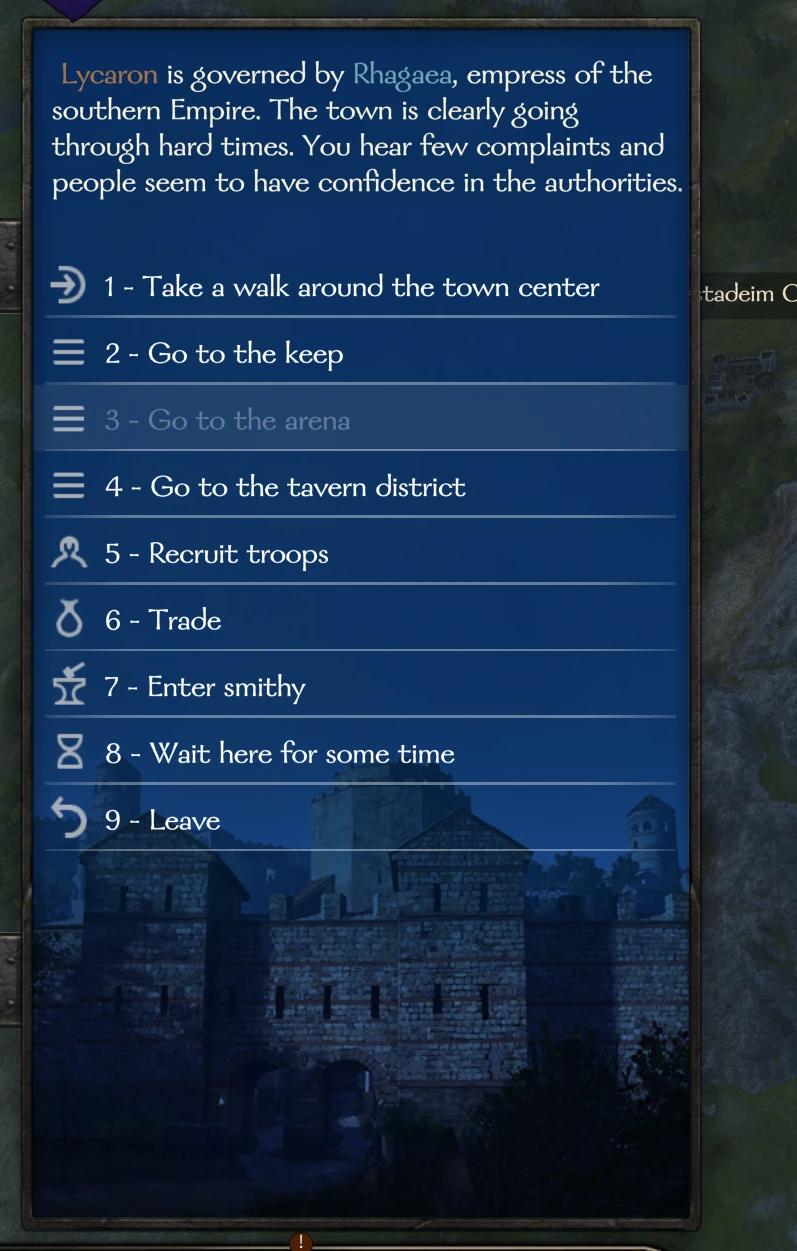
[]All Menus and Conversations can be navigated using number hotkeys.
[]Leave (Backspace).
[]All Overlays (Army Party interaction, Settlement Notable interaction and so on) now has number hotkeys.
[]Tournament support: Max Bet (F). Join the Round (F). Skip Round (F). Skip All Rounds (Ctrl+F). Leave when the tournament is over (F).
[]Increase Army Cohesion (G) from Army Management Screen or directly from Map Screen.
[]Boost Construction Process (G) from Town Management Screen.
[]Forge (F), skipping weapon naming. Can be configured to not skip in HotkeysModConfig.xml.
[]Forge (Shift+F), will attempt to Forge five times. Will always ignore HotkeysModConfig.xml and skip weapon naming.
[]Forge (Ctrl+Shift+F), will Forge until materials or stamina runs out. Will always ignore HotkeysModConfig.xml and skip weapon naming.
[]Smelt (F).
[]Smelt (Shift+F), will attempt to Smelt five times. NOTE: This will smelt weapons ruthlessly. By default, Locked weapons will not show up in the smelting list so make sure to Lock your favourite maiming tools.
[]Smelt (Ctrl+Shift+F), will Smelt until materials or stamina runs out. NOTE: See above!
[]Refine (F).
[]Refine (Shift+F), will attempt to Refine five times.
[]Refine (Ctrl+Shift+F), will Refine until materials or stamina runs out.
[]F, Shift+F and Ctrl+Shift+F also work for armor crafting added by Banner Kings/Banner Craft.
[]Switch to previous hero (A) and next hero (D) in Smithy.
[]Change filter during Trade: All (1), Weapons (2), Shields and Ranged (3), Armor (4), Mounts (5), Misc (6).
[]Recruit troops into your army from defeated party's prisoners (F).
[]Close the battle (F) when the Scoreboard screen is up and the battle is over. The game already does this for the Scoreboard after simulated battles.
[]Mouse Back/Forward can now be used in the Encyclopedia.
[]Roll Dice (F) during Board Games.
[]Close Town and Keep Manage screens (F).
[*]Press (F) to Pay Respects
Hotkeys adds keyboard shortcuts to menus, dialogs, and screens like Trade, Party, and Loot, letting you navigate without clicking everything. With 628 endorsements and 33,141 downloads, it's a popular UI mod that speeds up gameplay significantly. Last updated May 2026, it remains actively maintained.
✨ Key Features
📊 Pros & Cons
✅ Pros
- 628 endorsements and 33k downloads show it's a trusted, widely-used mod
- Cuts down on repetitive clicking, making menu navigation way faster
- Active updates (May 2026) mean it's likely compatible with current game versions
⚠️ Cons
- No specific hotkey list provided, so you'll have to discover them in-game
- May require remapping if you have custom keybinds already set
- Potential conflicts with other UI mods that alter the same menus
If you're tired of clicking through trade menus and loot screens, this is for you. It's perfect for players who want to streamline their UI interactions and play faster. Also great for those with repetitive strain from excessive mouse use.
💡 Beginner Tips
- Check the mod's in-game settings or readme to see the default hotkey assignments before you start.
- Try using hotkeys in the Trade menu first—it's the most click-heavy screen and you'll feel the difference immediately.
- If a hotkey doesn't work, make sure you're not in a text input field; that can override keybinds.
📊 Mod Details
- Game
- Bannerlord Mods
- Author
- cykro
- Version
- 2.4.5
- Downloads
- 33,141
- Endorsements
- 628
- Category
- User Interface
- Created
- 4/25/2020
- Updated
- 5/11/2026
🧩 Commonly Used Together
Users add these mods to the same collections — a real compatibility signal, not an AI guess.
🔧 How to Install Bannerlord Mods
Use Vortex or manual. Enable mods in launcher. Harmony required.
📖 Full step-by-step install guide for Bannerlord →
Visit the official mod page for specific installation instructions for this mod.
🎮 Need cheat codes or console commands? Check ur gaming wiki for Bannerlord commands, item IDs, and more.
Keep browsing — more Bannerlord mods await