Fast Dialogue
⚪ Last updated 2020Preview
🔍 Analysis
- 👍 2.7% endorsement rate — high engagement, a strong quality signal
- 🏆 #3 of 92 User Interface mods in this game by downloads
📋 About This Mod
Special thanks to @Aragasas for rewriting most of the mod with Harmony support.
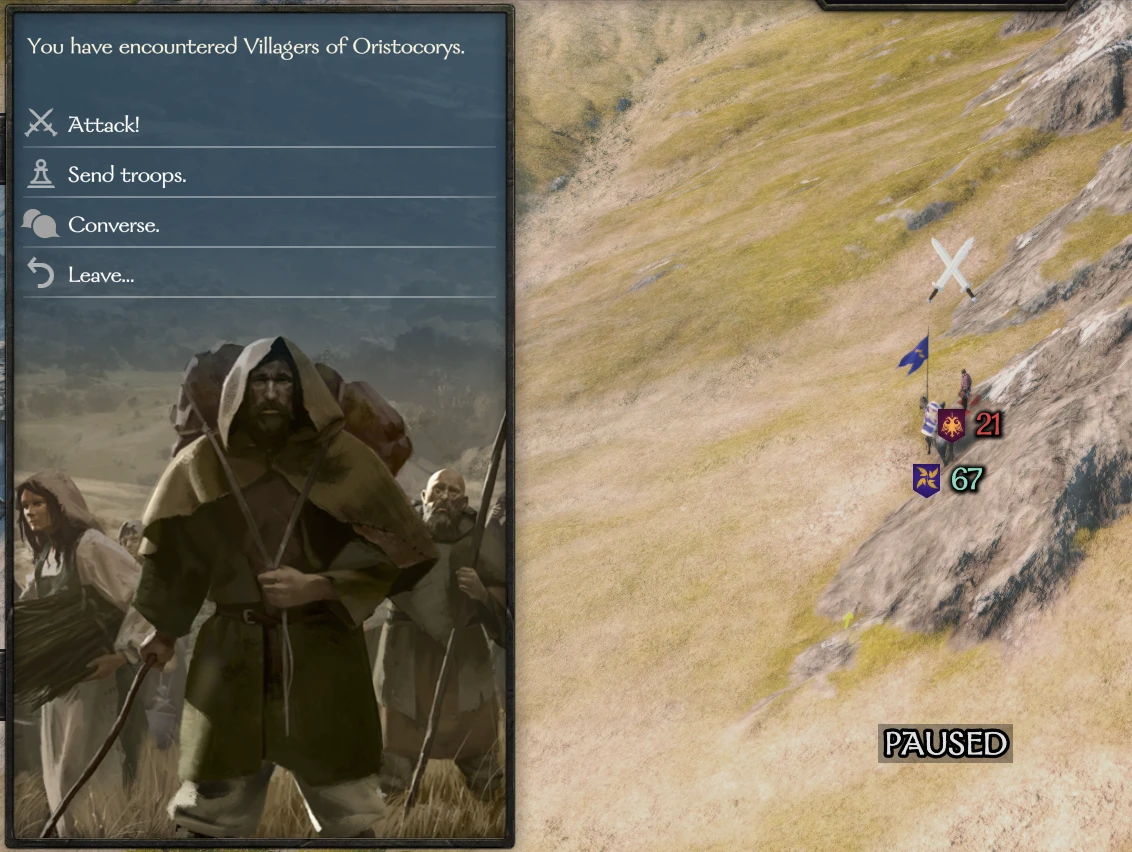
Interacting with looters, bandits, and enemy lords now uses menus instead of dialogue interactions. This removes at least two unnecessary loading screens.
Source: https://github.com/DonoA/MBFastDialogue
Feel free to submit any PRs!
Recent Fixes:
- Bandit lair boss fights (1. 2)
- Compatibility with other mods (1. 2)
- Apply to lords (1. 3)
- Apply to all map interactions (1. 5)
To configure which parties will be affected by that mod, edit the settings.xml file in the mod folder:
By Default it looks like:
<MBFastDialogue. Settings>
<pattern_whitelist>
<!--pattern>looter</pattern-->
<!--pattern>bandit</pattern-->
</pattern_whitelist>
</MBFastDialogue. Settings>
To make only looters and bandits affected, change it like so:
<MBFastDialogue. Settings>
<pattern_whitelist>
<pattern>looter</pattern>
<pattern>bandit</pattern>
</pattern_whitelist>
</MBFastDialogue. Settings>
You may add or change the patterns as you see fit. To make all parties affected again, simply leave the list blank or comment out the entries in it like in the default settings.xml
Manual Install:
- Extract the zip file to C:\Program Files (x86)\Steam\steamapps\common\Mount & Blade II Bannerlord\Modules.
- Make sure that SubModule.xml and the bin folder are now in C:\Program Files (x86)\Steam\steamapps\common\Mount & Blade II Bannerlord\Modules\MBFastDialogue
- Navigate to "Modules > MBFastDialogue> bin > Win64_Shipping_Client" in your game files.
- Right click the "MBFastDialogue.dll" and click properties
- If you see an unblock at the bottom, click it. (Visual reference: https://www.limilabs.com/blog/unblock-dll-file)
- Start the Bannerlord launcher and then tick MBFastDialogue in the Singleplayer > Mods tab.
When interacting with villagers for example, you first see this menu. Converse allows you to use the normal dialogue options if you want to do more complex interactions.
Fast Dialogue replaces dialogue interactions with looters, bandits, and enemy lords with menus, removing at least two loading screens per encounter. It uses Harmony for compatibility and offers a whitelist configuration. With 16,610 endorsements and 624,068 downloads, it's a popular quality-of-life mod for Mount & Blade II: Bannerlord.
✨ Key Features
📊 Pros & Cons
✅ Pros
- Huge community trust with 16,610 endorsements and 624k downloads.
- Saves time by removing at least two loading screens per encounter.
- Configurable whitelist lets you choose which parties are affected.
⚠️ Cons
- Last updated in 2020 — may not work with the latest game version.
- Requires manual XML editing to customize, which might intimidate casual users.
- No explicit uninstall instructions provided by the author.
For Bannerlord players who are tired of loading screens when dealing with looters and bandits. If you want a smoother, faster overworld experience, this is a must-have. Skip if you prefer the full dialogue immersion or play on a version newer than 2020 without compatibility patches.
💡 Beginner Tips
- After extracting to Modules, ensure the SubModule.xml and bin folder are inside the MBFastDialogue folder.
- To customize, edit settings.xml with a text editor — uncomment patterns like looter or bandit to restrict the mod.
- If you use other mods, check for compatibility patches since the mod uses Harmony.
📊 Mod Details
- Game
- Bannerlord Mods
- Author
- Dallen
- Version
- 2.4
- Downloads
- 624,068
- Endorsements
- 16,610
- Category
- User Interface
- Created
- 4/3/2020
- Updated
- 5/8/2020
🔧 How to Install Bannerlord Mods
Use Vortex or manual. Enable mods in launcher. Harmony required.
📖 Full step-by-step install guide for Bannerlord →
Visit the official mod page for specific installation instructions for this mod.
🎮 Need cheat codes or console commands? Check ur gaming wiki for Bannerlord commands, item IDs, and more.
Keep browsing — more Bannerlord mods await