Script Merger
⚪ Last updated 2020Preview
🔍 Analysis
- 👍 3.4% endorsement rate — high engagement, a strong quality signal
- 🏆 #1 of 43 Utilities mods in this game by downloads
📋 About This Mod
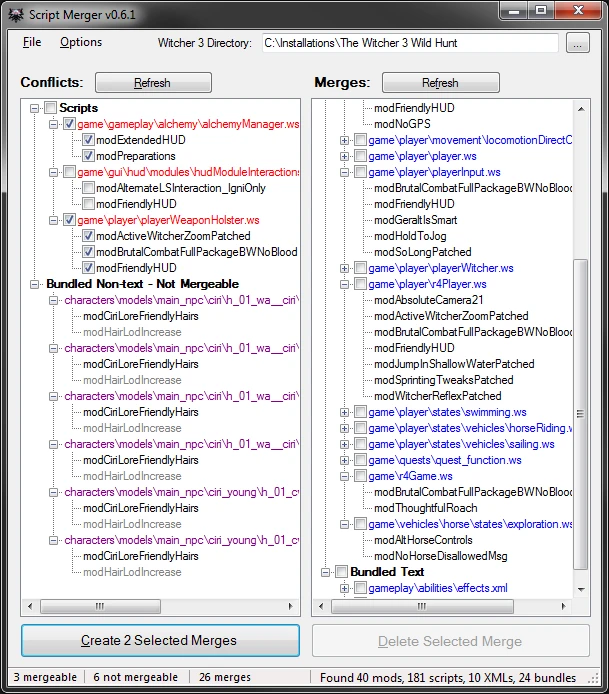
Detects conflicts between mods & helps you resolve them, either by creating merged files that override the conflicting ones, or by configuring a custom load order for your mods. Merges are easy to undo because they don't change the original
Why It's Useful
What It Does
Uses these 3rd-party external tools: - KDiff3 by Joachim Eibl, for merging text files. - QuickBMS by Luigi Auriemma, for scanning & unpacking .bundle files. - wcc_lite by CD Projekt RED, for packing merged text files into .bundle files.
Also contains code from xxHash. NET by Wilhelm Liao, to detect when mod updates have changed files that you merged.
Also, script mods can have logic conflicts that the tool can't detect. In these cases, even if the text can merge without direct conflicts, the resulting script won't work properly. For example, if Mod A tries to hide the HUD, but then Mod B displays the HUD, Mod A won't work. Resolving this also requires human help.
NMM users: Currently, Script Merger doesn't support NMM's multi-HD mode (or symlinks in general).
2) Enter your game's installation path in the textbox at the top.
3) Click "Refresh" button above the "Conflicts" list.
4) If mergeable conflicts are detected, repeat these steps until the conflicts are resolved: > Choose 2 or more versions of any file(s) to merge. > Click "Create Selected Merge" button. > If the mods have differences that don't overlap, KDiff3 can merge them automatically. > If the mods have differences that overlap, KDiff3
📊 Mod Details
- Game
- Witcher3 Mods
- Author
- AnotherSymbiote
- Version
- 0.6.4
- Downloads
- 3,056,396
- Endorsements
- 103,372
- Category
- Utilities
- Created
- 8/23/2015
- Updated
- 7/3/2020
🔧 How to Install The Witcher 3 Mods
Download from Nexus Mods.
📖 Full step-by-step install guide for The Witcher 3 →
Visit the official mod page for specific installation instructions for this mod.
🎮 Need cheat codes or console commands? Check ur gaming wiki for The Witcher 3 commands, item IDs, and more.
Keep browsing — more The Witcher 3 mods await