No Talk Icon
⚪ Last updated 2015Preview
🔍 Analysis
- 👍 5.0% endorsement rate — high engagement, a strong quality signal
- 🏆 #52 of 155 User Interface mods in this game by downloads
📋 About This Mod
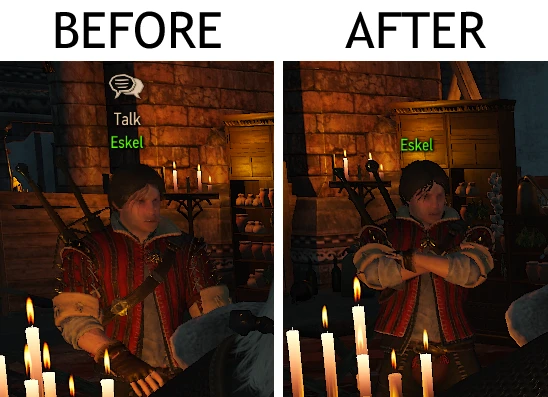
Hides speech bubble over NPCs who are far away
Tested & working with patch 1. 22, but not tested with the HoS or B&W expansions.
Known issue with the "no button prompt" alternate version: Button prompt is still briefly displayed sometimes.
What it does: This small edit hides the speech bubble icon that appears over NPCs who are far away.
Alternate versions:
- []"Just text" version - Hides the speech bubble icon, but still shows "Talk" text from far away. []"No button prompt" version - Hides the speech bubble from far away AND the "E - Talk" button prompt when close.
Installation:
- []Just download & install with the Nexus Mod Manager. []Or, download manually & extract the .zip file into your "The Witcher 3 Wild Hunt\mods" folder. (Create the "mods" folder if you don't have it.)
- If you have any other mods that modify the file below, you'll have to merge them. I made a tool called Script Merger that tries to merge .ws script conflicts automatically.
Files: content/scripts/game/gui/hud/modules/hudModuleInteractions.ws Edited lines 147–163 (main version) / 197–200 ("just text" version) / 135–163 ("no button prompt" version)
📊 Mod Details
- Game
- Witcher3 Mods
- Author
- AnotherSymbiote
- Version
- 1.0.2
- Downloads
- 49,659
- Endorsements
- 2,486
- Category
- User Interface
- Created
- 8/16/2015
- Updated
- 10/11/2015
🔧 How to Install The Witcher 3 Mods
Download from Nexus Mods.
📖 Full step-by-step install guide for The Witcher 3 →
Visit the official mod page for specific installation instructions for this mod.
🎮 Need cheat codes or console commands? Check ur gaming wiki for The Witcher 3 commands, item IDs, and more.
Keep browsing — more The Witcher 3 mods await