Tweaked Gamepad Controls (Next Gen)
⚪ Last updated 2024⚠️ Install Order · 2 steps
Install in this order, then this mod last — most mods fail to load without their framework and dependencies in place.
Preview
🔍 Analysis
- 🏆 #16 of 41 Controller Button Layout mods in this game by downloads
📋 About This Mod
I have returned to playing Witcher 3 but have decided to archive the Sign Casting portion of this mod to promote what I believe is a better alternative - Configurable Quick Sign Casting - which allows you to change Sign casting keys to your liking from a in game menu, which I find preferable. The Horse Riding changes txt is still available on the main download page for any that want it. Thank you for your support and be safe out there Witchers.
::::::::::::::::::::
Changes a few of the controls for Alternate Sign Casting and for traveling on Roach.
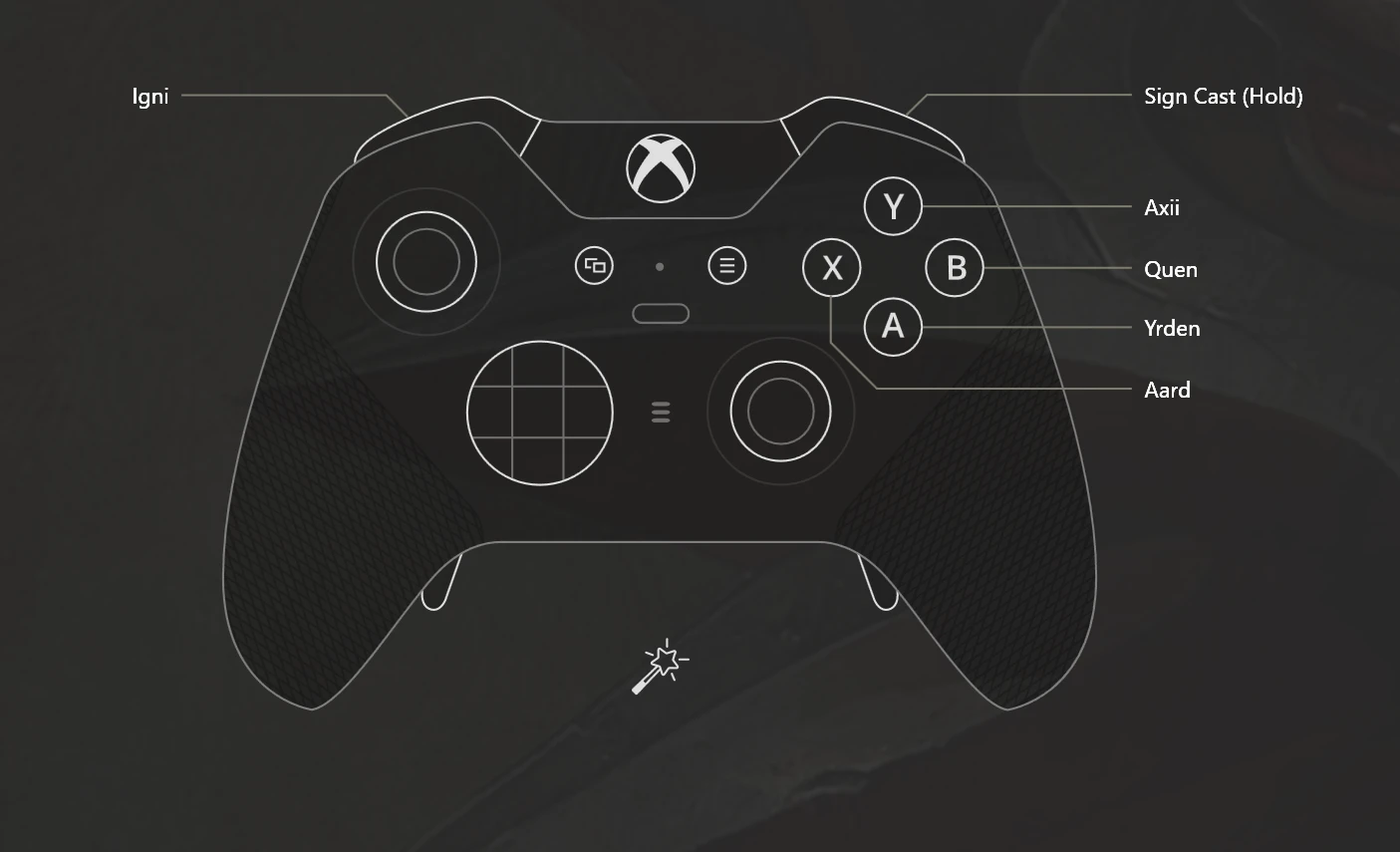
Nothing major or revolutionary is changed, just a few of the button commands are moved around for Alternate Sign Casting and riding your trusty Roach. Signs are still brought up with RT like normal but Aard has been moved to X, Yrden has been moved to A, and Axii is now Y. To me this made more sense. Quen and Igni have been left unchanged.
Roach is now spurred using RT instead of A. This will leave your right thumb free to control the RS and pan the camera during your rides. Y is now Axii to keep in line with the changes above and because having Y perform the same exact function as X seemed like an absolute waste of button usage. A is now Jump.
Installation:
Mod is separated into two downloads.
Alternate Sign Casting Tweak can be installed via TW3MM. I assume it is Vortex compatible, you are free to try it but I will not support it because I don’t use Vortex for TW3. Manual installation is also viable, I assume if you're manualling installing your mods you dont need me to tell you what to do.
Roach Tweaks is downloaded as a simple txt document. You will need to locate your input.settings file in C:\Users\\Documents\The Witcher 3. Copy the contents of the text and replace the entries for , and . Version 1. 11 now includes changes to Boat acceleration to match horse acceleration. Back up your original input.settings. It’s good practice and it’ll keep you from having to redownload it if you bork it up.
Bonus Control Tweak: Ignite and Extinguish Hold function
Open input.settings and press CTRL + F to bring up the "Find" window. Type in "ignite" and press Find Next button. The next iteration of "ignite" should be selected. We will be editing all lines starting with "IK_Pad_A_CROSS". This represents the control pad button A for Xbox or Cross (X) for Play Station. The vanilla line will be "IK_Pad_A_CROSS=(Action=Ignite) we are going to add a hold function to that by adding ",State=Duration,IdleTime=0. 2" to the end but within the ( ) structure. So it should end up looking like "IK_Pad_A_CROSS=(Action=Ignite,State=Duration,IdleTime=0. 2)" when edited. Now look about 6 lines below it and you will see a similar line to what you originally had e
📊 Mod Details
- Game
- Witcher 3 Mods
- Author
- Tomzo711
- Version
- 1.1
- Downloads
- 361
- Endorsements
- 16
- Category
- Controller Button Layout
- Created
- 1/6/2023
- Updated
- 7/18/2024
🔧 How to Install Witcher 3 Mods
Download from Nexus.
📖 Full step-by-step install guide for Witcher 3 →
Visit the official mod page for specific installation instructions for this mod.
🎮 Need cheat codes or console commands? Check ur gaming wiki for Witcher 3 commands, item IDs, and more.
Keep browsing — more Witcher 3 mods await