Supreme to Extreme Graphics Options
⚪ Last updated 2017⚠️ Install Order · 2 steps
Install in this order, then this mod last — most mods fail to load without their framework and dependencies in place.
Preview
🔍 Analysis
- 👍 2.9% endorsement rate — high engagement, a strong quality signal
- 🏆 #53 of 264 Visuals and Graphics mods in this game by downloads
📋 About This Mod
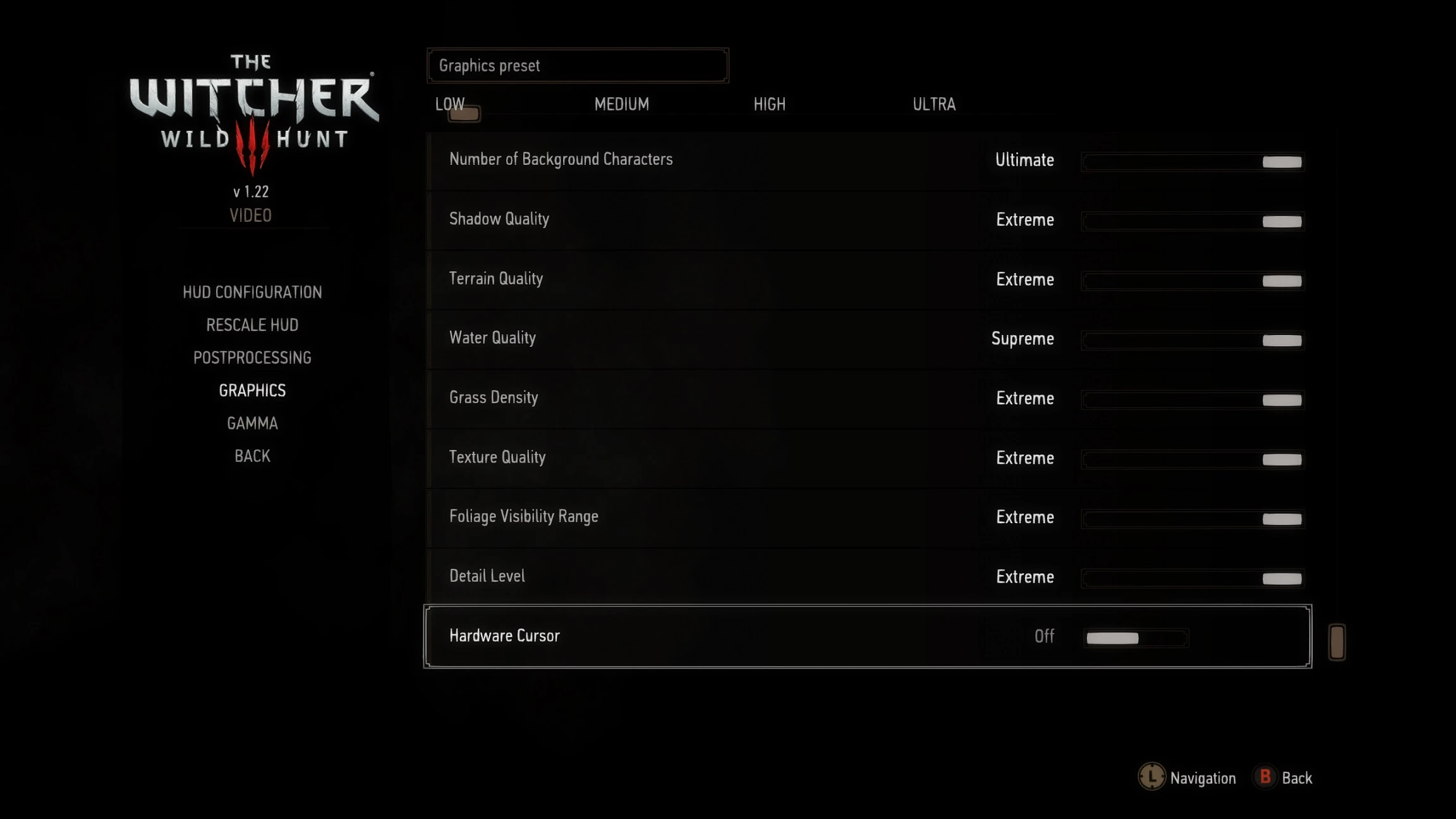
Supreme to Extreme Graphics Option
Made the Sep 2016 File of the Month List. Thank you for your amazing support of my mods! INTRODUCTION Some of you may already may be familiar with this since I had it before on one of my reshades Wild Hunt Re-Imagined with Supreme to Extreme Graphics. I received some good feedback about it and people seemed to like the simplicity it offered. So, I figured I would go ahead and just release as a separate mod file.
I love the Witcher 3 graphics. But, wanted to push some settings beyond ultra. So, often I would edit my user ini file manually. Although, it would it get changed at times for some reason. I couldn’t set the file to read only cause some mods need access to the user ini to change settings like Darker Nights, Camera Mods Ect…. So if you lock it you cant change the info.
I like the Ultimate Graphics Option Mod by Marvelmaster. He did do a great job. But, I wanted something more simplistic. Just something I could just select in my in-game graphics menu for the settings I like. Hence, this mod.
This will change your ini file for you when you select Supreme, Ultimate or Extreme. No longer seeing your graphics options slider always at "low" when you manually edit your ini. If you don't like the settings or to much of a FPS you can easily just switch back to low-ultra settings.
This adds a Supreme-Ultimate-Extreme graphic options via the in game graphics option. Reason I gave 3 options is for those that want to go beyond Ultra but maybe don’t want to push it to the extreme or don't have the top of the line GPU or running SLI setup so, maybe can’t quite push to the extreme. With Supreme-Ultimate-Extreme options you should be able to find that sweet spot for you beyond Ultra.
Low to Ultra Settings were not affected. So you can easily switch back to those settings if you don’t want to push one or more of the settings beyond Ultra. (one exception is MipBias was made into its own option in V3. 0. No longer adjusted in the texture option)
- As always back up your current user in file in your My Documents/The Witcher 3/User
- Back up your current rendering file Witcher 3/bin/config/r4game/user_config_matrix/pc
- Back up you rendering file in Witcher 3/bin/config/base
- DO NOT MAKE BACK UP IN THE DEFAULT FILE LOCATION OTHERWISE YOU WILL HAVE DUPLICATE OPTIONS & NO SUPREME-EXTREME OPTIONS
However, with this mod I have included the default rendering files with the d
This mod adds Supreme, Ultimate, and Extreme graphics presets to the in-game options menu, eliminating the need for manual INI edits. It prevents the settings menu from reverting to Low when selecting options beyond Ultra. Ideal for players wanting higher visual fidelity without configuration hassle.
✨ Key Features
📊 Pros & Cons
✅ Pros
- Huge community trust with 3,425 endorsements and 119k downloads.
- Saves time—no more digging through INI files to push graphics beyond Ultra.
- Fixes the annoying bug where the menu resets to Low after selecting higher presets.
⚠️ Cons
- Last updated in 2017—may not be compatible with current game versions or DLC.
- Only adds presets; doesn't include custom tweaks or performance optimizations.
- No documentation on what each preset changes, so you're flying blind on performance impact.
For players with high-end rigs who want to push graphics beyond Ultra without manual config edits. Also for modders who want a quick way to test extreme settings. Skip if you're on a mid-range PC or prefer fine-tuned control over individual settings.
💡 Beginner Tips
- After installing, launch the game and go to Options > Display to find the new presets.
- If you experience crashes or artifacts, revert to Ultra and adjust individual settings manually.
- Since the mod is from 2017, check if your game version is compatible before installing.
📊 Mod Details
- Game
- Witcher 3 Mods
- Author
- firemanaf
- Version
- 4.1
- Downloads
- 119,145
- Endorsements
- 3,425
- Category
- Visuals and Graphics
- Created
- 8/11/2016
- Updated
- 8/13/2017
🔧 How to Install Witcher 3 Mods
Download from Nexus.
📖 Full step-by-step install guide for Witcher 3 →
Visit the official mod page for specific installation instructions for this mod.
🎮 Need cheat codes or console commands? Check ur gaming wiki for Witcher 3 commands, item IDs, and more.
Keep browsing — more Witcher 3 mods await