(Next Gen Edition) Friendly HUD
⚪ Last updated 2024⚠️ Install Order · 2 steps
Install in this order, then this mod last — most mods fail to load without their framework and dependencies in place.
Preview
🔍 Analysis
- 👍 1.5% endorsement rate — high engagement, a strong quality signal
- 🏆 #10 of 155 User Interface mods in this game by downloads
📋 About This Mod
Friendly HUD - Next Gen Edition
E9Yj-YxPMMsDF9UYrXxk8c
This mod is for v4. 0 of the game also known as the "Next Gen Edition" (NGE).
NGE introduces a couple of QoL changes that were previously provided by FriendlyHUD - those are now removed from the mod files: main menu access from dialogs and cutscenes, fix for "unable to call Roach" message popping up when indoors under certain conditions. Thus, make sure you completely delete non-NGE (Classic Edition - CE) version of the mod before installing an NGE one.
Note that NGE partially duplicates dynamic minimap and quest log features of the mod, so you need to disable those in vanilla options if you want FriendlyHUD to take proper control of those modules.
Also note that the mod doesn't hide HUD modules, it shows them. So if you want to use the smart HUD feature, you need to turn modules OFF one by one using in-game vanilla video options menu (see the details below).
Description
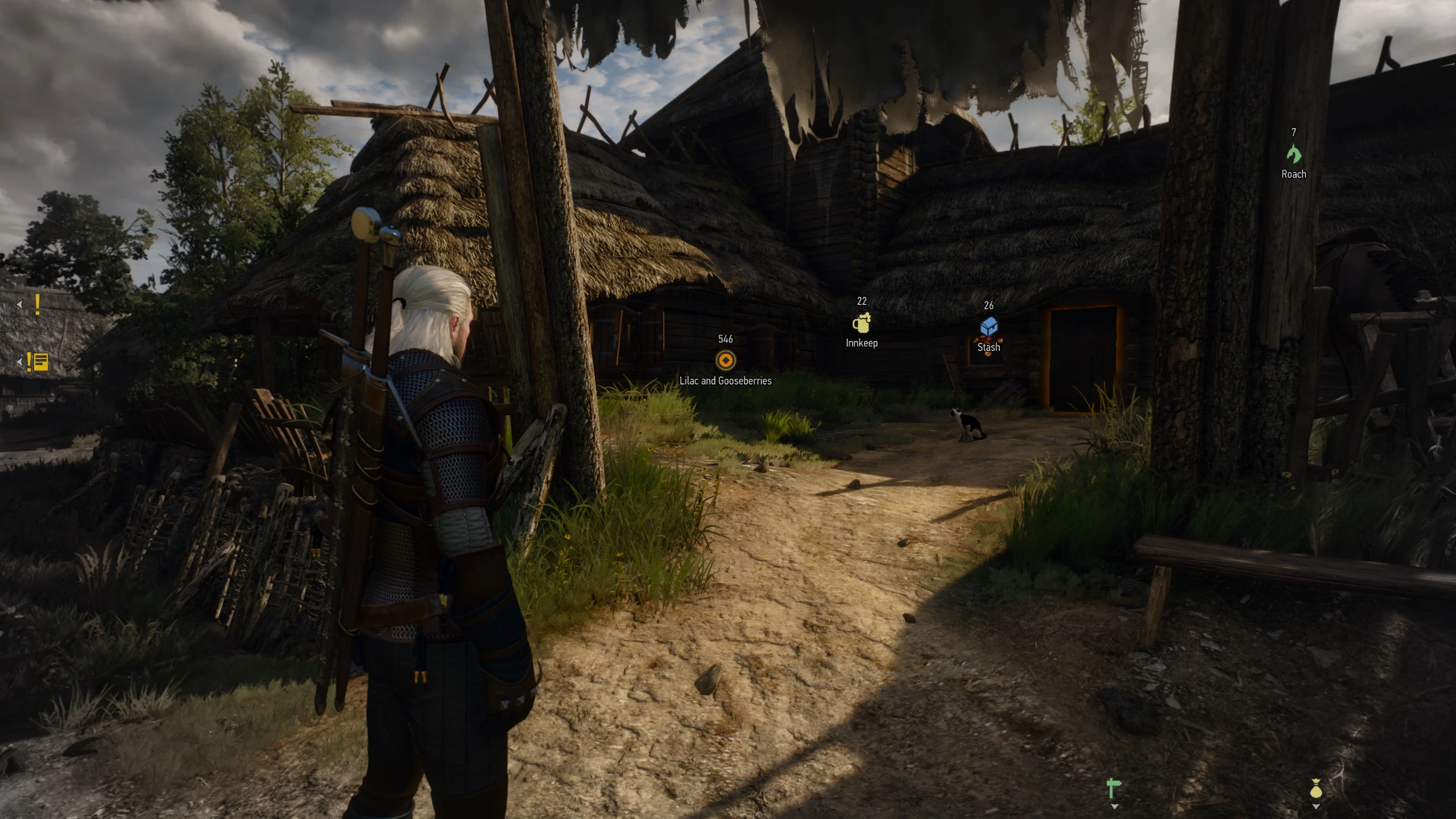
Switching some parts of the HUD off allows for more immersive gameplay. But playing without minimap or healthbar can be as painful under certain circumstances as it's fantastic while just exploring the world. This mod offers a lot of options to configure HUD modules as well as adds 3D markers for quest and NPC tracking and makes several improvements to game menus. You can use all of the options mod has or turn the ones you don't need off.
The mod doesn't change any of the balance aspects of the game and only provides pieces of information to the player he/she already has access to. By installing it you won't be making the game easier or unrealistic, it's an UI mod, which aims to improve quality of life and immersion.
Important!
The mod doesn't hide HUD modules, it shows them. So if you want to use smart HUD feature, you need to turn modules OFF one by one using in-game vanilla video options menu. You don't have to turn off every module, just the ones you don't want to see all the time. Modules that are ON in game video options are not affected by the mod and retain their vanilla behavior. Another important thing to know is that turning an entire HUD off with a hotkey or menu switch will result in no modules being shown at all (as modules are a part of the HUD and when an entire HUD is off nothing is shown).
Note that NGE partially duplicates dynamic minimap and quest log features of
Friendly HUD is a comprehensive UI overhaul for the Next Gen Edition of the game, offering extensive customization for HUD modules, adding 3D markers for quest and NPC tracking, and improving game menus. With over 3,700 endorsements and 250k downloads, it's a popular choice for players wanting a tailored interface.
✨ Key Features
📊 Pros & Cons
✅ Pros
- Huge community trust with 3,767 endorsements and 252,983 downloads.
- Flexible configuration lets you tweak only what you want, perfect for minimalists or power users.
- Adds 3D markers that make quest and NPC tracking way more intuitive.
⚠️ Cons
- Last updated in May 2024 — might not be compatible with future game patches.
- Requires manual setup to get the most out of it, which could be overwhelming for casual players.
For players who want a cleaner, more customizable HUD without overhauling the entire game. If you're tired of cluttered UI and want 3D quest markers, this is for you. Skip if you prefer a vanilla experience or don't want to fiddle with settings.
💡 Beginner Tips
- Check the mod's files for a readme or config guide — the description is sparse, so look for included documentation.
- Start with default settings and toggle options one by one to see what each does.
- If you're using a mod manager, make sure to load this mod after other UI mods to avoid conflicts.
📊 Mod Details
- Game
- Witcher 3 Mods
- Author
- wghost81 aka Wasteland Ghost
- Version
- 0.9.9.1NGE
- Downloads
- 252,983
- Endorsements
- 3,767
- Category
- User Interface
- Created
- 12/18/2022
- Updated
- 5/22/2024
🧩 Commonly Used Together
Users add these mods to the same collections — a real compatibility signal, not an AI guess.
🔧 How to Install Witcher 3 Mods
Download from Nexus.
📖 Full step-by-step install guide for Witcher 3 →
Visit the official mod page for specific installation instructions for this mod.
🎮 Need cheat codes or console commands? Check ur gaming wiki for Witcher 3 commands, item IDs, and more.
Keep browsing — more Witcher 3 mods await