More Quick Slots - Better Radial Menu - Quick Inventory
⚪ Last updated 2023⚠️ Install Order · 2 steps
Install in this order, then this mod last — most mods fail to load without their framework and dependencies in place.
Preview
🔍 Analysis
- 👍 2.7% endorsement rate — high engagement, a strong quality signal
- 🏆 #3 of 33 Inventory mods in this game by downloads
📋 About This Mod
Initially this was one mod named More Quick Slots, but was rewritten for Next-Gen and split in 3 different mods.
If you install 2+ mods (e.g. More Quick Slots and Quick Inventory) then all must have the same exact version. For example, you can't combine More Quick Slots v4. 01 with Quick Inventory v4. 02.
The screenshots were not updated yet and are still from the Classic version.
All 3 mods change many standard script files, some being also modified by other mods, so you MUST use Script Merger to detect and fix any conflicts. Script Merger is required even if you install only these mods, because they are not compatible with each other by default. If 2+ mods are installed then Script Merger will report a Not Mergeable conflict for hud_radialmenu.redswf file. Is safe to ignore it because the same exact file is included in all 3 mods.
The mods supports a gamepad as input and were tested using an Xbox One Wireless Controller.
MORE QUICK SLOTS
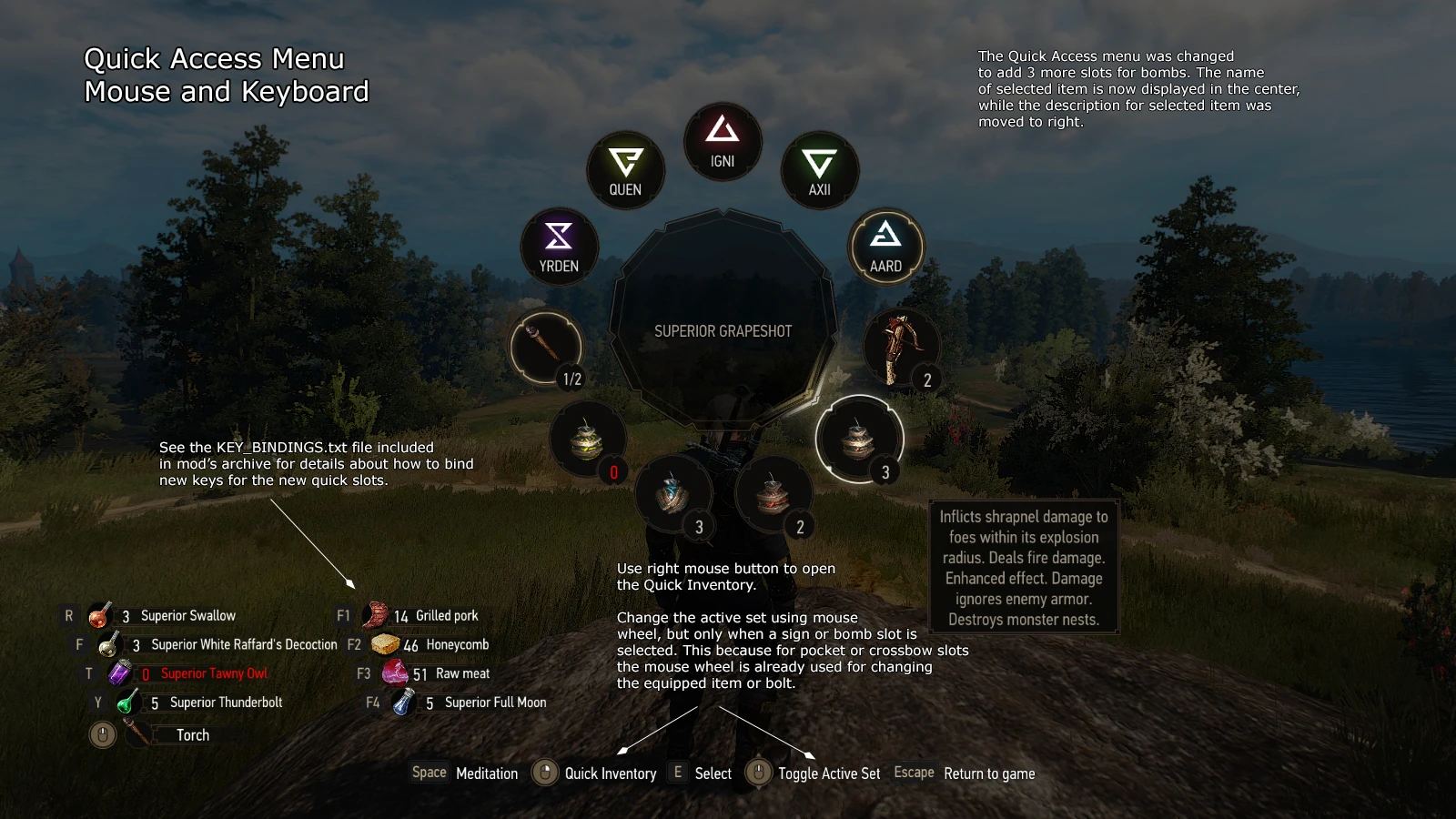
Doubles the number of quick slots for consumables (potions and food).
Actually you can assign up to 16 consumables to quick slots because the equipped items are separated in two sets, only one being active at a time. And you can easily toggle the active set from Inventory and Quick Access menus. Note that by default the first set is restored back as the active one when the Inventory or Quick Access menu is closed, but this behavior can be easily changed from mod's options menu.
HOW TO USE: Keyboard & Mouse
The mod supports two methods for using the new quick slots for consumables: you can bind 4 new keys (one for each new slot) or you can reuse the same keys that are also used for the standard quick slots. See the KEY BINDINGS section and the README.txt file included in downloaded archive for details about how to bind new keys (like F1, F2, F3 and F4) for the new quick slots.
By default the same keys used for the standard quick slots are also used for the new quick slots (R, F, T and Y if you didn't change them): quick pressing a key will use the consumable from the standard quick slot, while holding the key pressed for a short interval will use the consumable from the new quick slot.
The active set can be changed using the MOUSE WHEEL: in inventory menu the mouse cursor must be over the quick slots, while in Quick Access menu a sign slot must be selected (for other slots the mouse wheel being already used to select the pocket item or bolt). Optionally you can bind a new key (like SHIFT) for toggling the active set.
HOW TO USE: Gamepad
The big difference is that by default all the quick slots for consumables are visible on HUD when the Quick Access
More Quick Slots expands the quick slot system by doubling consumable slots, adding 3 bomb slots, and introducing a Quick Inventory HUD module for potions, oils, food, and item repairs. A popular QoL mod for players who want faster access to items without opening the inventory.
✨ Key Features
📊 Pros & Cons
✅ Pros
- Huge community trust with nearly 5,000 endorsements and over 182k downloads.
- Streamlines combat by letting you pop potions and oils without pausing the game.
- Repairing gear from the HUD is a lifesaver when you're deep in a dungeon.
⚠️ Cons
- Last updated in May 2023 — might not be compatible with the latest game patches.
- The Quick Inventory HUD could clutter your screen if you already run other UI mods.
For Witcher 3 players who hate pausing to chug potions or apply oils mid-fight. If you're a combat-focused player who wants faster item access, this is a must-have. Skip if you prefer a minimal HUD or rarely use consumables.
💡 Beginner Tips
- Make sure you have the latest game patch installed, as the mod was last updated in 2023.
- If you use other UI mods, test them together to avoid overlapping HUD elements.
- Check the mod's comments section on Nexus for any user-reported compatibility fixes.
📊 Mod Details
- Game
- Witcher 3 Mods
- Author
- Wolfmark
- Version
- 4.03
- Downloads
- 182,403
- Endorsements
- 4,978
- Category
- Inventory
- Created
- 1/25/2016
- Updated
- 5/12/2023
🔧 How to Install Witcher 3 Mods
Download from Nexus.
📖 Full step-by-step install guide for Witcher 3 →
Visit the official mod page for specific installation instructions for this mod.
🎮 Need cheat codes or console commands? Check ur gaming wiki for Witcher 3 commands, item IDs, and more.
Keep browsing — more Witcher 3 mods await