Modders Resource - Blender Icon Generator
🟡 Updated this year⚠️ Install Order · 2 steps
Install in this order, then this mod last — most mods fail to load without their framework and dependencies in place.
Preview
🔍 Analysis
- 🏆 #43 of 50 Modders Resources and Tutorials mods in this game by downloads
📋 About This Mod
Versatile tool to create icons for games or others. Fine tune while previewing in Blender and batch process with desired settings.
Content of the addon
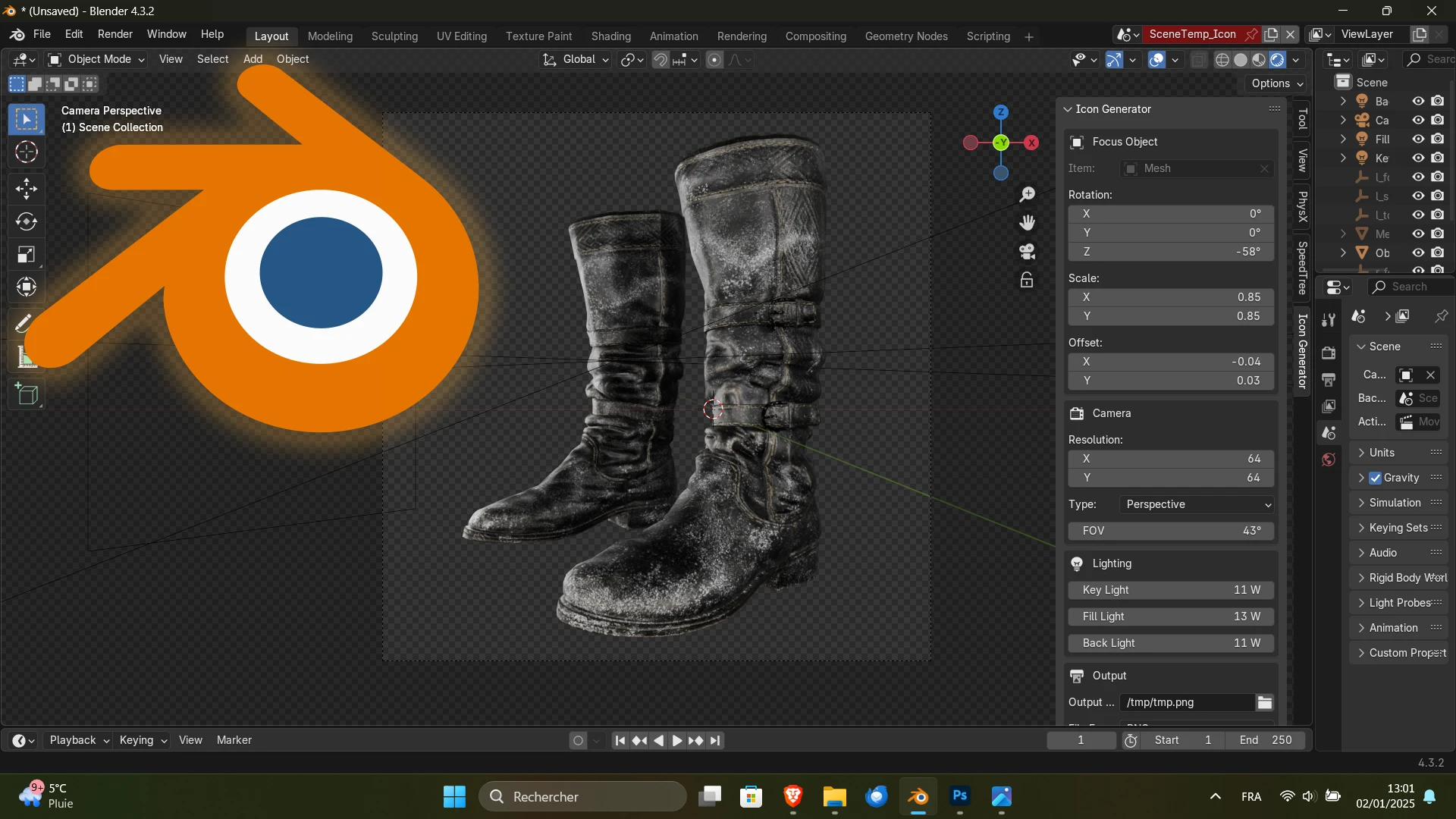
Versatile tool to generate icons for games or others. Fine tune while previewing in Blender and batch process with desired settings. Developed for Blender 5. 0. X, other versions are not tested. In short, the addon automatically creates a three-point lighting shot of the selected object with an adjusted framing. You can then manually fine tune the framing and lighting to your liking. When you are satisfied with a set of parameters you can use that preset for other similar assets, either manually or with a python script for batch processing with a single click.
Each paramater works as follows:
[]Item: the object you want to generate an icon from. Only objects that can hold material data are shown.
[]Rotation: the 3D rotation of the object in the 3D space. Camera, framing and lights get re-arranged automatically to ensure an adjusted shot.
[]Scale: the 2D scale of the object in the camera view space. Use to fine tune the size of the object in the shot. Lights get resized accordingly.
[]Offset: the 2D positional offset of the object in the camera view space. Use to fine tune the location of the object in the shot. Lights get re-positioned accordingly.
[]Resolution: the resoltion of the output file. The camera gets re-positioned accordingly.
[]Type: the type of camera used for the shot. Either Orthographic or Perspective.
[]FOV: the Field Of View of the perspective camera. The camera gets re-positioned accordingly.
[]Side: the side from which the key light shines. It determines the orientation of the three-point lighting.
[]Key Light: the power of the key light. It determines the shot's overall design.
[]Fill Light: the power of the fill light. It balances the key by illuminating shaded surfaces.
[]Back Light: the power of the back light. It gives the subject a rim of light, serving to separate the subject from the background and highlighting contours.
[]Shadow Catcher: enables or disables the shadow catcher.
[]Depth: the depth of the shadow catcher. 0 means that the shadow catcher is right behind the asset. Positive values push the catcher further away from the camera, while negative values pull it closer.
[]Output File: the path in which the output file gets written. The extension gets adjusted depending on the file format.
[]File Format: the format of the output file. Either PNG, Targa or DDS. The extension of the output file gets adjusted depending on it.
[]DXGI Format: the compression method used by the DDS output file. Either BC1, BC3, BC5 or BC7.
[*]Preview Button: enables or disables preview to allow fine tuning parameters with visual feedback. Enabling the preview locks the user inputs except for mouse movements and left cl
📊 Mod Details
- Game
- Witcher 3 Mods
- Author
- Ard Carraigh
- Version
- 2.0.1
- Downloads
- 80
- Endorsements
- 8
- Category
- Modders Resources and Tutorials
- Created
- 1/2/2025
- Updated
- 1/22/2026
🔧 How to Install Witcher 3 Mods
Download from Nexus.
📖 Full step-by-step install guide for Witcher 3 →
Visit the official mod page for specific installation instructions for this mod.
🎮 Need cheat codes or console commands? Check ur gaming wiki for Witcher 3 commands, item IDs, and more.
Keep browsing — more Witcher 3 mods await