Minimap ZoomOut
⚪ Last updated 2015⚠️ Install Order · 2 steps
Install in this order, then this mod last — most mods fail to load without their framework and dependencies in place.
Preview
🔍 Analysis
- 👍 3.7% endorsement rate — high engagement, a strong quality signal
- 🏆 #45 of 155 User Interface mods in this game by downloads
📋 About This Mod
v0. 4 - Updated for 1. 11 by Wolfmark - many thanks
I probably won't be able to keep the mod updated, though it doesn't seem like there'll be any other mod-breaking huge patches in future. Changelog v0. 4 - Updated for 1. 11 by Wolfmark - many thanks v0. 3 - Experimental versions added - Map zooms out further when riding! v0. 2 - Fix : Mod correctly goes into effect after loading v0. 1 - Release
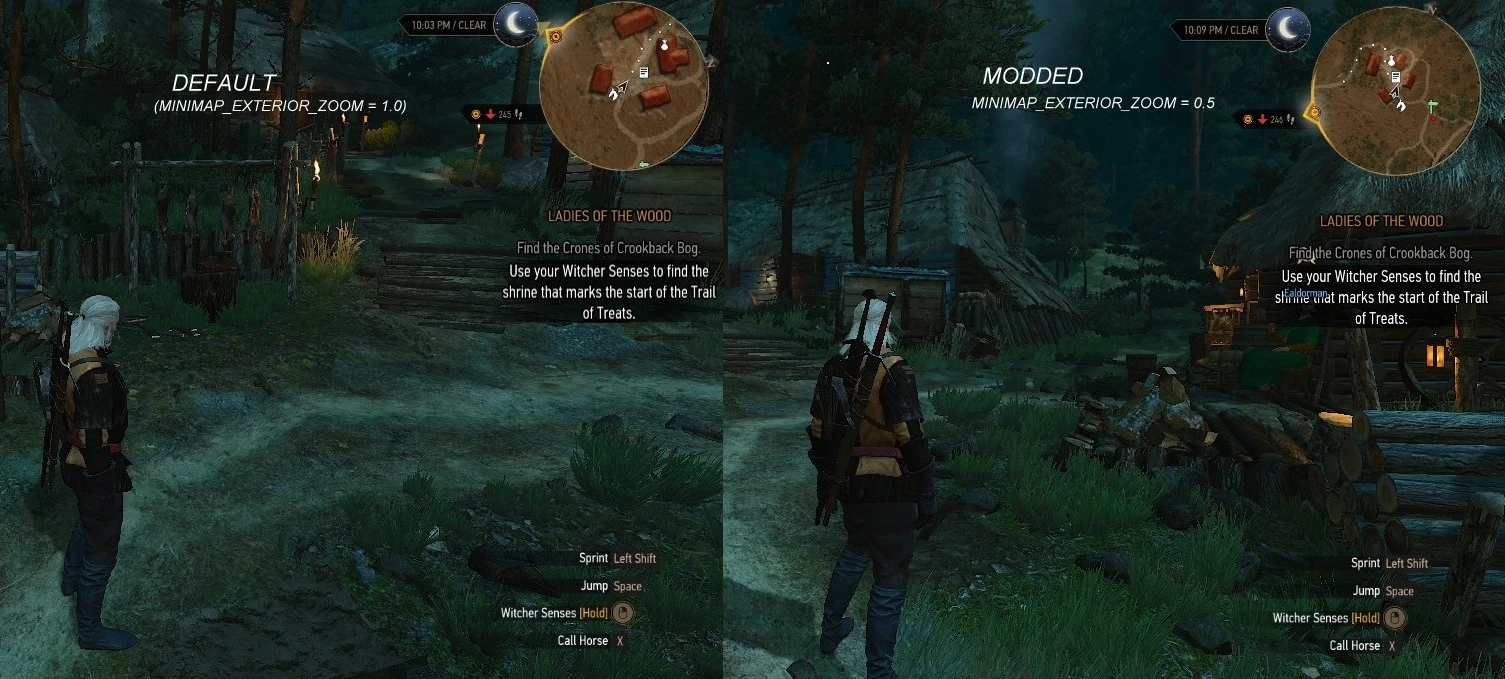
Here is a small tweak that zooms out the minimap further to give more awareness of your surroundings, eliminating the need to checking the main map often. With v0. 3, minimap now zooms out further when riding! Three options are available: ZoomOutBasic : Only modifies hud.ws and hudModuleMinimap2.ws, does not include different zoom level for riding. ( zoom lvls ext = 0. 45 (default = 1. 0), interior = 1. 50 (default 2. 0) ZoomOutLHUD :Optimized for larger HUDs,or those who want more zoom out. ( riding = 0. 25 , exterior = 0. 55 , int = 1. 25 ) ZoomOutSHUD : Optimized for smaller HUDs, less zoom out ( riding = 0. 35, ext = 0. 65 , int = 1. 50 ) It is not necessary to use SHUD for small huds or LHUD for larger ones, you can experiment with them as you like. In my experience minimap becomes harder to read at lower resolutions (I'm running the game at 1366x768), so SHUD is easier on my eye, but I still go with LHUD so yeah that's that...
To install extract the mod into your Mods folder, delete it to uninstall. Have fun! If you are also bothered by the scarcity of ropes in the game, try Rope Crafting Diagram for a simple fix with minimal editing of game files. ----------------------------------------------------------------------------------------------------------------------------------------------------------------------------------------------- I noticed that some markers start to pop-in on the minimap at lower zoom values, this becomes especially noticeable after values lower than 0. 5. It seems that some markers like undiscovered areas of interest and inns are always shown on the minimap so do not pop-in; but blacksmith and armorer markers become visible only when player gets close to them. This is one of the reasons for having on foot zoom level higher than riding zoom lvl. and it is easier to navigate in cities, so it makes more sense gameplay wise.
I do not have much time for testing, also I started the game pretty recently ( I'm still in Velen) therefore I cannot guarantee it will work as intended everywhere. Basic version is really unlikely to cause any problems.- -KNOWN ISSUES/COMPATIBILITY--
- I had to modify bunch of other files to add different zoom level for riding, this likely
Minimap ZoomOut is a small UI tweak that zooms out the minimap to a more useful level, making it easier to navigate. Originally by balparmak, it was updated for compatibility with version 1.11 by Wolfmark. With 2,227 endorsements and nearly 60k downloads, it's a popular quality-of-life improvement for players who find the default minimap too zoomed in.
✨ Key Features
📊 Pros & Cons
✅ Pros
- Community favorite with 2,227 endorsements and nearly 60k downloads — clearly fills a need.
- Simple tweak that makes the minimap actually useful without overhauling your UI.
- Compatibility update for 1.11 means it should work with that version without issues.
⚠️ Cons
- Last updated in 2015 — may not work with newer game versions or other UI mods.
- Only zooms out the minimap; if you want more UI customization, you'll need other mods.
For players who find the default minimap too zoomed in and want a quick, no-fuss fix. If you're running game version 1.11 or similar, this is a solid pick. Skip if you're on a newer version or want extensive UI overhauls.
💡 Beginner Tips
- Since it's a simple file drop, make sure to place the files in the correct mod folder for your game.
- If you're using other UI mods, test for conflicts by enabling this mod last.
- Check the mod's compatibility with your exact game version before installing, as it was last updated for 1.11.
📊 Mod Details
- Game
- Witcher 3 Mods
- Author
- balparmak
- Version
- 0.4
- Downloads
- 59,676
- Endorsements
- 2,227
- Category
- User Interface
- Created
- 8/22/2015
- Updated
- 11/7/2015
🔧 How to Install Witcher 3 Mods
Download from Nexus.
📖 Full step-by-step install guide for Witcher 3 →
Visit the official mod page for specific installation instructions for this mod.
🎮 Need cheat codes or console commands? Check ur gaming wiki for Witcher 3 commands, item IDs, and more.
Keep browsing — more Witcher 3 mods await