Instant Sign Casting for Logitech Gaming Software
⚪ Last updated 2016⚠️ Install Order · 2 steps
Install in this order, then this mod last — most mods fail to load without their framework and dependencies in place.
Preview
🔍 Analysis
- 🏆 #10 of 41 Controller Button Layout mods in this game by downloads
📋 About This Mod
This script for the Logitech Gaming Software allows you to map your signs to your mouse buttons. It allows selecting and instant casting of signs.
Instant Sign Casting for Logitech Gaming Software
Description
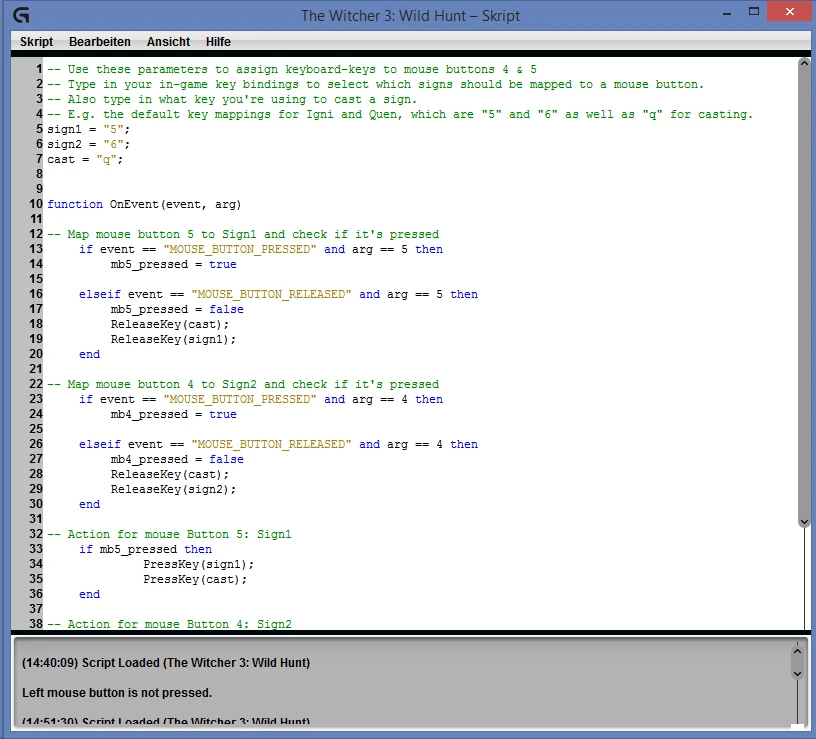
This script allows you to map your favorite signs to your mouse buttons 4 and 5 (Back and Forward mouse buttons). By clicking the button, signs will get selected and casted instantly. If you keep pressing the button, signs will be casted in alternate sign casting mode.
Which signs you want to map is entirely your choice. You just have to do a little bit of configuration. If you have some knowledge in scripting/programming you should also be able to extend the script to your likings.
The script is designed to work with Logitech Gaming Software. However, as it's a LUA script it might as well work with other Gaming Software.
Please feel free to contact me if you have any questions.
26. 07. 2015: Added profile preset for Logitech G600. This can be used as a base for other mice with lots of G-buttons. Updated Installation description. Updated script comments.
Installation
- []Open Logitech Gaming Software by double-clicking on the bold "G" in the System Tray. []Switch to the profile view by clicking on "Customize G-Keys/Buttons" on the device bar. []Right-click on your Witcher 3 profile and choose "Create Script". The Script window will be displayed. []Click on "Script" and choose "Import". []Import the script and click on ok/yes to overwrite the default script. []Configure the script as described below if necessary. []Save the script by clicking on "Script" --> "Save" []That's it. You're done.
Configuration
To configure you need to know your key mappings in-game. The default configuration is button "5" for Igni, button "6" for Quen and "Q" for casting.
All you need to do now is configuring the following lines:
sign1 = "5"; sign2 = "6"; cast = "q";
Replace the key for sign1 with the actual ingame-key of the sign you want to use. Same goes for sign2. Then replace the "q" with
📊 Mod Details
- Game
- Witcher 3 Mods
- Author
- Tyranos
- Version
- 1.2
- Downloads
- 483
- Endorsements
- 19
- Category
- Controller Button Layout
- Created
- 7/19/2015
- Updated
- 9/4/2016
🔧 How to Install Witcher 3 Mods
Download from Nexus.
📖 Full step-by-step install guide for Witcher 3 →
Visit the official mod page for specific installation instructions for this mod.
🎮 Need cheat codes or console commands? Check ur gaming wiki for Witcher 3 commands, item IDs, and more.
Keep browsing — more Witcher 3 mods await