High Quality Faces
⚪ Last updated 2016⚠️ Install Order · 2 steps
Install in this order, then this mod last — most mods fail to load without their framework and dependencies in place.
Preview
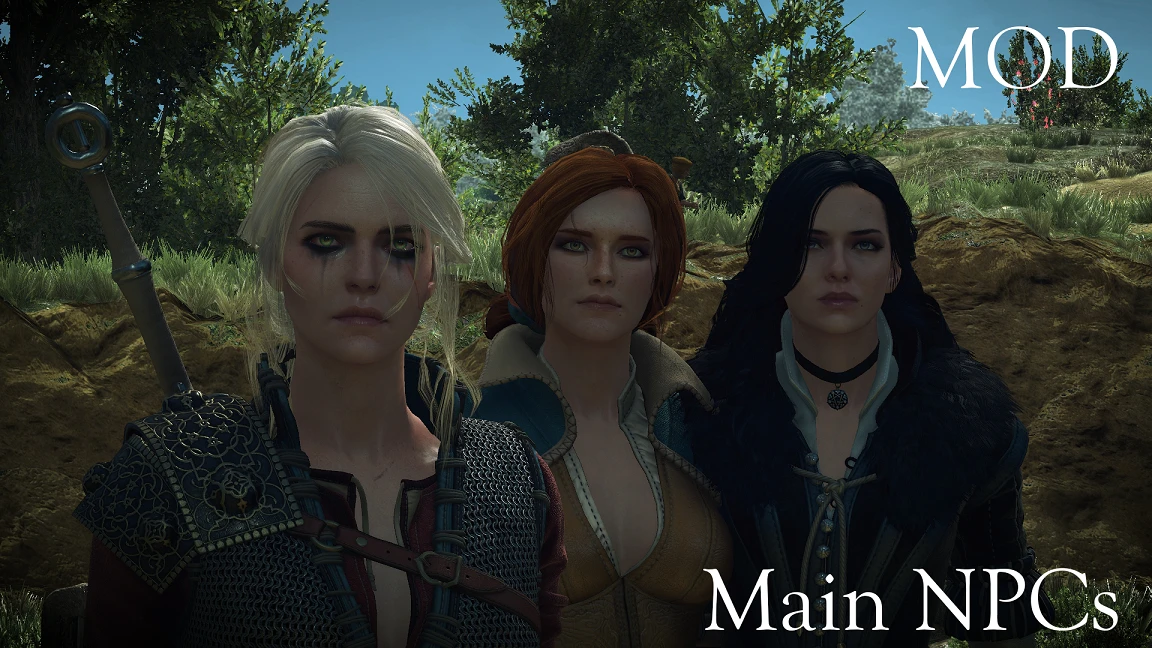
🔍 Analysis
- 👍 2.8% endorsement rate — high engagement, a strong quality signal
- 🏆 #2 of 325 Characters mods in this game by downloads
📋 About This Mod
This would not have been possible without the help of Asmodean778. And Sarcen with his Mod's editor, thank you both.
- ----------------------------------------------------------------------------------------------------------------------------------------------------------
RECOMMENDED MOD:
- http://www.nexusmods.com/witcher3/mods/1902/?
PLEASE READ THE INSTRUCTIONS
What it does?
Increases almost to the cap the LOD of faces and increases the autodistance (aka draw distance) of the eyes by 10x times:
- []Main NPCs - HoS included (100%) []Secondary NPCs - HoS included (100%) []Common NPCs - HoS included (80%) ---> Not all of them have an HQ version
No idea, didn't notice any drops, let me know.
Instructions
- Open your user.settings located it C:\Users\Holgar96\documents\The Witcher 3
- Find and modify "MeshLODDistanceScale" with the value 10 or 2. (i have MeshLODDistanceScale=10) Then save the file.
- Download and extract "modHQFaces" folder to "\yourTW3directory\Mods"
IF IT STILL DOESN'T WORK WITH THESE INSTRUCTIONS TRY TO DELETE THE USER. SETTINGS. BAK ( it's in the same folder)
Uninstallation
Delete "modHQFaces" from your "Mods" folder
Known issues:
- []The ears of certain Common NPCs could look a little weird, it's a small thing and not so noticeable, not sure what causes this.
- Lips outside of cutscenes won't move unless you download the recommended mod
High Quality Faces is a compact character mod that increases the LOD and quality of every face in the game. With over 34,000 endorsements and 1.2 million downloads, it's a popular choice for players seeking sharper facial details. Last updated in 2016, it remains a staple for visual upgrades.
✨ Key Features
📊 Pros & Cons
✅ Pros
- Community favorite with 34,658 endorsements and 1.2 million downloads — clearly a go-to for face quality.
- Does exactly what it says: boosts LOD and face quality across the board, no bloat.
- Lightweight and easy to install — just drop it in and go.
⚠️ Cons
- Last updated in 2016 — may be outdated for current game versions, so check compatibility.
- No detailed description or install instructions provided by the author.
- Purely cosmetic — if you're looking for gameplay changes, this isn't it.
For players who want sharper, more detailed faces without overhauling the whole game. If you're into character customization or just want NPCs to look better up close, this is a quick win. Skip if you want gameplay tweaks — this is purely visual.
💡 Beginner Tips
- Since it's a simple texture/LOD mod, you can install it manually by dropping the files into your Data folder, but using a mod manager makes it easier to uninstall if needed.
- If you're on a modded setup, place this mod early in your load order to ensure other mods don't overwrite the face changes.
- Check if the game version you're running is compatible with a 2016 mod — if you're on a newer patch, you might need to test it out.
📊 Mod Details
- Game
- Witcher 3 Mods
- Author
- Holgaroni
- Version
- 4.0
- Downloads
- 1,220,628
- Endorsements
- 34,658
- Category
- Characters
- Created
- 11/30/2015
- Updated
- 7/22/2016
🧩 Commonly Used Together
Users add these mods to the same collections — a real compatibility signal, not an AI guess.
🔧 How to Install Witcher 3 Mods
Download from Nexus.
📖 Full step-by-step install guide for Witcher 3 →
Visit the official mod page for specific installation instructions for this mod.
🎮 Need cheat codes or console commands? Check ur gaming wiki for Witcher 3 commands, item IDs, and more.
Keep browsing — more Witcher 3 mods await