Extended Keybind Options Menu
⚪ Last updated 2015⚠️ Install Order · 2 steps
Install in this order, then this mod last — most mods fail to load without their framework and dependencies in place.
Preview
🔍 Analysis
- 👍 3.4% endorsement rate — high engagement, a strong quality signal
- 🏆 #101 of 155 User Interface mods in this game by downloads
📋 About This Mod
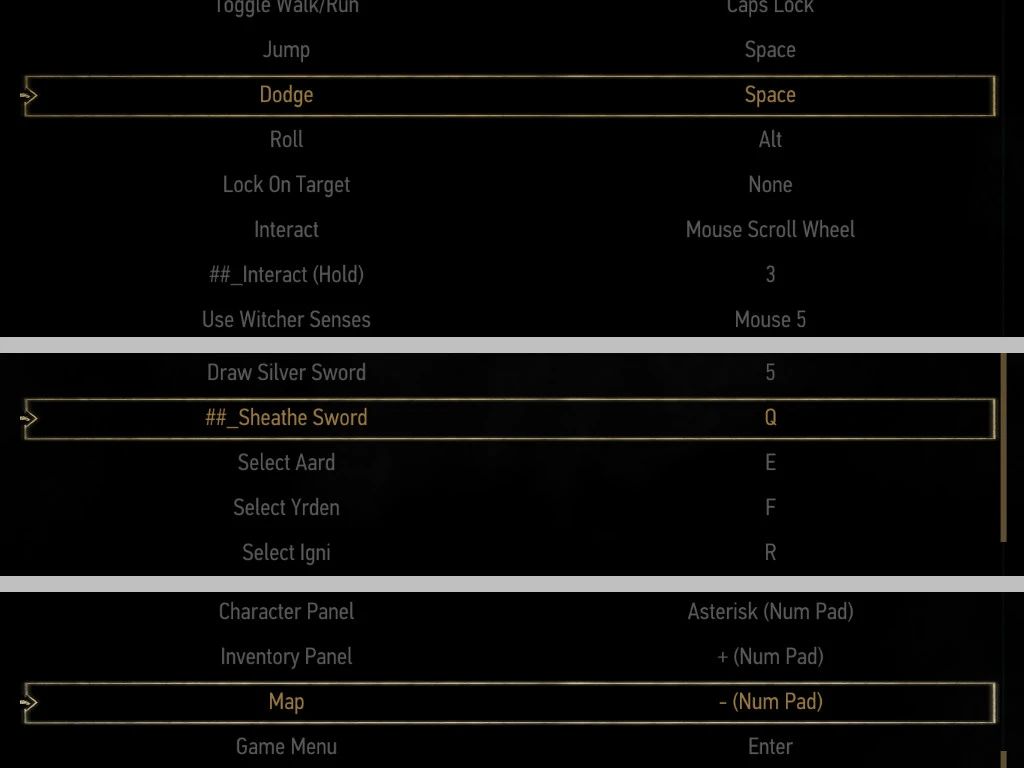
This extends Witcher 3's disappointing 'Key Bindings' options menu by adding new options and fixing bugs. It's an faster alternative to editing the .ini file. I also threw in a fix for AZERTY and QWERTZ keyboards.
The file was used on v1. 04. No promises on later versions. This file was uploaded to nexusmods.com. If you find it somewhere else, it was done without my knowledge.
// Installation Remember to backup the relevant files.
- []Go to #Install Directory#\The Witcher 3 Wild Hunt\bin\config\r4game\user_config_matrix\pc []Replace the input.xml file. []Reset, then reassign your keybinds.
-
[]Fixed "Cancel Aiming Mode" to also cover when on Horses and Boats.
[]"Follow" can now be rebinded as part of "Sprint/Gallop". I don't know what this button does, but it's written as a part of "Gallop".
[]"Stop/Reverse Boat" added; default key was S. It can overlap with Movement-Down or that huge group.
- []Synchronised to official 1. 04 patch. []Unlisted official 1. 04 patch note: WASD has been fixed can now be rebinded. azerty fix no longer needed. []Unlisted official 1. 04 patch note: Dodge and Roll can now be swapped without this mod. []"Map" key fixed and can now be rebinded. (1. 04 bug)
- []"Horse Jump" has been fixed and can be rebinded with the Jump Key. []Simplified overlap groups. The following group of keys can now all overlap with one another: [] Jump, Roll, Surface, Dodge, Roll, Dive, Stop Horse, Call Horse.
- []Keybind list rearranged to make it easier to see the allowed overlapping binds. []You can now swap "Dodge" and "Roll", as per the gamepad design. The "Dodge" key can overlap with Jump, Roll, Surface. []"Sheathe Sword" has been added. []Menu Keys have been unlocked. Please refer to the Unfixable Bug List. []"Call Horse" and "Stop Horse" can now be overlapped during rebinding, as per the default keybinds. []"Dive" can now be overlapped with "Stop Horse" and "Call Horse". []Rebinding "Roll" now properly rebinds Ciri's Dash. []"Cancel Aiming Mode" has been added. The default key is Spacebar. The key can overlap with Jump, Roll, Surface. []"Interact (Hold)" key added; it's a hack for binding keys to the mouse wheel. By default it will automatically copy the "Interact" Key.
Extended Keybind Options Menu is a UI mod for Skyrim that adds missing keybinds and fixes bugs in the keyboard and mouse controls, including a fix for AZERTY and QWERTZ keyboard layouts. It's a small utility mod with 378 endorsements, last updated in 2015, aimed at players who want more control customization.
✨ Key Features
📊 Pros & Cons
✅ Pros
- Community-trusted with 378 endorsements and over 11k downloads.
- Solves a real problem for non-QWERTY keyboard users—rare in Skyrim mods.
- Lightweight and focused, does exactly what it says without bloat.
⚠️ Cons
- Last updated in 2015—likely outdated for the Special Edition or newer game versions.
- Only addresses keyboard/mouse controls; no gamepad or other UI improvements.
For Skyrim players on PC who use AZERTY or QWERTZ keyboards and are tired of missing keybinds. Also for anyone who wants to fix control bugs without overhauling the whole UI. Skip if you play with a controller or don't care about keybinding tweaks.
💡 Beginner Tips
- If you're using the Special Edition, check if this mod works with your version—it's old, so you might need to manually test it.
- After installing, go to the Controls section in Settings to see the new keybind options.
- If you have other UI mods, install this one after them to avoid conflicts.
📊 Mod Details
- Game
- Witcher 3 Mods
- Author
- llwydn
- Version
- 1.04a
- Downloads
- 11,240
- Endorsements
- 378
- Category
- User Interface
- Created
- 5/22/2015
- Updated
- 5/26/2015
🔧 How to Install Witcher 3 Mods
Download from Nexus.
📖 Full step-by-step install guide for Witcher 3 →
Visit the official mod page for specific installation instructions for this mod.
🎮 Need cheat codes or console commands? Check ur gaming wiki for Witcher 3 commands, item IDs, and more.
Keep browsing — more Witcher 3 mods await