Enemy HUD 2.0
⚪ Last updated 2017⚠️ Install Order · 2 steps
Install in this order, then this mod last — most mods fail to load without their framework and dependencies in place.
Preview
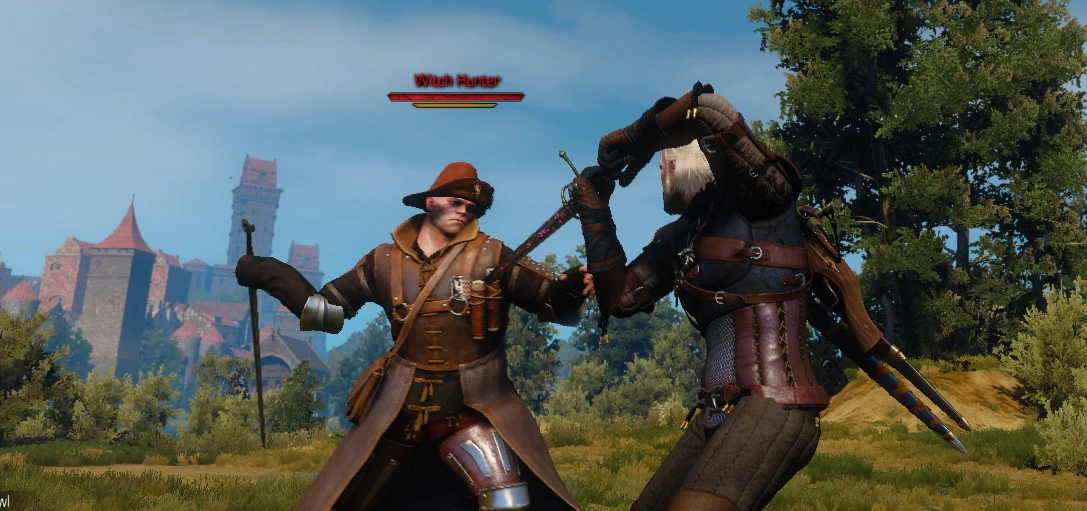
🔍 Analysis
- 👍 2.5% endorsement rate — high engagement, a strong quality signal
- 🏆 #67 of 155 User Interface mods in this game by downloads
📋 About This Mod
Install instructions:
- []Download the mod with NML or manually, and place the extracted folder into your Mods directory []Download the enemyHud.xml OR use the one inside the modEnemyHud\ folder.. and place it inside The Witcher 3 Wild Hunt\bin\config\r4game\user_config_matrix\pc\ []Change settings in the menu []Choose the colours You want. []Play and Enjoy!
Added a feature, that lets you hold a button to show the enemy level.
Navigate to your input.settings and add these lines to the bottom:
IK_E=(Action=EnemyHudLevel)
Hold down the E button to see enemy levels (releasing the button makes it go away as per request) You can change the E to anything you like. (Its not instant for me but requires a dodge or a parry or a target switch to work)
Credits:
- []HUGE thanks to Hyadum for making these awesome new textures!
- []Remove the files you added when installing []Done!
A compact UI mod that changes the Enemy HUD in the game. With 604 endorsements and over 23,000 downloads, it has a solid user base. Last updated in 2017, so it may not be compatible with current game versions.
✨ Key Features
📊 Pros & Cons
✅ Pros
- Community-approved with 604 endorsements.
- Over 23,000 downloads show it's been widely used.
- Lightweight UI tweak that doesn't bloat your load order.
⚠️ Cons
- Last updated in 2017 — might break with newer game patches.
- No detailed description, so you're flying blind on what exactly changes.
- No screenshots or videos provided, so you can't preview the look.
For players who want a fresh look at the enemy health bars without overhauling the whole UI. Skip if you need current compatibility or detailed previews.
💡 Beginner Tips
- Check if the game version matches the mod's last update (2017) to avoid conflicts.
- Use a mod manager to easily enable/disable if issues arise.
- Look for user screenshots in the comments section to see the changes before installing.
📊 Mod Details
- Game
- Witcher 3 Mods
- Author
- erxv
- Version
- 3.0.2
- Downloads
- 23,727
- Endorsements
- 604
- Category
- User Interface
- Created
- 10/23/2016
- Updated
- 8/7/2017
🔧 How to Install Witcher 3 Mods
Download from Nexus.
📖 Full step-by-step install guide for Witcher 3 →
Visit the official mod page for specific installation instructions for this mod.
🎮 Need cheat codes or console commands? Check ur gaming wiki for Witcher 3 commands, item IDs, and more.
Keep browsing — more Witcher 3 mods await