E3 UI and HUD
⚪ Last updated 2018⚠️ Install Order · 2 steps
Install in this order, then this mod last — most mods fail to load without their framework and dependencies in place.
Preview
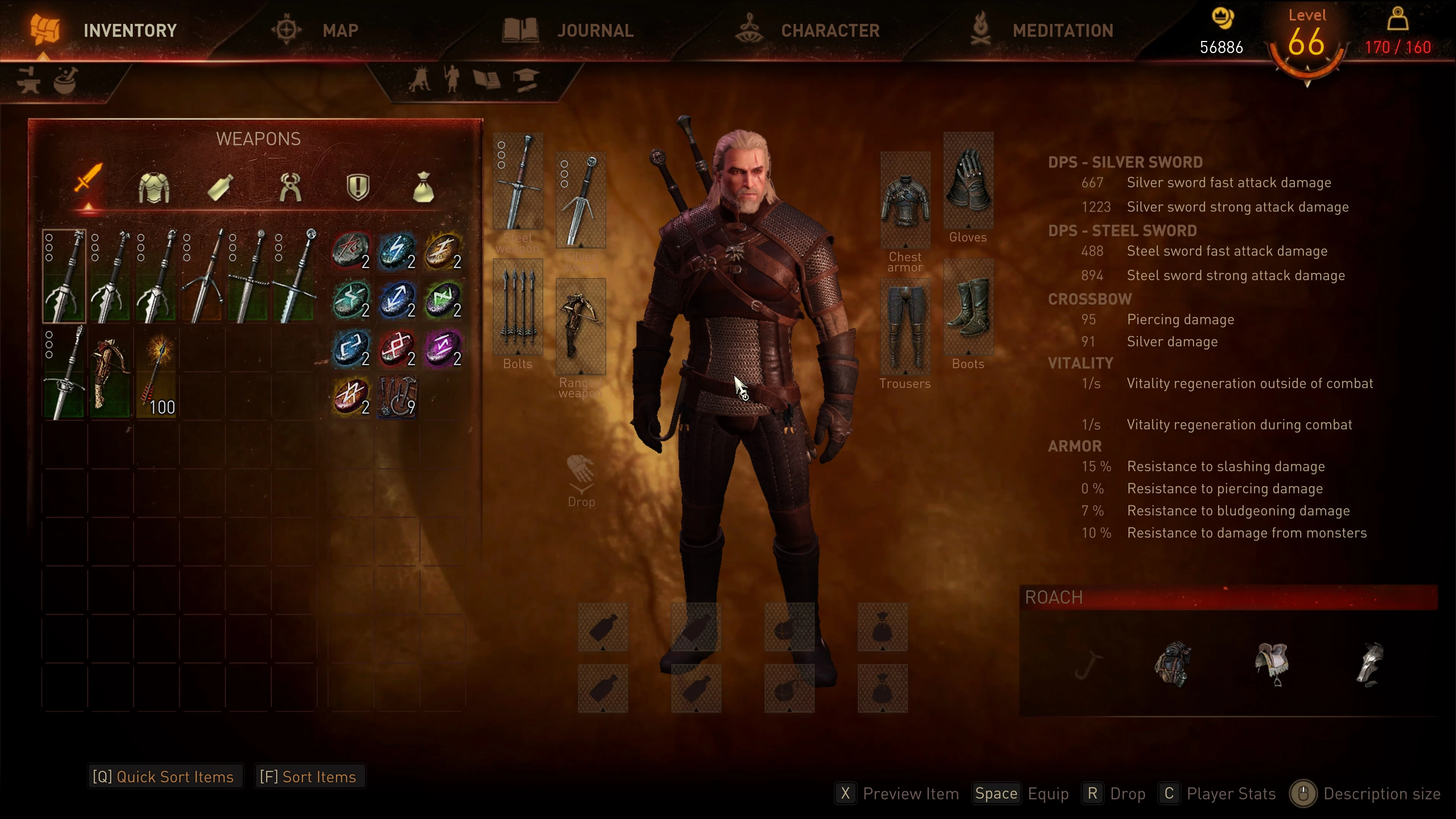
🔍 Analysis
- 👍 2.2% endorsement rate — high engagement, a strong quality signal
- 🏆 #15 of 155 User Interface mods in this game by downloads
📋 About This Mod
This mod is no longer maintained, nor does it work with the latest Game Updates (next gen version).
Please do not PM ANY of the mod authors. You will be ignored and most likely blocked. If you are looking to update this mod for newer versions or modify it, please read and respect the permission instructions. Good luck on your endeavours.
Introduction:
Hello there fellow E3 Fanatics
It has been a long journey, we had lots of laughs, created new memes and lost quite a bit of mental sanity in trying to bring you the hud you had always dreamed about. What are you waiting for? Go ahead and embrace all that E3 glory! We hope you will enjoy it just as much as we did making it, if not more!
This Mod aims to bring back the old Hud & Ui shown in the famous gameplay demo from E3 2014. It was created by Team mostly from scratch, while some assets are leftover files or from pre 1. 22 builds of the game.
Features:
-
[]every menu got revamped into e3 style
[
]animated background for every menu except Inventory and Bestiary[]the hud is e3 style
[]the original xbox box button icons from e3 2014
[]maps and minimaps in (you guessed it) E3 style
[]new font
[]new regional loading screens
[]new inregional loading screens for every sign post in an either black/white or coloured variant
[]integrated live Bestiary
[]moster Tracker. Shows corresponding monster if active monster hunt quest. Otherwise currently buffed monster
Some advices:
If you are not a big fan of the for example the maps, the mod comes with an mod menu where some features can be toggled.
Options are:
- []animated Background (y/n)
-
[]E3 maps (y/n)
[]E3 minimaps (y/n)
[]live Bestiary (y/n)
- Loading screens (coloured/blackwhite)
Perhaps you realized the legend in the Map Menu is missing and now you got no clue how to find the next brothel. But dont worry. The legend can be toggled on and off via "f" (keyboard), "RT" (xBox) or "R2" (PS).
AND NO, the question marks are not missing. It just makes the map kinda cluttered, so we set the standard filter to "gerenal".
You may also have noticed the missing level indicator on monster no matter whether you have scaling on or off. This is an intentional design decision. There was no level indicator
E3 UI and HUD is a user interface overhaul for Fallout 4 that recreates the look of the 2014 E3 showcase. It replaces the default HUD elements with a cleaner, more streamlined design. With 3,692 endorsements and 167,714 downloads, it's a popular choice for players seeking a fresh UI. Last updated in 2018, it may require compatibility checks with current game versions.
✨ Key Features
📊 Pros & Cons
✅ Pros
- Community favorite with 3,692 endorsements—clearly a lot of players dig this look.
- Massive download count (167k+) shows it's been tried and tested by a huge audience.
- Gives your game that classic E3 2014 vibe, which is a nice nostalgia trip for long-time fans.
⚠️ Cons
- Last updated in 2018—might not play nice with the latest Fallout 4 patches or DLC.
- It's purely cosmetic—if you're after functional UI improvements, this isn't it.
For Fallout 4 players who want a cleaner, more cinematic HUD that mimics the E3 2014 showcase. If you're tired of the default cluttered UI and want a fresh look without changing gameplay, this is for you. Skip if you need updated mod support or functional UI tweaks.
💡 Beginner Tips
- Since it's a UI mod, make sure to load it after other UI mods to avoid conflicts.
- If you're using a mod manager, use the preview feature to see the HUD changes before installing.
- Check the mod's comments section for any user-reported compatibility fixes with current game versions.
📊 Mod Details
- Game
- Witcher 3 Mods
- Author
- Evgen Hyadum KamehamehaNudel Lim3zer0 Linas MrMoonshoes Paulscott Stronghim Erxv
- Version
- 1.2
- Downloads
- 167,714
- Endorsements
- 3,692
- Category
- User Interface
- Created
- 3/26/2018
- Updated
- 11/23/2018
🔧 How to Install Witcher 3 Mods
Download from Nexus.
📖 Full step-by-step install guide for Witcher 3 →
Visit the official mod page for specific installation instructions for this mod.
🎮 Need cheat codes or console commands? Check ur gaming wiki for Witcher 3 commands, item IDs, and more.
Keep browsing — more Witcher 3 mods await