Discontinued - xTcModKit - 5.0-BETA-1.1 - Uncook Build Cook and Merge.
⚪ Last updated 2018⚠️ Install Order · 2 steps
Install in this order, then this mod last — most mods fail to load without their framework and dependencies in place.
Preview
🔍 Analysis
- 👍 5.4% endorsement rate — high engagement, a strong quality signal
- 🏆 #33 of 43 Utilities mods in this game by downloads
📋 About This Mod
This project is Discontinued - Read Sticky Post for more Info.
Consider using version 4. 1. It still works great and im pretty satisfied with it. Im using it myself today and its great for quick edits.
If someone is cracy enough to pick up this project i added the sources to the sticky post.
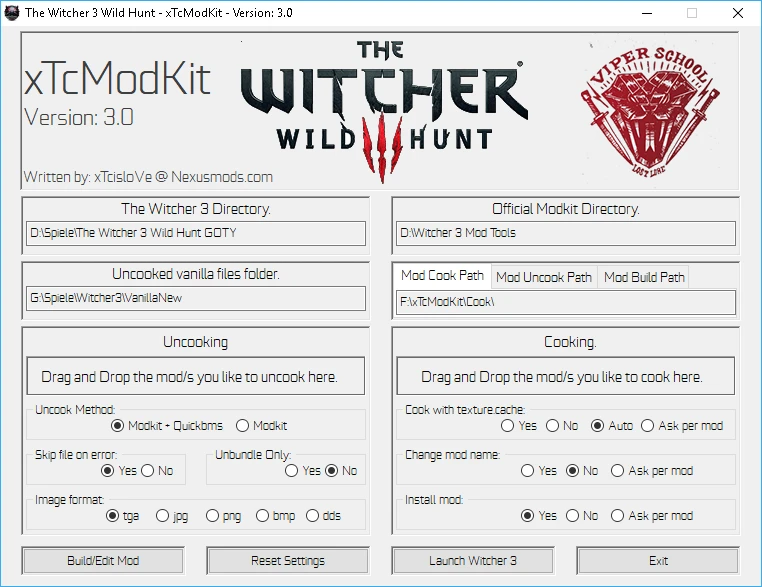
My second attempt of building a proper Modkit for The Witcher 3.
This Tool is far away from finished! Report Bugs and give Feedback, please!
-Drag and Drop multiple mods!
-Uncooking mods.
-Cooking mods.
-Build your own mod.
-Build Script mods.
-Literally every function get explained if u hover with your mouse over the text or button u dont understand.
Future: Merging with DiffView.
4. 0 added Merging!
Future depends on feedback, since i dont know if W3 modding is already dead.
How to install:
Password: xtc
Extract xTcModKit.exe for example to: D:\xTcModKit\xTcModKit.exe
Run xTcModKit.exe
Avoid using white spaces in your Directorys! Put xTcModKit.exe in something like:
C:\xTcModKit\xTcModKit.exe
Put Witcher 3 and the Official Mod Kit also on the same drive.
Vanilla folder:
If u like to cook with texture.cache file.
Whis will pack some of the xbm and w2mesh files into a faster loading texture.cache file.
U also need this folder if u like to build a mod from scratch!
So if u uncook the vanilla files (drag&drop empty folder) it will uncook the entire game, as a resource for cooking with texture cache (this will take 80gb of space if u have the goty version).
u7UVkXwniV8
A discontinued utility mod for 7 Days to Die that allows players to uncook, cook, build, and merge mods, including script support. It offers an easy-to-use interface with many options. Last updated in 2018, it may be outdated for current game versions.
✨ Key Features
📊 Pros & Cons
✅ Pros
- Solid community trust with 508 endorsements.
- Handy for modders who need to unpack and repack mods.
- Script support sets it apart from basic mod tools.
⚠️ Cons
- Discontinued since 2018 — likely incompatible with current game versions.
- No detailed documentation or instructions provided.
- May require manual configuration for advanced merging tasks.
For 7 Days to Die modders who want a tool to unpack, modify, and repack mods, especially those dealing with scripts. Skip if you're a casual player looking for gameplay mods — this is a developer utility.
💡 Beginner Tips
- Since this is a utility, ensure you have a backup of your mods before using the uncook/cook functions.
- Check the mod's forum thread for community-made guides, as the description lacks detailed instructions.
- If you're on a newer game version, test the tool on a copy of your mods first to avoid corruption.
📊 Mod Details
- Game
- Witcher 3 Mods
- Author
- xTcisloVe
- Version
- 5.0-1.1
- Downloads
- 9,480
- Endorsements
- 508
- Category
- Utilities
- Created
- 8/5/2018
- Updated
- 10/1/2018
🔧 How to Install Witcher 3 Mods
Download from Nexus.
📖 Full step-by-step install guide for Witcher 3 →
Visit the official mod page for specific installation instructions for this mod.
🎮 Need cheat codes or console commands? Check ur gaming wiki for Witcher 3 commands, item IDs, and more.
Keep browsing — more Witcher 3 mods await