Discontinued - TextureMod Merger Quick and Easy V4 (bypass mod limit)
⚪ Last updated 2016⚠️ Install Order · 2 steps
Install in this order, then this mod last — most mods fail to load without their framework and dependencies in place.
Preview
🔍 Analysis
- 👍 5.1% endorsement rate — high engagement, a strong quality signal
- 🏆 #37 of 43 Utilities mods in this game by downloads
📋 About This Mod
Witcher 3 Model/Texture Mod merger.
First of all thanks to Utopolyst and his Mergin tools MTM - Merging Texture Mods you inspired me to this.
Welcome to my Witcher 3 Model/Texture Mod merger.
Best way for bypassing mod/texture limit.
Whats this?
Its a script that combines all the steps described by Utoplyst in his merging tutorial.
It also uncook mods with quickbms that cant be uncooked with official modkit.
- Logfile of the process.
- Mod counter.
-Easier to use.
-Download faster ModKit
-Download ModKit 1. 3
-Select Mods from everywhere on your computer.
How to
1. download Setup_V4.rar and EXTRACT it. pw=xtc
2. Open Setup_V4.bat and follow the instructions
Model/Texture Merger:
1. Start QuickModMergerv4 from your desktop.
2. Select Witcher 3 Folder.
3. Select ModKit folder.
4. Select uncooked Base Game Folder or uncook Base Game
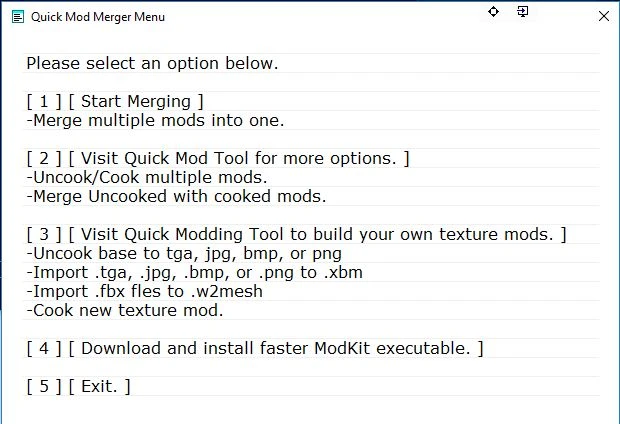
1. Press: [ 1 ] [ Start Merging ]
2. Select desired mods - remember last mod=highest priority
3. Build Mod
4. Enjoy The Witcher 3 Wild Hunt.
Want more Options?Visit:
Quick Mod Tool
Do you like to edit textures and build your own mod?Visit:
Quick Modding Tool
FC2lQv9xAVM
A utility mod that merges model and texture mods in a few clicks, offering a safe and easy method to bypass the mod limit. Last updated in 2016, it has 395 endorsements and 7,694 downloads, indicating a niche but appreciated tool for modders.
✨ Key Features
📊 Pros & Cons
✅ Pros
- Community-trusted with 395 endorsements and 7,694 downloads
- Saves time by merging mods in a few clicks instead of manual work
- Safe method reduces risk of breaking your game
⚠️ Cons
- Last updated in 2016 — may not work with current game versions
- No detailed instructions or troubleshooting provided
- Limited to model and texture mods, not for other types
For modders who hit the mod limit and want a quick way to merge texture and model mods. Skip if you're on a newer game version or need support for other mod types.
💡 Beginner Tips
- Check if the game version you're using is compatible with this 2016 tool before merging.
- Back up your mods folder before merging to avoid permanent changes.
- Test the merged mods in a new save to ensure stability.
📊 Mod Details
- Game
- Witcher 3 Mods
- Author
- xTcisloVe
- Version
- 4.0
- Downloads
- 7,694
- Endorsements
- 395
- Category
- Utilities
- Created
- 9/14/2016
- Updated
- 11/9/2016
🔧 How to Install Witcher 3 Mods
Download from Nexus.
📖 Full step-by-step install guide for Witcher 3 →
Visit the official mod page for specific installation instructions for this mod.
🎮 Need cheat codes or console commands? Check ur gaming wiki for Witcher 3 commands, item IDs, and more.
Keep browsing — more Witcher 3 mods await