Boot icon recolor
⚪ Last updated 2023⚠️ Install Order · 2 steps
Install in this order, then this mod last — most mods fail to load without their framework and dependencies in place.
Preview
🔍 Analysis
- 👍 0.3% endorsement rate
- 🏆 #38 of 155 User Interface mods in this game by downloads
📋 About This Mod
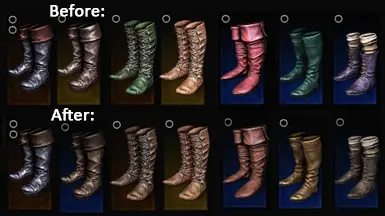
This is an addition to FS Restored Icons and it's updated version. Those mod restore icons of some boots - they were in the game files, but were left unused. The mods I mentioned edit paths to images, so the game uses unique icons for these boots. The thing is, the icons have weird colors: purple, green, blue or pink.
This mod replaces 7 icons:
-
[]common_light_boots_lvl1_02_64x128.png (Hunting boots, alternative version) - from purple to dark brown
[
]common_light_boots_lvl3_02_64x128.png (Swordsman's boots) - now they are less pink[]common_light_boots_lvl4_02_64x128.png (Mountain Folk boots) - from green to dark brown
[]common_light_boots_lvl4_64x128.png (Assassin's boots) - still light brown, but now a bit darker
[]common_heavy_boots_lvl1_02_64x128.png (Campaigner's boots) - from blue to yellowish brown
[]common_heavy_boots_lvl3_02_64x128.png (Condottiere's boots) - collar recolored from reddish to dark brown
- common_heavy_boots_lvl3_64x128.png (Reaver's boots) - still dark brown, now a bit darker and the collar is less shiny
Feel free to use this mod for bug fix/restored content compilations
PS. Optional version included: boots + Bounty Hunter's gambeson.
Boot icon recolor is a small UI fix that replaces the icons of boots restored by another mod, correcting their colors to match the actual boots. With 208 endorsements and 75,680 downloads, it's a popular quality-of-life tweak for players bothered by mismatched icons. Last updated in December 2023.
✨ Key Features
📊 Pros & Cons
✅ Pros
- Community-approved with 208 endorsements and over 75k downloads.
- Fixes a specific visual annoyance for players using the restored boots mod.
- Lightweight and focused—does exactly what it says without extra bloat.
⚠️ Cons
- Requires the original boots mod to be useful—standalone value is limited.
- Only affects boot icons; other item icons may still have color issues.
- Last updated in 2023—may not be updated for future game patches.
For players who use the boots restoration mod and are bothered by mismatched icon colors. If you're a UI perfectionist or want your inventory to look accurate, this is a quick fix. Skip if you don't use the base mod or don't care about icon colors.
💡 Beginner Tips
- Make sure you have the original boots restoration mod installed, or this fix won't have anything to apply to.
- If you're using a mod manager, install this after the base mod to ensure it overwrites the icons correctly.
- Check the mod's file structure to confirm it matches your game version—if it's outdated, you may need to manually place files.
📊 Mod Details
- Game
- Witcher 3 Mods
- Author
- Macrophobic
- Version
- 1
- Downloads
- 75,680
- Endorsements
- 208
- Category
- User Interface
- Created
- 12/3/2023
- Updated
- 12/3/2023
🔧 How to Install Witcher 3 Mods
Download from Nexus.
📖 Full step-by-step install guide for Witcher 3 →
Visit the official mod page for specific installation instructions for this mod.
🎮 Need cheat codes or console commands? Check ur gaming wiki for Witcher 3 commands, item IDs, and more.
Keep browsing — more Witcher 3 mods await