Better Icons 2020 v2.0 - German Edition
🟠 Updated over a year ago⚠️ Install Order · 2 steps
Install in this order, then this mod last — most mods fail to load without their framework and dependencies in place.
Preview
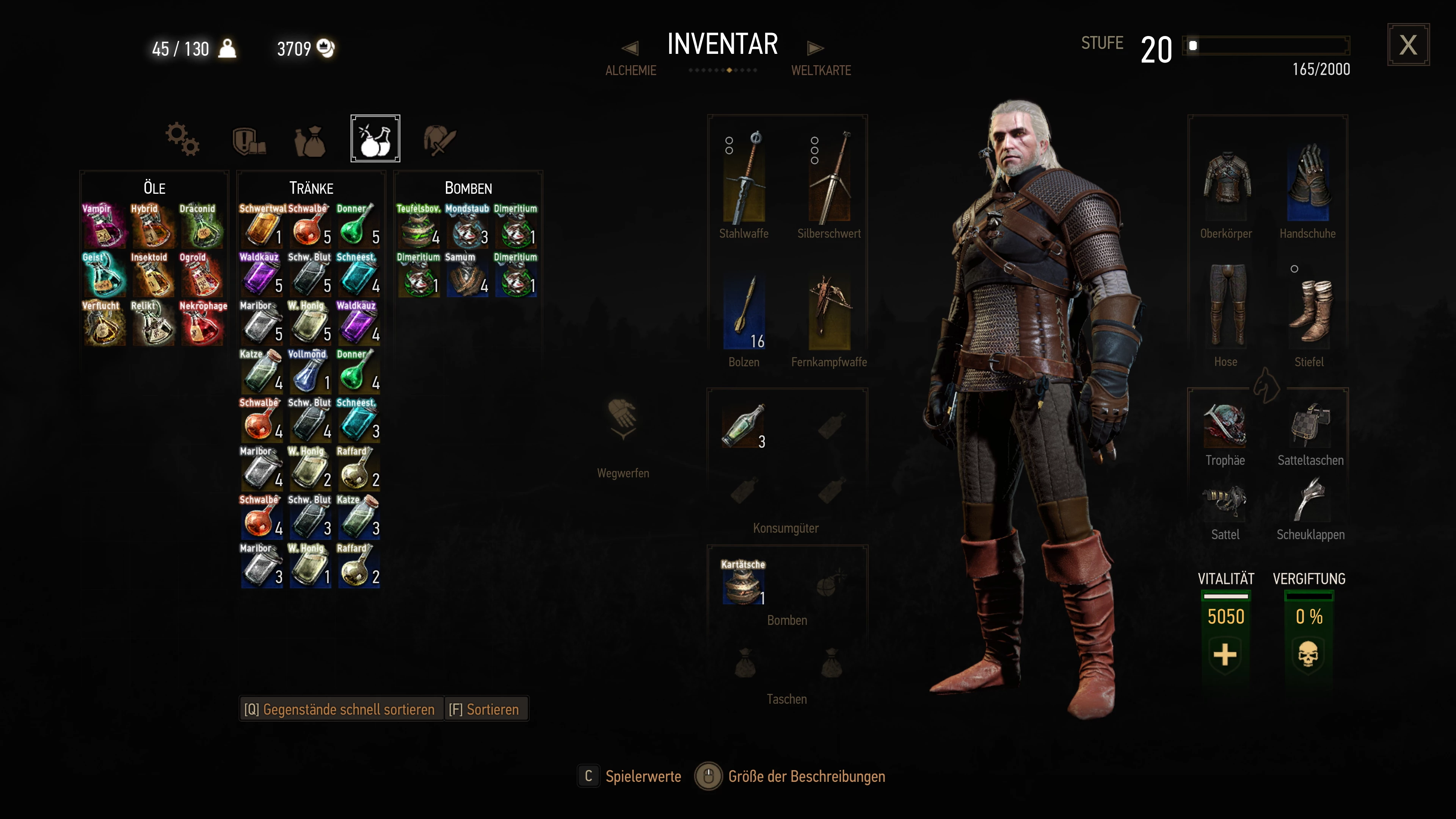
🔍 Analysis
- 👍 3.7% endorsement rate — high engagement, a strong quality signal
- 🏆 #30 of 276 User Interface mods in this game by downloads
📋 About This Mod
New version of 'Better Icons' but with more icons, smaller font and different font options to choose... now including features from KlausGamingShow's 'Default GUI Icons' mod. W3EE compatible version available. German language.
Diese Mod ist veraltet, eine aktualisierte und verbesserte Version finden Sie unter dem folgenden link:
https://www.nexusmods.com/witcher3/mods/10256
Deepk & KlausGamingShow proudly present:
Better Icons 2020 v2. 0
This new version is a combination that includes an improved version of KlausGamingShow's mod Default GUI Icons... and Deepk's mod Better Icons 2020.
Also available in these languages:
The features of this new version are:
- The Better Icons 2020 only in inventory and bestiary, the default icons will be displayed in HUD, Alchemy menus, etc... because their names are already there.
- Better compatibility with other mods like MQS because KlausGamingShow made a totally new implementation of scripts.
- Extra Icons and my 'Better Icons 2020 for Additional Alchemy' mod from karpfenfrosch included (if you don't have installed that mod don't worry, the icons simply will not be shown in your game... if you have installed Additional Alchemy mod... you don't have to do anything, the Better Icons 2020 v2. 0 mod will show the proper labeled icons).
INSTALL:
- Simply choose one of the font versions available and drop the modBetterIcons2020xxxx file inside your "Mods" folder.
- If you want the Extra Icons to be shown on HUD, install the optional file following the instructions you'll find in 'FILES'.
- Run Script Merger if you have more mods installed.
- If you install the optional file and have some mod installed that modifies the files...
gameplay\abilities\effects.xml
gameplay\abilities_plus\effects.xml
gameplay\items\def_item_alchemy_potion.xml
gameplay\items_plus\def_item_alchemy_potion.xml
...then you'll have to merge them. Be sure to choose:
icon_path="icons/inventory/ingredients/alchemy/village-drink-64x64.png
icon_path="icons/inventory/ingredients/alchemy/pop-mold-antidote-64x64.png
INSTALL TIERS VERSIONS:
- Choose one of the font versions available and drop the modBetterIcons2020TIERSxxxx file inside your "Mods" folder.
- TIERS versions has EXTRA ICONS file included, you don't need to download EXTRA ICONS file if you're using TIERS versions.
- In "Optional Files" you'll find compatibility patches for Ghost Mode and FCR3[
📊 Mod Details
- Game
- Witcher 3 Mods
- Author
- Deepk
- Version
- 2.0.3
- Downloads
- 592
- Endorsements
- 22
- Category
- User Interface
- Created
- 4/12/2022
- Updated
- 3/4/2025
🔧 How to Install Witcher 3 Mods
Download from Nexus.
📖 Full step-by-step install guide for Witcher 3 →
Visit the official mod page for specific installation instructions for this mod.
🎮 Need cheat codes or console commands? Check ur gaming wiki for Witcher 3 commands, item IDs, and more.
Keep browsing — more Witcher 3 mods await