Nexus Update Check
🟠 Updated over a year ago⚠️ Install Order · 1 step
Install in this order, then this mod last — most mods fail to load without their framework and dependencies in place.
Preview
🔍 Analysis
- 👍 3.7% endorsement rate — high engagement, a strong quality signal
- 🏆 #19 of 251 Utilities mods in this game by downloads
📋 About This Mod
This mod allows mod authors and mod users to create a simple way to check for updates to any BepInEx mod on the nexus.
Features
-
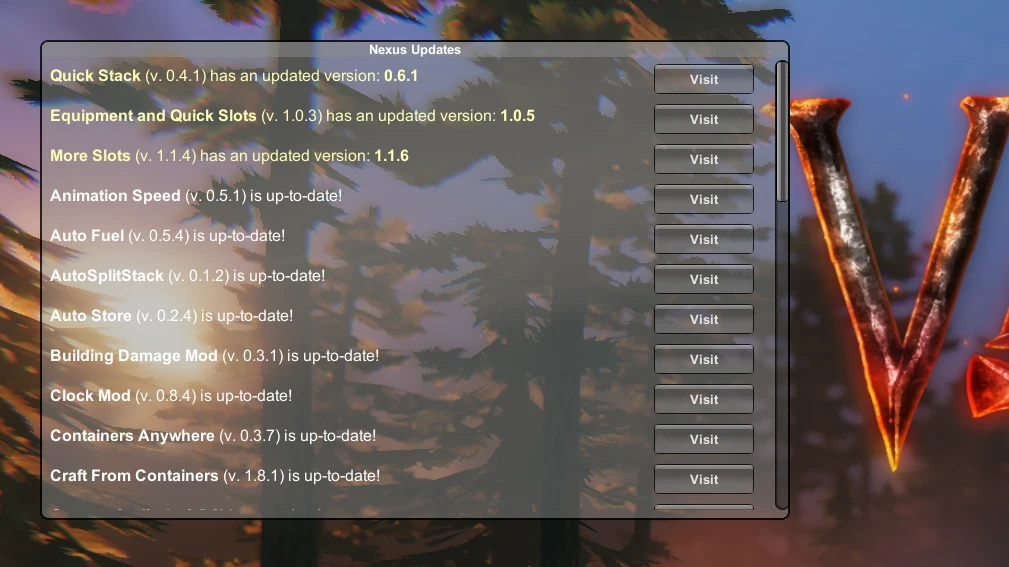
[]Adds a customizable Nexus Updates window to the main menu that shows update information
[
]Update information includes a Visit button and an Ignore button[]Option to show all mods or only updatable mods
[]Option to create empty config files for mods that don't use them
The ignore button only shows if you are only showing updatable mods.
Making Mods Compatible
For mod authors, just add an int config setting with the key "NexusID" and the value of the mod's id on the nexus. E.g.:
nexusID = Config. Bind<int>("General", "NexusID", 48, "Nexus mod ID for updates");
For mod users, if you have a mod that hasn't added this config value, you can try adding the key value pair NexusID = ## (replace ## with that mod's Nexus ID) to that mod's config file (provided it uses standard config creation method) and this mod will pick it up, e.g.:
NexusID = 48
Warning, this appears to break some mods. They must be fragile.
You can find the number in the URL for the mod, e.g.:
https://www.nexusmods.com/valheim/mods/48
And you can find the config files in the folder BepInEx/config. If a mod doesn't have a config file, you can have this mod create an empty one for it.
You should only have to do this once, and the entry will stay there even though it's not recognized by that mod as a config variable.
All of my mods are now updated to support this mod in the latest versions.
How It Works
It uses BepInEx to find metadata for all BepInEx plugins installed.
It then finds the BepInEx config file for each mod and gets its nexus id that has been helpfully supplied by the mod author or manually added by the mod user.
Next, it sends an http request (yes, this mod connects to the Internet...) to Nexus Mods that simply consists of the mod's nexus page url. It parses the html code for the version string and compares it to the version in the DLL file.
Finally, it displays a list of mods with new versions on the main menu with buttons that trigger your browser to visit each mod's nexus page.
Config
A config file BepInEx/config/aedenthorn. NexusUpdate.cfg is created after running the game once with this mod).
You can adjust the config values by editing this file using a text editor or in-game using the Config Manager.
To reload the config from the config file, type nexusupdate reset into the game's
Nexus Update Check is a lightweight utility for BepInEx mod users that notifies them of updates to their installed mods hosted on Nexus. With 1,455 endorsements and 39,512 downloads, it's a popular tool for keeping mods current. Last updated July 2025, it remains actively maintained.
✨ Key Features
📊 Pros & Cons
✅ Pros
- Community-approved with 1,455 endorsements — clearly a tool people trust.
- Nearly 40k downloads show it's widely used in the BepInEx scene.
- Simple and flexible — does one job without bloat.
⚠️ Cons
- Only works with BepInEx mods — if you don't use that framework, this is useless.
- Requires Nexus mods to be hosted there — won't help with mods from other sources.
For BepInEx users who juggle multiple mods and want a heads-up when updates drop. If you're a mod author, this could be a handy addition to your toolkit. Skip if you don't use BepInEx or prefer manual update checking.
💡 Beginner Tips
- Make sure you have BepInEx installed before adding this mod — it's a dependency for any BepInEx plugin.
- Check the mod's page on Nexus for any configuration files that might need tweaking to fit your setup.
- Since it's a utility, place it in the BepInEx/plugins folder as you would any other plugin.
📊 Mod Details
- Game
- Valheim Mods
- Author
- aedenthorn
- Version
- 1.4.0
- Downloads
- 39,512
- Endorsements
- 1,455
- Category
- Utilities
- Created
- 2/23/2021
- Updated
- 7/10/2025
🧩 Commonly Used Together
Users add these mods to the same collections — a real compatibility signal, not an AI guess.
🔧 How to Install Valheim Mods
Download from Nexus.
📖 Full step-by-step install guide for Valheim →
Visit the official mod page for specific installation instructions for this mod.
🎮 Need cheat codes or console commands? Check ur gaming wiki for Valheim commands, item IDs, and more.
Keep browsing — more Valheim mods await