Map Coordinates Display
🟠 Updated over a year ago⚠️ Install Order · 1 step
Install in this order, then this mod last — most mods fail to load without their framework and dependencies in place.
Preview
🔍 Analysis
- 👍 4.3% endorsement rate — high engagement, a strong quality signal
- 🏆 #40 of 173 User Interface mods in this game by downloads
📋 About This Mod
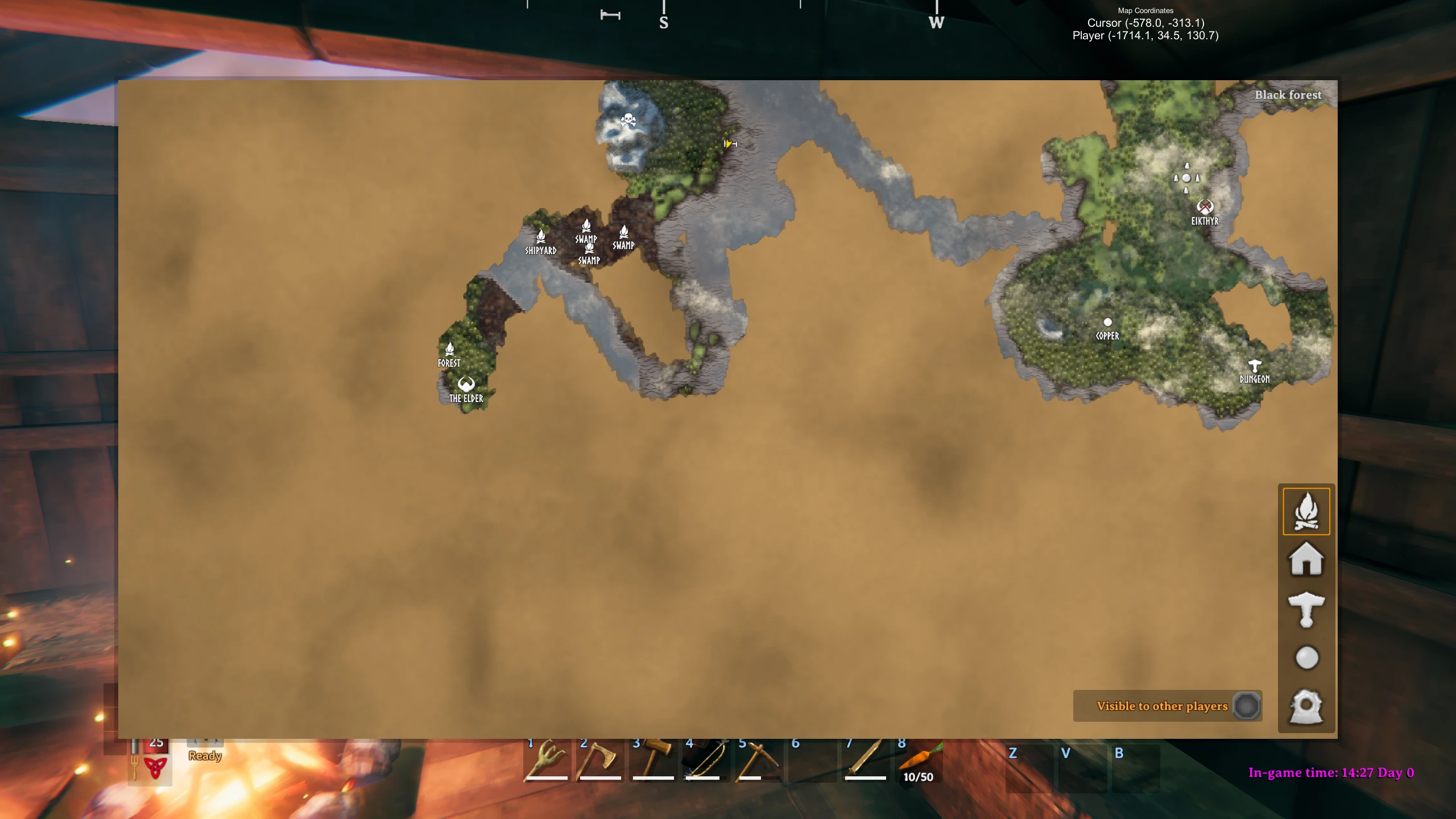
This mod lets you show:
-
[] The world position pointed to by the cursor on the map.
[
]The world position and altitude of the player.World position for the cursor is (x,y), world position for the player is (x, y, altitude).
You can configure:
-
[]The title of the display
[
]The player text[]The cursor text
[]The font name
[]The font size
[]The font colours
[]The text alignment
[]The display background color
You can move the display around the screen by dragging it with the left mouse button.
Config
A config file BepInEx/config/aedenthorn. MapCoordinateDisplay.cfg is created after running the game once with this mod).
You can adjust the config values by editing this file using a text editor or in-game using the Config Manager.
To reload the config from the config file, type mapcoordinatedisplay reset into the game's console (F5).
Technical
To install this mod, the easiest way is to just use Vortex, the Nexus Mods mod manager. It should take care of all dependencies.
To install manually, place the dll file in the BepInEx/plugins folder. You will need BepInEx.
Code is at https://github.com/aedenthorn/ValheimMods.
If you want to complain or ask for help or help me test my mods, you can visit my Discord server.
Click here for a list of all my mods for Valheim.
-
[]The title of the display
Map Coordinates Display is a lightweight UI mod that shows map coordinates for the player and/or cursor position when the map is open. With 281 endorsements and over 6,500 downloads, it's a popular utility for players who want precise navigation. Last updated in May 2025, it remains a simple, functional addition for those who need coordinate readouts.
✨ Key Features
📊 Pros & Cons
✅ Pros
- Community-approved with 281 endorsements and over 6,500 downloads.
- Simple, focused functionality—does exactly what it says without bloat.
- Recent update (May 2025) suggests active maintenance.
⚠️ Cons
- Limited to map screen—no in-world coordinate display.
- No configuration options mentioned beyond player/cursor toggles, so you can't customize appearance or format.
For players who want precise map navigation, especially those exploring large worlds or coordinating with friends. If you're tired of guessing where you are on the map, this mod gives you exact coordinates. Skip if you want a full HUD overhaul—this is a minimal utility.
💡 Beginner Tips
- Check if the mod requires a mod manager like Vortex or Nexus Mods' manual download—if manual, just drop the files into your game's Data folder.
- Test both player and cursor coordinate modes to see which you prefer; you can toggle them in the mod's settings if available.
- If the mod doesn't work, ensure your game is updated to the latest version, as mods can break with patches.
📊 Mod Details
- Game
- Valheim Mods
- Author
- aedenthorn
- Version
- 0.4.1
- Downloads
- 6,543
- Endorsements
- 281
- Category
- User Interface
- Created
- 4/7/2021
- Updated
- 5/26/2025
🧩 Commonly Used Together
Users add these mods to the same collections — a real compatibility signal, not an AI guess.
🔧 How to Install Valheim Mods
Download from Nexus.
📖 Full step-by-step install guide for Valheim →
Visit the official mod page for specific installation instructions for this mod.
🎮 Need cheat codes or console commands? Check ur gaming wiki for Valheim commands, item IDs, and more.
Keep browsing — more Valheim mods await