XPortal
🟡 Updated this year⚠️ Install Order · 2 steps
Install in this order, then this mod last — most mods fail to load without their framework and dependencies in place.
Preview
🔍 Analysis
- 👍 1.5% endorsement rate — high engagement, a strong quality signal
- 🏆 #38 of 836 Gameplay mods in this game by downloads
📋 About This Mod
XPortal
An AnyPortal revamp.
Description
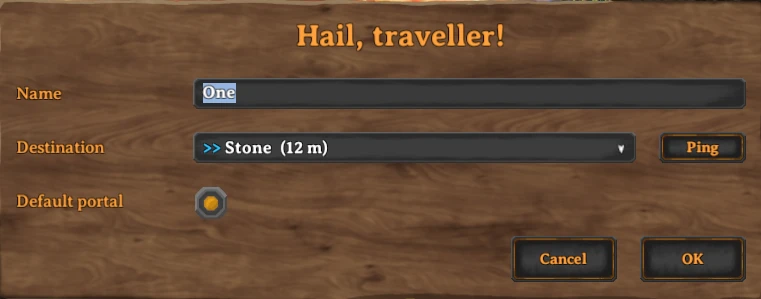
XPortal lets you select a portal destination from a list of existing portals.
No more tag pairing, and no more portal hubs!
Features
Select a destination
When interacting with a portal, instead of entering a tag which has to match another portal's, XPortal lets you choose the portal's destination from a list.
For your convenience, this list also shows you how far away the portals are.
Default destination
A Portal can be marked as the "Default Portal". When a Default Portal has been set, all newly built portals will immediately connect with that portal, without you having to go into the portal configuration panel.
Longer names
XPortal completely removes the character length restriction on portal names, so that you can give your portals clear and descriptive titles.
Ping a portal location
Forgot where you put your portal? You don't need to teleport to it to find out. Just click the Ping button next to the list, and XPortal will show the selected portal on your map, while also pinging its location to all players on the server.
If you prefer to play without a map, this button can be hidden, either by using the 'nomap' global key, or by setting 'PingMapDisabled' to 'True'.
Multiplayer
XPortal has been built with multiplayer support at its core. All players must run the same version of XPortal. If you play on a dedicated server, that too needs to have same version of XPortal installed.
Gamepad support
The XPortal UI will respond to gamepad input when configuring your portal. As of v1. 2. 10 it even shows you the gamepad keyhints!
The controls are as follows:
[]'A' / 'Cross' - Submit (i.e. press the OK button)
[]'B'/ 'Circle' - Cancel
[]'Y' / 'Triangle' - Ping the selected portal
[]'X' / 'Square' - Show/hide the contents of the dropdown
[*]'D-Pad Up' / 'D-Pad Down'
XPortal is a gameplay mod for Valheim that replaces the traditional tag-pairing portal system with a simple list-based destination selector. It is a complete rewrite of the popular AnyPortal mod, offering a more streamlined way to manage portal travel without the need for hub setups.
✨ Key Features
📊 Pros & Cons
✅ Pros
- Huge community trust with over 1,000 endorsements and 69k downloads
- Solves the classic portal tag-pairing headache in Valheim
- Actively maintained — last updated February 2026
⚠️ Cons
- Requires Valheim mod manager (BepInEx) for installation
- May conflict with other portal-related mods
- No detailed documentation provided by the author
For Valheim players who are tired of managing portal tags and building hub complexes. If you want a cleaner, more intuitive way to travel between bases, this is a must-have. Skip if you prefer the vanilla portal system or if you're playing on a server that doesn't allow mods.
💡 Beginner Tips
- Install BepInEx first, then drop XPortal into the BepInEx/plugins folder.
- After installing, launch the game once to generate the config file, then adjust settings to your liking.
- If you're using other portal mods, test them together to ensure no conflicts.
📊 Mod Details
- Game
- Valheim Mods
- Author
- SpikeHimself
- Version
- 1.2.24
- Downloads
- 69,343
- Endorsements
- 1,063
- Category
- Gameplay
- Created
- 1/31/2023
- Updated
- 2/7/2026
🧩 Commonly Used Together
Users add these mods to the same collections — a real compatibility signal, not an AI guess.
🔧 How to Install Valheim Mods
Download from Nexus.
📖 Full step-by-step install guide for Valheim →
Visit the official mod page for specific installation instructions for this mod.
🎮 Need cheat codes or console commands? Check ur gaming wiki for Valheim commands, item IDs, and more.
Keep browsing — more Valheim mods await