Quick Slots Plus (BepInEx)
🟡 Updated this yearThis mod was updated after the recent game update — it should work on the current version. (Subnautica Security Hotfix)
⚠️ Install Order · 3 steps
Install in this order, then this mod last — most mods fail to load without their framework and dependencies in place.
Preview
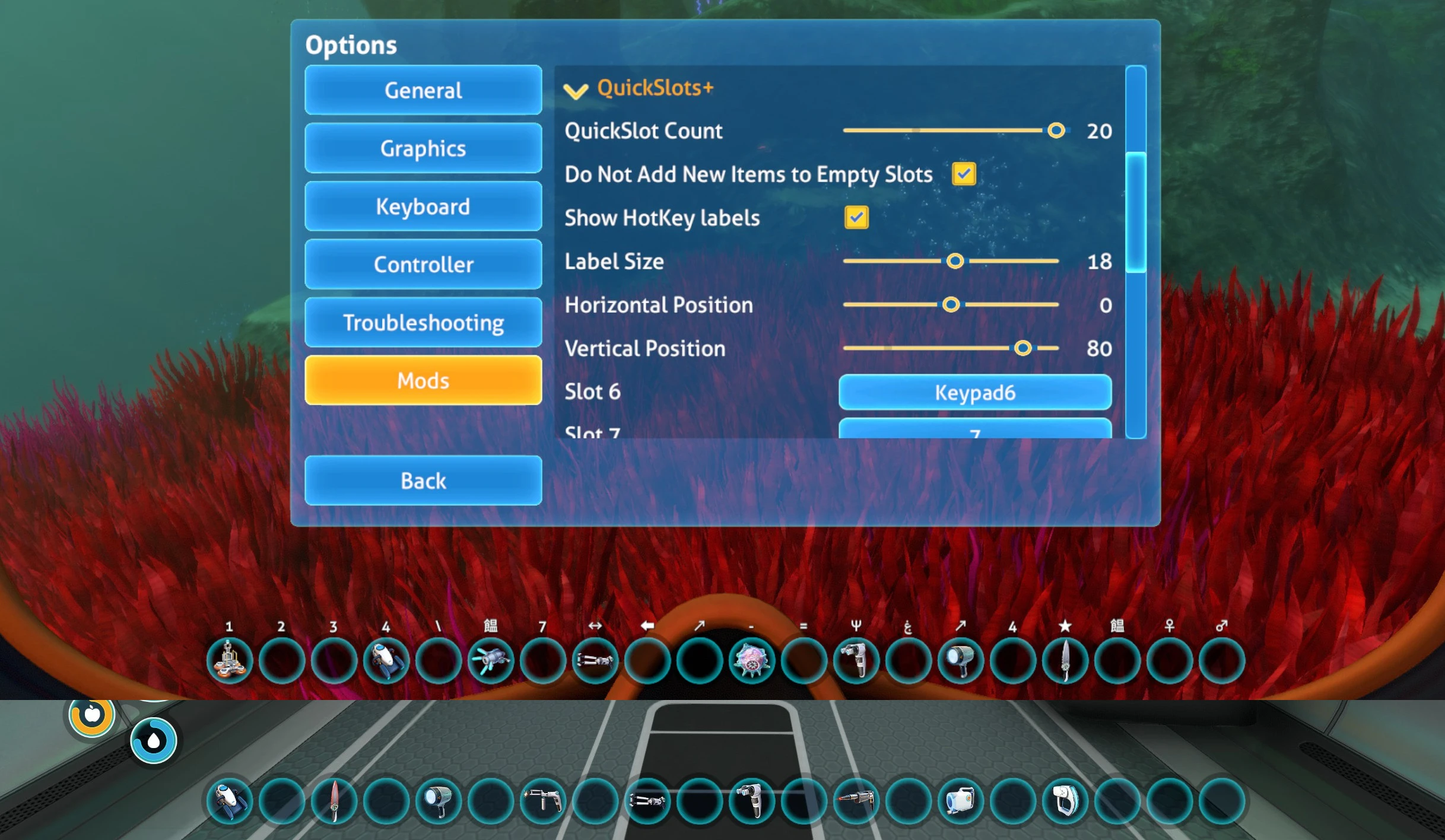
🔍 Analysis
- 👍 1.3% endorsement rate — high engagement, a strong quality signal
- ✅ Updated 23 days after the latest game patch — actively maintained
- 🏆 #8 of 191 User Interface mods in this game by downloads
📋 About This Mod
QuickSlots+
Special thanks to RandyKnapp for the original MoreQuickSlots mod!
3. 0 Update Info
As of October, keybinds have moved to the new "Mod Input" Nautilus tab in settings. This will require you to redo your keybinds, sorry! This uses the new input system and sprites for keyboard/controllers. Unfortunately this did not work with the color option so I removed it. If you want to use the old text labels instead of sprites, see the section describing "customLabels.json" below.
WARNING:
Uninstall MoreQuickSlots if you have it, there will be bugs if you have both installed.
Up to 20 slots with hotkeys
Disable adding new items to the quick slots
Custom hotkey labels
Works with Nitrox, use the Legacy 1. 3. 1 version
Manual Install:
1. Make sure to install BepInEx and Nautilus.
2. Extract `BepInEx\plugins\QuickSlotsPlus\` to `Subnautica\BepInEx\plugins\QuickSlotsPlus\`.
3. (Nitrox only) Edit Nautilus's mod.json file and add "NitroxCompat": true
If you have issues installing, try asking in the Discord for the fastest help!
https://discord.gg/UpWuWwq
Reserve Item Slots:
Sometimes you may want to allow auto-add, or reserve items for specific slots.
Create a file in your Subnautica folder named "BepInEx\plugins\QuickSlotsPlus\allowItems.json" with the TechNames and slot numbers you want. Set to -1 to use the first empty slot.
For example to reserve slot 3 for Knife, and add Flare to the first empty, non-reserved slot:// BepInEx\plugins\QuickSlotsPlus\allowItems.json
"Knife": 3,
"Flare": -1
}You can find the TechNames in the Nautilus debug log after picking up an item.
Add custom labels:
This is useful if you want to change the text for a hotkey, for example to use the text "1" instead of the sprite.
1. Set hotkey in game, check the debug log for the binding name.
2. Create a file named "Subnautica\BepInEx\plugins\QuickSlotsPlus\customLabels.json". Limited support for unicode.
"<Keyboard>/1": "1",
"<Keyboard>/rightArrow": "→"
3. I've already added some default custom labels. You can override them with the KeyCode name.
Controller Info:
The hotkey labels no longer redraw when you switch primary inputs, so I removed "Mixed Input Mode". This means if you are playing with controller a
Quick Slots Plus is a BepInEx mod for Valheim that expands the quick slot bar from the default 8 to 20, with full controller support. It's a popular utility mod with over 2,300 endorsements and 182,000 downloads, last updated in October 2025.
✨ Key Features
📊 Pros & Cons
✅ Pros
- Huge quality-of-life boost for inventory management (2,361 endorsements).
- Controller support means gamepad players aren't left out.
- Actively maintained (last updated October 2025).
⚠️ Cons
- Requires BepInEx, so you'll need to set that up first.
- May conflict with other UI mods that modify the hotbar.
For Valheim players who are tired of juggling items in the default 8 slots and want more room for tools, food, and potions. Also great for controller users who want the same expanded slots as keyboard players. Skip if you prefer a minimal UI or don't want to deal with BepInEx.
💡 Beginner Tips
- Install BepInEx first and run the game once to generate the plugins folder, then drop Quick Slots Plus into it.
- Check your keybindings in the settings to assign the new slots to comfortable keys.
- If you use other UI mods, test them together to ensure no conflicts with the hotbar.
📊 Mod Details
- Game
- Subnautica Mods
- Author
- celvro
- Version
- 3.0.0
- Downloads
- 182,873
- Endorsements
- 2,361
- Category
- User Interface
- Created
- 5/9/2022
- Updated
- 10/26/2025
🧩 Commonly Used Together
Users add these mods to the same collections — a real compatibility signal, not an AI guess.
🔧 How to Install Subnautica Mods
Download from Nexus.
📖 Full step-by-step install guide for Subnautica →
Visit the official mod page for specific installation instructions for this mod.
🎮 Need cheat codes or console commands? Check ur gaming wiki for Subnautica commands, item IDs, and more.
Keep browsing — more Subnautica mods await