Flare Repair (BepInEx)
🟠 Updated over a year ago⚠️ Install Order · 3 steps
Install in this order, then this mod last — most mods fail to load without their framework and dependencies in place.
Preview
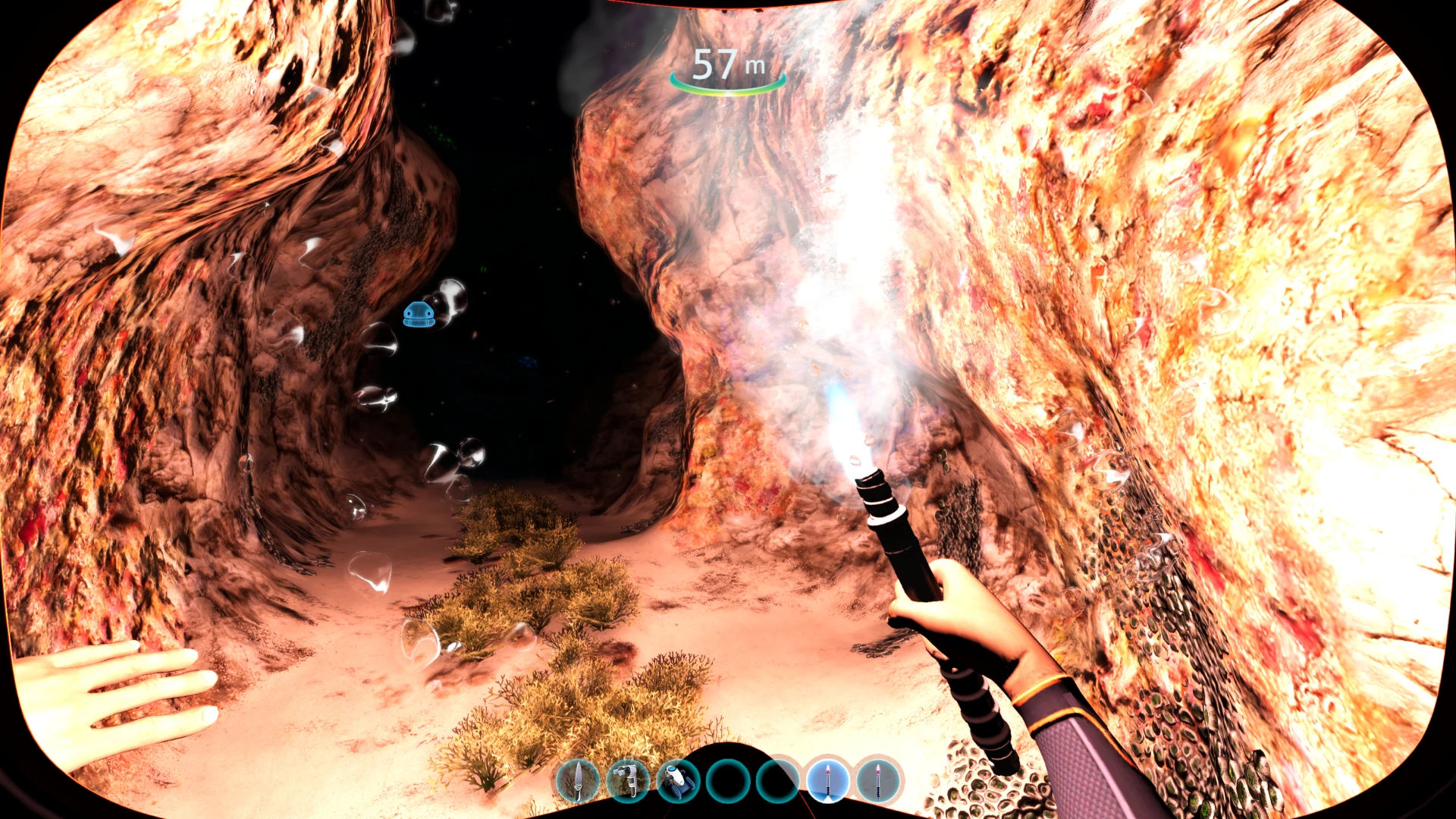
🔍 Analysis
- 👍 4.7% endorsement rate — high engagement, a strong quality signal
- 🏆 #82 of 192 Items mods in this game by downloads
📋 About This Mod
!! IMPORTANT !!
SMLHelper is no longer supported. Steam Legacy Branch is no longer supported. Old files can still be found in the "Files/Archive" section.
Introduction
When playing with the Filmic filter (which I absolutely recommend!), a light source is mandatory. For this, flares are underestimated despite being one of the best light sources in the game.
However, the handling could use some improvements and there is also a number of bugs related to them. So I created this mod to adjust this!
Description
Bugfixes:
-
[]Energy consumption: In the base game flares had a total amount of energy, which only depleted when they were visible (holding in hand or within 60m distance to them). Therefore, many people still believe flares last forever, but they are only super buggy.
[
]Flares now have an ignition Time (savegame consistent). Based on the time they were lit, they will deplete after a set duration no matter where they are. As you would expect it: when you light a flare and put it in a locker or your pocket, it is still depleting![]Fixed visual bugs: There is a number of visual bugs related to flares which are now fixed, e.g.:
[]Flare flickering is not affected by game speed anymore (very annoying if you set a low game speed, like 0. 2).
[]Flare cap fix: After reloading, used flares magically had there flare cap reappearing to the flare and just burning through the cap (see image). This is now fixed, the cap will not reappear on used flares after reloading.
[]Flare state is now properly restored when loading, holstering, and throwing.
Altogether flares now just work as you would expect them to!
Additions:
[
]Added an option to `Keep Depleted Flares`: In the vanilla game, flares were destroyed when depleted. With this option they will persist, even after saving and loading. You can either leave a flare permanently somewhere, e.g. to mark a location, or you need to destroy it with the trash can. Disabling this option will remove all kept flares as long as they are currently loaded.[]Added an option to set the total duration of flares in relation to ingame days. The default duration is set to 0. 5, which corresponds to half a day.
[]Added an option to modify the flare intensity. The default intensity is 1.
[*]Added the ability to keep holding the flare during the ignition. When holding the "use-button" (right mouse button) during ignition, the player will not instantly throw
Fixes flare-related bugs and adds quality-of-life improvements: hold flares during ignition, adjust intensity and duration, and progressive dimming based on remaining time. For players who want more control over flare usage.
✨ Key Features
📊 Pros & Cons
✅ Pros
- Fixes annoying flare bugs that break immersion.
- Gives you control over flare intensity and duration — no more wasted flares.
- Progressive dimming is a nice touch that adds realism.
⚠️ Cons
- Requires BepInEx, so you'll need to set that up first.
- Only affects flares; if you wanted broader item tweaks, this won't help.
For survival players who rely on flares and want them to work properly without bugs. Also for those who like fine-tuning item behavior. Skip if you rarely use flares or prefer vanilla mechanics.
💡 Beginner Tips
- Make sure BepInEx is installed correctly and matches your game version before adding this mod.
- Check the mod's config file (if any) to tweak intensity and duration to your liking.
- Test flares in a safe area first to see how the dimming behaves.
📊 Mod Details
- Game
- Subnautica Mods
- Author
- Remodor
- Version
- 2.0.0
- Downloads
- 3,833
- Endorsements
- 180
- Category
- Items
- Created
- 4/4/2020
- Updated
- 12/10/2024
🔧 How to Install Subnautica Mods
Download from Nexus.
📖 Full step-by-step install guide for Subnautica →
Visit the official mod page for specific installation instructions for this mod.
🎮 Need cheat codes or console commands? Check ur gaming wiki for Subnautica commands, item IDs, and more.
Keep browsing — more Subnautica mods await