Creature Reskin Project
⚪ Last updated 2018⚠️ Install Order · 2 steps
Install in this order, then this mod last — most mods fail to load without their framework and dependencies in place.
Preview
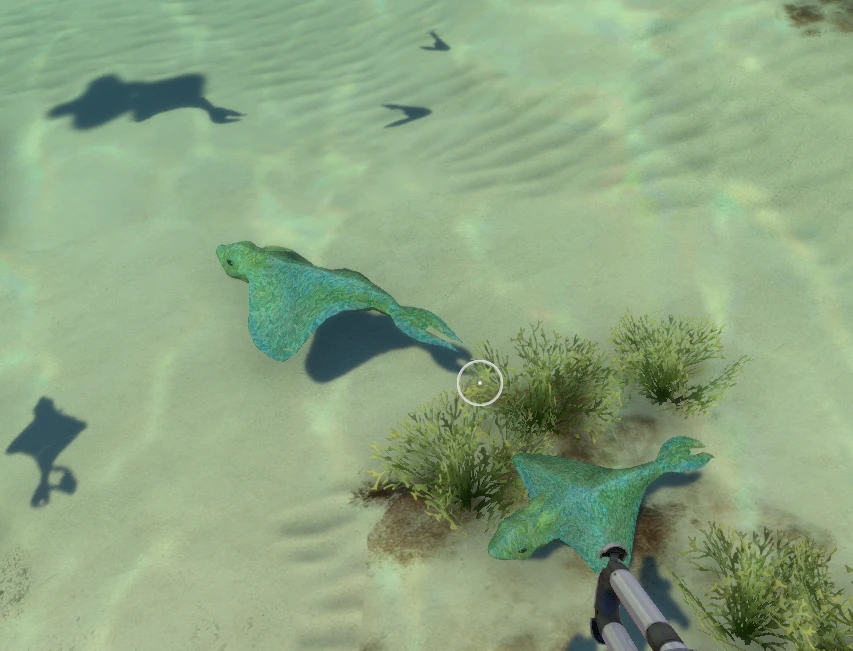
🔍 Analysis
- 👍 4.7% endorsement rate — high engagement, a strong quality signal
- 🏆 #93 of 224 Miscellaneous mods in this game by downloads
📋 About This Mod
step 1 instal QMosds.
How to Install QMods?:
-
[]Download the QModsSetup.exe file
[
]Run the installer[]Make sure your Subnautica install directory is correct
[]Click Install
step 2 : click download mod manually.
step 3: extract with winrar
step 4 : put the mod in: \SteamLibrary\steamapps\common\Subnautica\qmods.
And you are done enjoy the mod!
Updates will be coming soon.
ask:I don't like creature "X" I want it back to normal is there an option to disable certain creatures?:
ans:If you don't like a creature you can just delete its image file (or edit it) and it wont show up in game anymore while the rest of the mod will still work fine.
ask:Not all creatures are changed when i load a savegame.
ans:If you spawn in a creature of the type it will most likely change. and once you save the game the next load it will probably be fixed from the start.
currently 7 creatures have been re-skinned
Version 1. 0. 4
Added:Bone-Shark
Version 1. 0. 3
Added:Reaper-Leviathan ilum texture
changed: stalker ilum texture.
changed: Rabbit-Ray ilum texture
Version 1. 0. 2
Fixed:Boomerang texture Causing lagg.
Changed:Reaper-Leviathan texture Deep Blue
Added:Scuttlebug(Jumper) Poison Colors
Version 1. 0. 1
Fixed:Boomerang texture loading upside down, fixed illumination texture not changing
Added: Rabbit-Ray
Version 1. 0. 0
Added: Stalker
Added: Peeper
Added: Reaper-Leviathan
Added: Boomerang
Added: Sand-shark
Creature Reskin Project is a cosmetic mod for Subnautica that re-skins five creatures to blend into their environments with natural camouflage. It's an early-stage project with modest community support (75 endorsements) and hasn't been updated since 2018.
✨ Key Features
📊 Pros & Cons
✅ Pros
- Adds a fresh look to creatures, making them blend into their surroundings for a more immersive experience.
- Lightweight and easy to install—just drop files in and go.
- Community-backed with 75 endorsements, showing some players appreciate the effort.
⚠️ Cons
- Only 5 creatures are re-skinned so far, so coverage is limited.
- Last updated in 2018, so it may not be compatible with the latest Subnautica versions.
- No screenshots or detailed install instructions provided, so you're flying blind until you try it.
For Subnautica players who want a subtle visual overhaul that makes creatures feel more natural and less conspicuous. If you're looking for a complete re-skin of all creatures, this is just a starting point—skip if you want more coverage or gameplay changes.
💡 Beginner Tips
- Make sure to back up your original game files before replacing any creature textures.
- Check the mod's file structure to see which creatures are affected—you can manually remove specific files if you only want certain re-skins.
- Since the mod is old, test it on a saved game to ensure it doesn't cause visual glitches with the current version.
📊 Mod Details
- Game
- Subnautica Mods
- Author
- abariba
- Version
- 1.0.3
- Downloads
- 1,581
- Endorsements
- 75
- Category
- Miscellaneous
- Created
- 7/9/2018
- Updated
- 11/20/2018
🔧 How to Install Subnautica Mods
Download from Nexus.
📖 Full step-by-step install guide for Subnautica →
Visit the official mod page for specific installation instructions for this mod.
🎮 Need cheat codes or console commands? Check ur gaming wiki for Subnautica commands, item IDs, and more.
Keep browsing — more Subnautica mods await