Advanced Inventory
⚪ Last updated 2023⚠️ Install Order · 2 steps
Install in this order, then this mod last — most mods fail to load without their framework and dependencies in place.
Preview
🔍 Analysis
- 👍 1.8% endorsement rate — high engagement, a strong quality signal
- 🏆 #5 of 191 User Interface mods in this game by downloads
📋 About This Mod
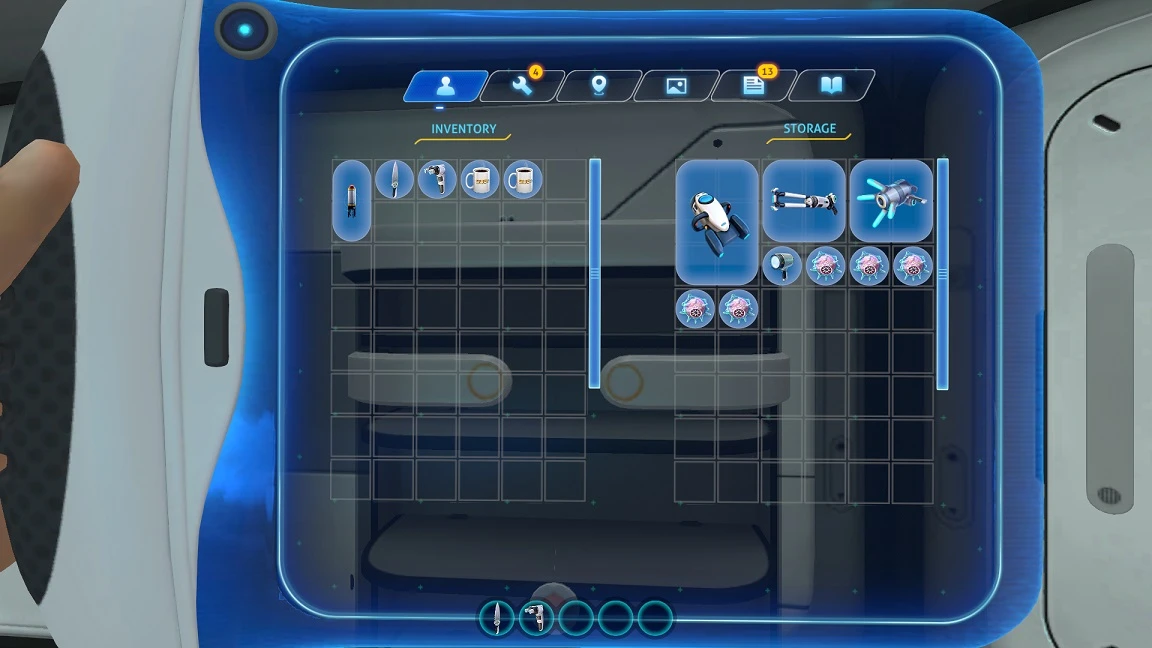
Adds scrolling zone for displaying expanded inventory.
Adds shift/ctrl + mouse hotkeys to quickly move all items.
Does not support controller.
Requirements
- Game Update 71137 or higher
Installation BepInEx
1. Install BepInEx
2. Extract the archive to folder \Subnautica\BepInEx\plugins\. Should be \Steam\steamapps\common\Subnautica\BepInEx\plugins\AdvancedInventory\
3. Install CustomizedStorage or Bag equipment mod optional. It is necessary to increase inventory/storage.
Installation QMod (legacy)
1. Install QModManager
2. Unpack the archive v1. 0. 3 to folder \Subnautica\QMods\. Should be \Steam\steamapps\common\Subnautica\QMods\AdvancedInventory\
3. Install CustomizedStorage or Bag equipment mod optional. It is necessary to increase inventory/storage.
Note
I recommend not exceeding the width of 7 and the height of 100 for any containers.
maxRows parameter controls the visible height of the inventory, can be changed in the configuration (the configuration will appear after the
Compatibility
Solution for FCS_StorageSolutions
If you have problems via vortex, try installing it manually.
Advanced Inventory is a user interface mod that expands inventory options in the game. With over 4,000 endorsements and 225,000 downloads, it has a solid following. The mod was last updated in January 2023, so it may not be compatible with the latest game version.
✨ Key Features
📊 Pros & Cons
✅ Pros
- Community-approved with over 4,000 endorsements.
- High download count (225k+) shows real demand.
- Simple description but likely does what it says: expands inventory.
⚠️ Cons
- No detailed feature list or install instructions provided by the author.
- Last updated in January 2023 — may be outdated for current game patches.
- No screenshots or videos to show what the expanded inventory looks like.
For players who want more inventory management options and don't mind a bare-bones mod page. If you're a UI tweaker looking for quality-of-life improvements, this might be worth a shot. Skip if you need detailed documentation or visual previews before installing.
💡 Beginner Tips
- Check the mod's last update date against your game version to ensure compatibility.
- Since the description is minimal, back up your save files before installing to avoid potential issues.
- Look for user comments or forum posts for real-world feedback on how the mod performs.
📊 Mod Details
- Game
- Subnautica Mods
- Author
- newman55
- Version
- 1.0.4a
- Downloads
- 225,795
- Endorsements
- 4,165
- Category
- User Interface
- Created
- 5/21/2020
- Updated
- 1/30/2023
🧩 Commonly Used Together
Users add these mods to the same collections — a real compatibility signal, not an AI guess.
🔧 How to Install Subnautica Mods
Download from Nexus.
📖 Full step-by-step install guide for Subnautica →
Visit the official mod page for specific installation instructions for this mod.
🎮 Need cheat codes or console commands? Check ur gaming wiki for Subnautica commands, item IDs, and more.
Keep browsing — more Subnautica mods await