See Distances in Light Years
⚪ Last updated 2024⚠️ Install Order · 2 steps
Install in this order, then this mod last — most mods fail to load without their framework and dependencies in place.
Preview
🔍 Analysis
- 👍 0.4% endorsement rate
- 🏆 #28 of 192 User Interface mods in this game by downloads
📋 About This Mod
As of December 3rd, 2024, I no longer have plans to actively mod Starfield. This mod is unlikely to receive further updates.
Bethesda has recently allowed paid mods to be tagged as Achievement Friendly on the Creations platform, with no plans to make accommodations for free mods. They are also allowing mod authors to re-upload free mods as paid mods to get the Achievement Friendly tag, at the request of console mod users.
This effectively disincentivizes free mods from being published, as it will push console users to stick with purely paid load orders in order to continue earning achievements. This was the final nail in the coffin for my interest in Starfield, and I no longer wish to support the money-first modding ecosystem that Bethesda is attempting to create.
Thank you to everyone who has used my work. I am happy to have been able to share things which have improved the game for so many people.
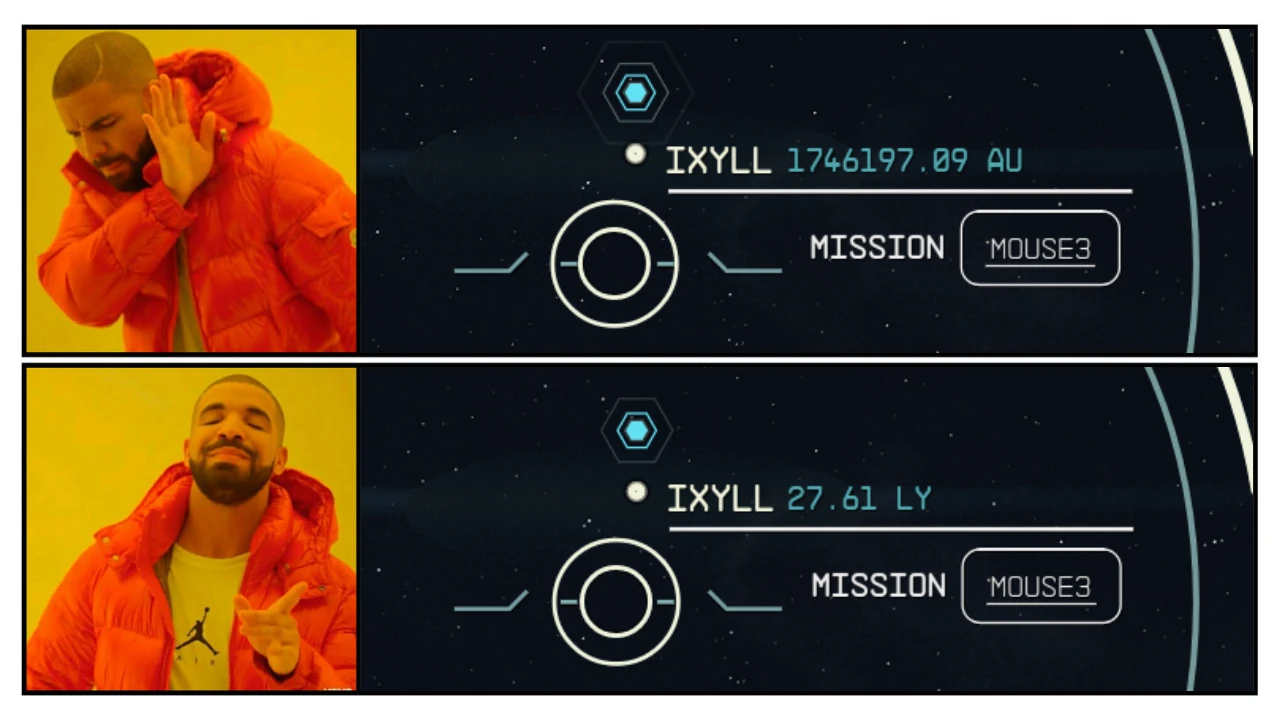
Does what it says on the tin. Makes your ship's HUD display interstellar distances in light years (LY) instead of astronomical units (AU).
Also increases the maximum light second (LS) value from 50,000 to 500,000. If anything is further than that, distance will start being measured at 0. 02 LY.
Personally, I found AU to be illegible for these sort of distances. LY is much easier to interpret at a glance, especially if you are used to other space games.
How does it work?
In the GlobalFunc script within the buttonclips.swf file, the following lines have been changed from:
private static const MetersInAU:Number = 149597870700;
private static const MaxLightSecondsDisplay:Number = 50000 MetersInLightSeconds;
_loc2_ = FormatNumberToString(param1 / MetersInAU,AUPrecision) + " AU";
private static const MetersInAU:Number = 9460730777119560;
private static const MaxLightSecondsDisplay:Number = 500000 MetersInLightSeconds;
_loc2_ = FormatNumberToString(param1 / MetersInAU,AUPrecision) + " LY";
Can be installed mid-save and should work immediately. No special steps required. Either use your favorite mod manager to install automatically, or manually install it by putting buttonclips.swf into your "Data/Interface" folder.
Uninstalling
Can be removed at any time, doesn't matter. It's just a flash file, so it's completely safe. You will immediately see AU again upon loading a save which previously had this mod.
Compatibility
Modifies buttonclips.swf. Any other mod which makes specific changes to this file will be incompatible without a patch.
See Distances in Light Years is a simple UI mod that converts interstellar distance measurements from astronomical units (AU) to light years (LY) in Starfield. It's for players who prefer the more intuitive scale of light years for space travel. With 695 endorsements and 182,906 downloads, it's a popular quality-of-life tweak.
✨ Key Features
📊 Pros & Cons
✅ Pros
- Huge community adoption (182k downloads) — clearly a lot of players wanted this
- Does exactly what it says: replaces AU with LY for a more intuitive read on long distances
- Zero bloat — no extra features, just the fix you're looking for
⚠️ Cons
- Only affects display — if you're hoping for a deeper UI overhaul, this isn't it
- Last updated in August 2024 — might not be compatible with the latest Starfield patches, so check before installing
For Starfield players who find AU measurements confusing when jumping between systems. If you're a space sim fan who thinks in light years, this is a must-have. Skip it if you want more comprehensive UI changes or gameplay tweaks — this is purely cosmetic.
💡 Beginner Tips
- If you're using a mod manager like Vortex or MO2, just download and install — it'll handle the file placement automatically.
- Manual install? Drop the files into your Starfield Data folder (usually Documents/My Games/Starfield/Data) and make sure the plugin is enabled in the game's mod settings.
- After a game update, verify the mod still works — if distances show in AU again, check for an updated version.
📊 Mod Details
- Game
- Starfield Mods
- Author
- Deebz96
- Version
- 1.4.0
- Downloads
- 182,906
- Endorsements
- 695
- Category
- User Interface
- Created
- 2/15/2024
- Updated
- 8/21/2024
🧩 Commonly Used Together
Users add these mods to the same collections — a real compatibility signal, not an AI guess.
🔧 How to Install Starfield Mods
Download from Nexus.
📖 Full step-by-step install guide for Starfield →
Visit the official mod page for specific installation instructions for this mod.
🎮 Need cheat codes or console commands? Check ur gaming wiki for Starfield commands, item IDs, and more.
Keep browsing — more Starfield mods await