Show Star Names
🟡 Updated this year⚠️ Install Order · 2 steps
Install in this order, then this mod last — most mods fail to load without their framework and dependencies in place.
Preview
🔍 Analysis
- 👍 1.7% endorsement rate — high engagement, a strong quality signal
- 🏆 #11 of 192 User Interface mods in this game by downloads
📋 About This Mod
Version 2. 3 is compatible with 1. 16. 236 + Free Lanes + Terran Armada
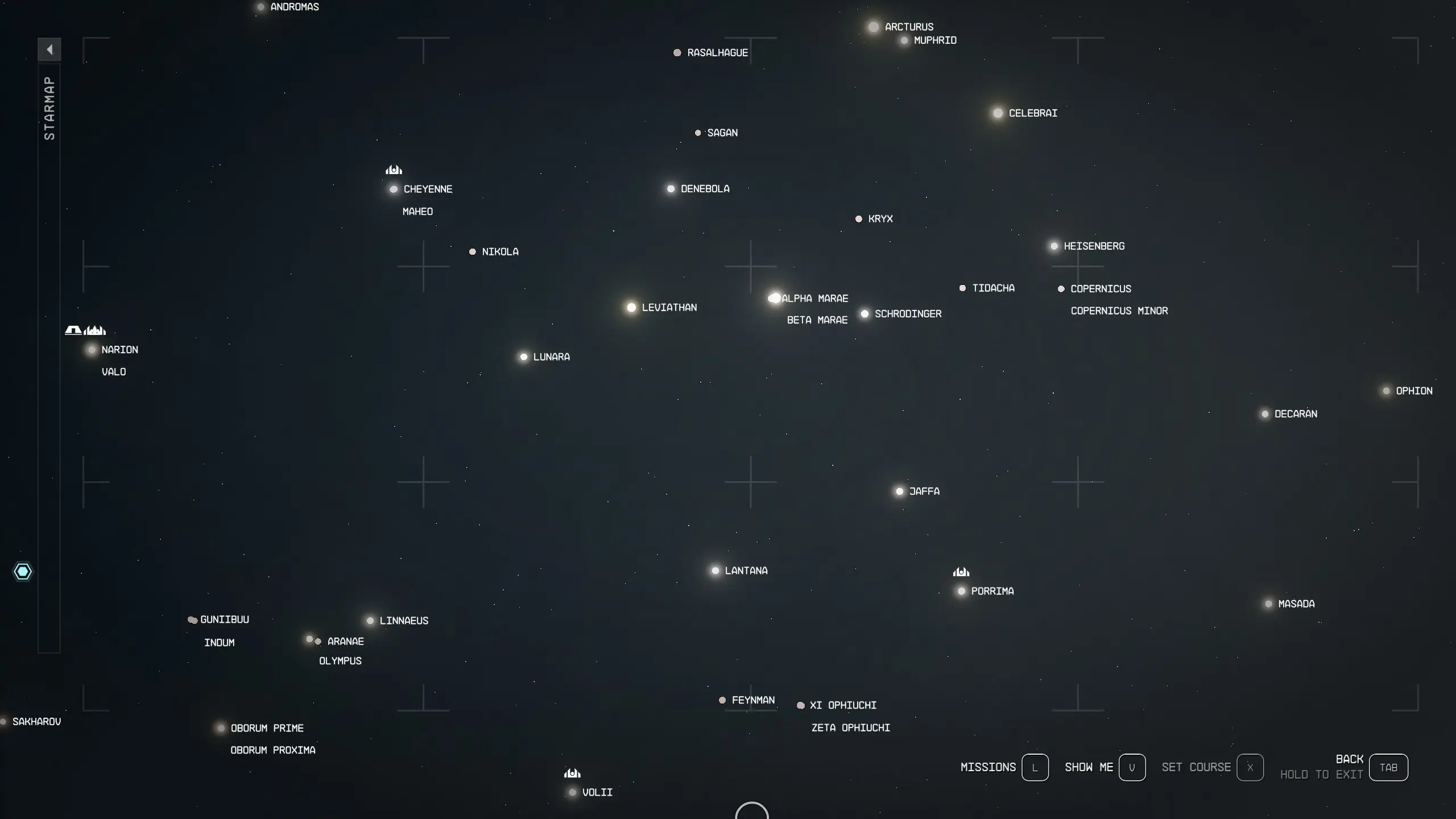
Always show star names when on the galaxy map
-
[]PC shortcuts:[/]
[]1 - Toggle all names, except important systems[/]
[]2 - Toggle level color of systems[/]
-
[]Xbox shortcuts:[/]
[]L3 - Toggle all names, except important systems[/]
[]R3 - Toggle level color of systems[/]
-
[]Names will be briefly hidden when selecting a stacked system (e.g. Narion + Valo)[/]
[]Default Font size of system names reduced from 18pt to 14pt for better visibility (26pt to 22pt for Large Menu Fonts setting)[/]
PC Configuration
An INI config file (ShowStarNames.ini) can be used to control font size and default behavior for showing system colors by level
You can change these settings in the file while the game is running; re-open the map for the new settings to take effect
-
[]"FontSize" controls the font size of names. Default 14, minimum of 10, maximum of 36 (Vanilla is 18)[/]
[]"FontSizeLarge" controls the font size when Starfield's "Large Menu Fonts" is turned on in Accessibility settings. Default 22, minimum of 10, maximum of 36 (Vanilla is 26)[/]
[]"LevelColorDefaultOn" sets the default behavior of showing the level colors when opening the map. 0 (zero) to not show colors by default, 1 to show colors by default. [/]
[]You can still use the hotkey to toggle the colors in addition to the default behavior[/]
Show Star Names.zip - FOMOD installer with options for interface FPS
Installation
-
[]Enable Archive Invalidation (INI settings)
[
]Your mod manager may do this step for you[/][
]Easiest way: Use BethINI to comfortably set the value (called Load Loose Files in the GUI) [/][
]Or: See this detailed Howto: Archive Invalidation to set the INI values with Windows tools.[/]
[]Install mod files
-
[]Install via Vortex or MO2[/]
[
]OR extract the .swf files from Options\<preferred option> to the Data\Interface folder[/]
Uninstallation
-
[]Remove via Vortex or MO2[/]
[]If manually installed, remove these files from the Data\Interface folder:[/]
galaxystarmapmarkers.swf
galaxystarmapmarkers_lrg.swf
Compatibility
[]Will not work with (most) other mods that replace these two files[/]
[]For 60 FPS - Smooth UI and 120 FPS - Smooth UI compatibility, load that mod first, then load this mod. No patch is needed.[/]
[*]Please reach out or drop me a message if you wish to incorporate
-
[]Enable Archive Invalidation (INI settings)
-
[]"FontSize" controls the font size of names. Default 14, minimum of 10, maximum of 36 (Vanilla is 18)[/]
-
[]Names will be briefly hidden when selecting a stacked system (e.g. Narion + Valo)[/]
Show Star Names is a lightweight UI mod for Stellaris that makes star names permanently visible on the galaxy map, removing the need to hover over systems. With over 6,000 endorsements and 372,000 downloads, it's a popular quality-of-life improvement for players who want constant system identification.
✨ Key Features
📊 Pros & Cons
✅ Pros
- Huge community trust (6,281 endorsements) — this is a must-have for map clarity
- Zero impact on performance or gameplay, just pure convenience
- Works with any playstyle, from wide empires to tall builds
⚠️ Cons
- No detailed description — you get what you see, no extra options
- Only affects the galaxy map; star names in other views remain unchanged
- May clutter the map if you have many systems visible at once
For Stellaris players who constantly hover over systems to check names and want that info at a glance. Perfect for map-painters and strategists who value quick system identification. Skip if you prefer a clean, minimal UI or if you're on a low-resolution screen where text might overlap.
💡 Beginner Tips
- Place the mod in your Stellaris mod folder (Documents/Paradox Interactive/Stellaris/Mod) and enable it in the launcher's Playset.
- If you use other UI mods, load order matters — put this one after any map overhaul mods to ensure it takes effect.
- Check the mod's compatibility with your game version after major updates, as UI mods often need patches.
📊 Mod Details
- Game
- Starfield Mods
- Author
- FSNovask
- Version
- 2.3
- Downloads
- 372,690
- Endorsements
- 6,281
- Category
- User Interface
- Created
- 10/11/2023
- Updated
- 4/17/2026
🧩 Commonly Used Together
Users add these mods to the same collections — a real compatibility signal, not an AI guess.
🔧 How to Install Starfield Mods
Download from Nexus.
📖 Full step-by-step install guide for Starfield →
Visit the official mod page for specific installation instructions for this mod.
🎮 Need cheat codes or console commands? Check ur gaming wiki for Starfield commands, item IDs, and more.
Keep browsing — more Starfield mods await