StarDew Valley ModManager(SDVMM) -not being worked on anymore-
⚪ Last updated 2018⚠️ Install Order · 2 steps
Install in this order, then this mod last — most mods fail to load without their framework and dependencies in place.
Preview
🔍 Analysis
- 👍 2.4% endorsement rate — high engagement, a strong quality signal
- 🏆 #59 of 119 Modding Tools mods in this game by downloads
📋 About This Mod
_________________________________________
SDVMM is not maintained anymore, if possible dont use it since it may result in errors.
If you are looking for a new Modmanager then try out https://www.nexusmods.com/stardewvalley/mods/4536
_________________________________________
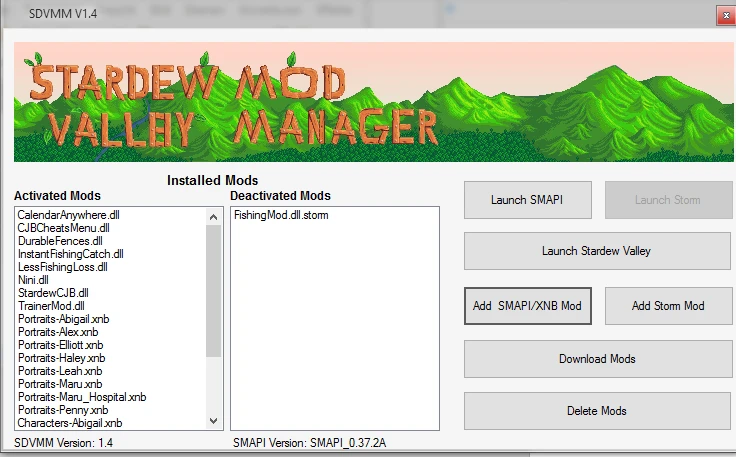
As of now it support:
- installing and updating of SMAPI
- Installing,deactivating as well as deleting of Smapi mods
- XNB mods as of now can only be installed and deletet in which case the programm will restore the last version of the file
- it can launch SMAPI,Storm and StarDew itself if wished
Downloading mods doesnt work as of now, it will just link you to the Stardew Valley mod Forum
How to Use video! (Credits to IDEDOnline)
zx12EsroRhQ
https://github.com/yuukiw/StardewValleyMM
StarDew Valley ModManager (SDVMM) is an outdated mod manager for Stardew Valley that supports XNB, SMAPI, and Storm mods. The author explicitly warns it is no longer maintained and may cause errors, so it is not recommended for current use.
✨ Key Features
📊 Pros & Cons
✅ Pros
- Huge download count (186k) shows it was once the go-to manager for many players
- Covers multiple mod types (XNB, SMAPI, Storm) in one tool
- Simple concept: a mod manager for Stardew Valley, which is handy for organizing mods
⚠️ Cons
- Abandoned since 2018 — no updates for years, so compatibility with current SMAPI is a gamble
- Author warns not to use it because it may cause errors — that's a red flag
- Storm support was untested even back then, so it's likely broken now
For retro Stardew Valley players who want a piece of modding history or need to manage old mods on an older game version. Skip if you're playing the current version — you're better off with SMAPI and manual installs or a maintained manager.
💡 Beginner Tips
- Don't use this for modern Stardew Valley — stick with SMAPI and manual mod folder placement.
- If you insist on trying it, back up your game folder first and expect potential crashes.
- Check the mod's forum posts for any community patches or workarounds before installing.
📊 Mod Details
- Game
- Stardew Valley Mods
- Author
- Yuuki
- Version
- 3.1e
- Downloads
- 186,883
- Endorsements
- 4,520
- Category
- Modding Tools
- Created
- 3/8/2016
- Updated
- 7/29/2018
🔧 How to Install Stardew Valley Mods
Download from Nexus.
📖 Full step-by-step install guide for Stardew Valley →
Visit the official mod page for specific installation instructions for this mod.
🎮 Need cheat codes or console commands? Check ur gaming wiki for Stardew Valley commands, item IDs, and more.
Keep browsing — more Stardew Valley mods await