(Outdated) Online and Home Shopping
⚪ Last updated 2019⚠️ Install Order · 2 steps
Install in this order, then this mod last — most mods fail to load without their framework and dependencies in place.
Preview
🔍 Analysis
- 👍 2.5% endorsement rate — high engagement, a strong quality signal
- 🏆 #21 of 48 Interiors mods in this game by downloads
📋 About This Mod
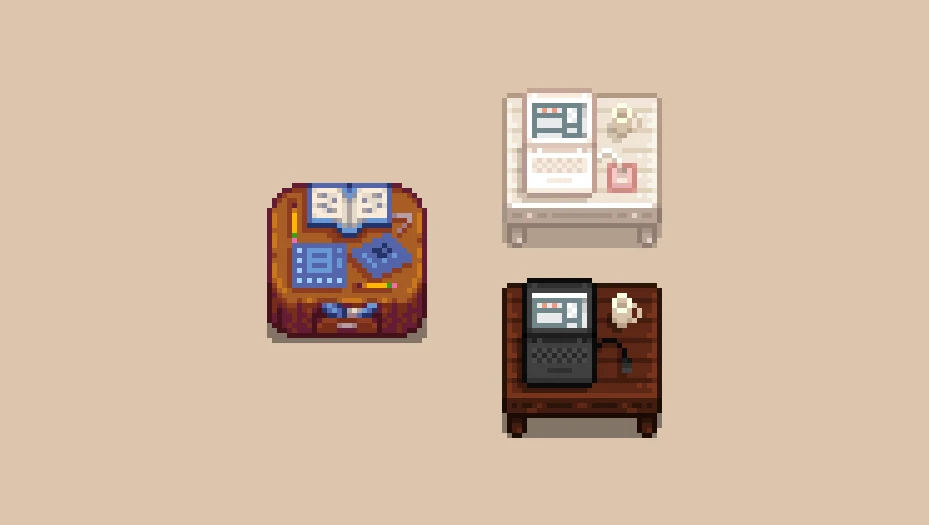
i don't like the vanilla looks of the catalogues and not many furniture mods change them so i decide to do so. pretend you're ordering online! there are two versions. enjoy!
features:
-
[]retextures of the furniture and wallpaper catalogues
[
]two versions, a light and dark version to match your interior[]this mod should work even if you already have a mod that changes your furniture
installation:
-
[]download and install the latest version of SMAPI and Content Patcher
[]drop the content of this zip file in your Mods folder
[]optional: rename the pngs in the assets folder from laptop_dark.png and tv_dark.png to laptop.png and tv.png if you wish to use the dark version
[]that’s it, enjoy!
check out my other mods:
-
[]flowery pink buildings (now seasonal!)
[]seasonal wizard style house
[]garden pot retextures
-
[]flowery pink buildings (now seasonal!)
-
[]download and install the latest version of SMAPI and Content Patcher
A simple retexture mod for the furniture and wallpaper catalogues in Fallout 4, giving them a fresh look. With 1,466 endorsements and 58,611 downloads, it's a popular cosmetic touch. Last updated in 2019, so it may not be compatible with the latest game version.
✨ Key Features
📊 Pros & Cons
✅ Pros
- Community favorite with 1,466 endorsements and 58,611 downloads.
- Simple drop-in retexture, no complex setup.
- Gives the in-game catalogues a fresh look.
⚠️ Cons
- Last updated in 2019, may be incompatible with current game version.
- Only affects catalogues, not other furniture or items.
- No screenshots or detailed description provided.
For Fallout 4 players who want a subtle visual upgrade to the shopping catalogues without changing gameplay. If you're a settlement builder who spends time browsing furniture, this adds a bit of polish. Skip if you're looking for more substantial content or gameplay tweaks.
💡 Beginner Tips
- Since it's a retexture, you can install it manually by dropping the files into your Data folder, but using a mod manager like Vortex or NMM is easier for uninstalling.
- Make sure to check if the mod requires any DLC or updates from the game's Creation Club, as it was last updated in 2019.
- If you're using other mods that alter the same catalogues, load order might matter; place this one after to ensure its textures take effect.
📊 Mod Details
- Game
- Stardew Valley Mods
- Author
- naeldeus
- Version
- 1.0
- Downloads
- 58,611
- Endorsements
- 1,466
- Category
- Interiors
- Created
- 5/20/2019
- Updated
- 5/20/2019
🔧 How to Install Stardew Valley Mods
Download from Nexus.
📖 Full step-by-step install guide for Stardew Valley →
Visit the official mod page for specific installation instructions for this mod.
🎮 Need cheat codes or console commands? Check ur gaming wiki for Stardew Valley commands, item IDs, and more.
Keep browsing — more Stardew Valley mods await