Nightmare's Additional Weaponry
⚪ Last updated 2016⚠️ Install Order · 2 steps
Install in this order, then this mod last — most mods fail to load without their framework and dependencies in place.
Preview
🔍 Analysis
- 👍 2.4% endorsement rate — high engagement, a strong quality signal
- 🏆 #43 of 144 Items mods in this game by downloads
📋 About This Mod
Nightmare's Additional Weaponry
TXsuyW4farA
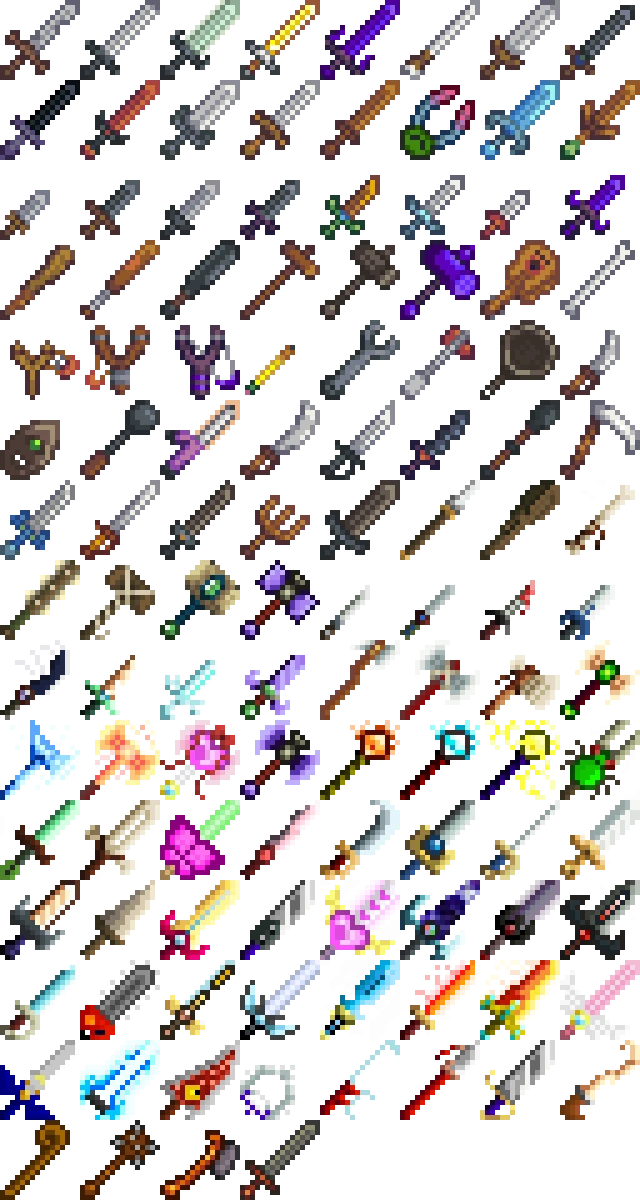
With all the retextures, for weapons, that I've done, I decided to add all of them as additional weapons to Stardew Valley's vanilla weapons.
64 New Weapons, Balanced (If you have Custom Shops Mod installed)
I highly recommend downloading Omegasis' Custom Shops Mod! It makes these weapons and obtaining them not cheaty.
(Link Below)
HOW TO INSTALL
- Transfer .zip's Content to your Stardew Valley directory (\Steam\steamapps\common\Stardew Valley)
- Agree to replace the two files already existing (don't worry, it won't delete/replace anything else)
- That's it!
There's a backup included if you want to return to vanilla. Installation is the same. If you prefer to install manually, just drag and drop the .xnb's to their correct folder Make sure you do this correctly or game will crash!
To obtain these weapons, you'll either need one of two mods:
- CJB's Item Spawner:
http://www.nexusmods.com/stardewvalley/mods/93/?
- Omegasis's Custom Shops:
https://github.com/janavarro95/Stardew_Valley_Mods
Now On Nexus!
(Omegasis plans to upload his mod to Nexus and Chucklefish forums, once he does, I'll update link)
Github is a bit confusing, here's what ya do to install it:
First Part-
Download ZIP (Top Right, it'll be a Master File including all his files)
^Link will take you straight to downloading Zip if you prefer
- Extract/Move CustomShopMod_Redux_GUI from .zip to your \Stardew Valley\Mods folder
(Check out his other mods, if you'd like, some pretty nifty ones! ^.^)
Second Part
- Extract/Move the CustomShopMod_Redux_GUI folder in NightmaresWeapAddons.zip into \Stardew Valley\Mods folder
- It will add my unique custom shop txt file and that's all.
- In-Game, the default hotkey to open custom shop is 'U'
(The Custom Shops mod comes with three premade shops, but you'll just press the arrow to cycle through until you find Nightmare's Weaponry)
How to video:
Mic has terrible feedback on it, so look for the annotations for worded instructions.
DNN39D7JatI
Everything should work fine now!
Both mods above do require SMAPI
https://github.com/ClxS/SMAPI/releases/tag/0. 40. 0
Want to know how to add your own weapons to SDV?
Unpack weapons.xnb from TileSheets and extend canvas down by 16 pixels (do not widen)
Adds 63 new weapons to Stardew Valley without altering vanilla textures. A popular content expansion for players seeking more combat variety, with 2,388 endorsements and nearly 100k downloads. Last updated in 2016, so compatibility with newer game versions is uncertain.
✨ Key Features
📊 Pros & Cons
✅ Pros
- Huge arsenal boost—63 new weapons means plenty of variety for combat-focused playthroughs.
- Community favorite with 2,388 endorsements and nearly 100k downloads, so it's proven.
- No vanilla retextures means it won't mess with the game's original look.
⚠️ Cons
- Last updated in 2016—may be incompatible with the latest Stardew Valley patches.
- No details on weapon stats or balance, so some might be overpowered or underpowered.
For Stardew Valley players who want more combat options and are tired of the vanilla weapon pool. Perfect for farmers who enjoy dungeon crawling and want new toys to try. Skip if you're on the latest game version and worry about mod compatibility.
💡 Beginner Tips
- Since the mod is from 2016, check if it's compatible with your Stardew Valley version before installing—older mods often break after major updates.
- Use a mod manager like SMAPI to install and manage this mod easily, and to catch any load order issues.
- Back up your save file before adding new weapons, just in case the mod causes crashes or conflicts.
📊 Mod Details
- Game
- Stardew Valley Mods
- Author
- zcsnightmare
- Version
- 1.0
- Downloads
- 98,744
- Endorsements
- 2,388
- Category
- Items
- Created
- 5/15/2016
- Updated
- 5/15/2016
🧩 Commonly Used Together
Users add these mods to the same collections — a real compatibility signal, not an AI guess.
🔧 How to Install Stardew Valley Mods
Download from Nexus.
📖 Full step-by-step install guide for Stardew Valley →
Visit the official mod page for specific installation instructions for this mod.
🎮 Need cheat codes or console commands? Check ur gaming wiki for Stardew Valley commands, item IDs, and more.
Keep browsing — more Stardew Valley mods await