Minakie's Dressers
⚪ Last updated 2020⚠️ Install Order · 2 steps
Install in this order, then this mod last — most mods fail to load without their framework and dependencies in place.
Preview
🔍 Analysis
- 👍 3.0% endorsement rate — high engagement, a strong quality signal
- 🏆 #89 of 144 Items mods in this game by downloads
📋 About This Mod
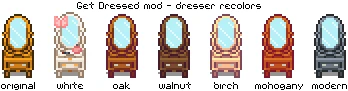
Dressers inspired by the GetDressed mod.
These dressers are recolors for the Get Dressed or Kisekae mods and you'll need one of them for my dressers to work. You can only have one of these working at the time, so you'll need to choose the color you want and replace the one on the original file (GetDressed or Kisekae).
GetDressed and Kisekae broke in the 1. 4 update but you can still use the Customize Anywhere mod, which is a partial replacement.
Get Glam is the new replacement for those mods. Install it if you want the dressers to be functional. :)
Minakie's dressers are now updated for Content Patcher!
This means you can now choose from two different models (floor or wall) or even have them both at the same time!
(The Floor version replaces the Modern End Table and the Wall version replaces the Dancing Grass painting.)
Each model comes in 11 colors: beige, birch, black, chocolate, modern, mahogany, oak, silver, vanilla (GetDressed original), walnut, and white.
For further customization, you can also add some accessories to the Floor version or a butterfly to the Wall version.
If you have the CJB Item Spawner mod installed, you can use it to spawn your cutie of choice by looking up "dresser" in its search bar.
- Make sure you have SMAPI and Content Patcher installed as well
- Download my latest file and unzip it
- Navigate to your "Stardew Valley\Mods" folder and drop the extracted folder there
- Run the game to generate the config file (just leave it as-is or tweak the options to your liking)
- Have fun :)
If you want to use one of these dressers with Get Glam, you'll need to navigate to Minakie's Dressers\assets\dresser_floor and rename the dresser of your choosing to "dresser.png". Then, you need to grab that renamed dresser image, drop it inside GetGlam\assets and let it override the existing image.
Cat, Digus, LadyShardust, Lumina, Minerva, Mouse, Ria, Pathoschild, SaintPickles, Strobe, TheElm, Wingheart and all the other nice people from the #modding channel at the Stardew Discord (seriously, there's way too many to mention them all, I'm probably forgetting people).
This was my first time attempting to code a CP mod and I wanted it to have it all (recolou
📊 Mod Details
- Game
- Stardew Valley Mods
- Author
- Minakie
- Version
- 2.0
- Downloads
- 49,599
- Endorsements
- 1,505
- Category
- Items
- Created
- 10/24/2016
- Updated
- 1/1/2020
🧩 Commonly Used Together
Users add these mods to the same collections — a real compatibility signal, not an AI guess.
🔧 How to Install Stardew Valley Mods
Download from Nexus.
📖 Full step-by-step install guide for Stardew Valley →
Visit the official mod page for specific installation instructions for this mod.
🎮 Need cheat codes or console commands? Check ur gaming wiki for Stardew Valley commands, item IDs, and more.
Keep browsing — more Stardew Valley mods await