Dirt Grass Cliff Water - DIY Map Recolours
⚪ Last updated 2019⚠️ Install Order · 3 steps
Install in this order, then this mod last — most mods fail to load without their framework and dependencies in place.
Preview
🔍 Analysis
- 👍 2.5% endorsement rate — high engagement, a strong quality signal
- 🏆 #93 of 119 Modding Tools mods in this game by downloads
📋 About This Mod
It's made for personal use before, now I'm sharing it so you don't have to go through the pains of sectioning and testing your recolours.
I might add Sand and Snow later if people need them.
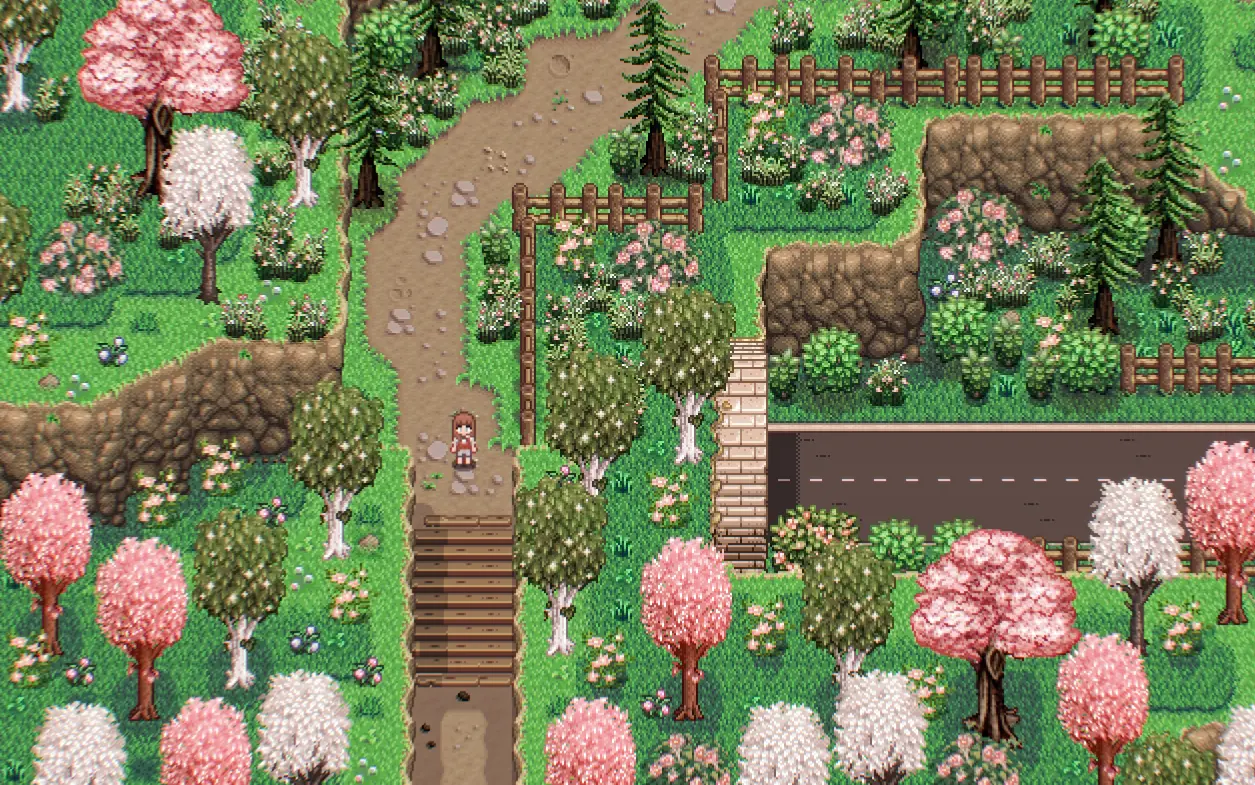
The recolour used in the screenshots is my Stardew Foliage Redone.
Brief Instructions:
If you want to recolour the vanilla maps, edit the images inside: Ourdoor Terrain Recolours/assets folder, and when you're done, put Ourdoor Terrain Recolours folder in your mods folder.
If you want to recolour the terrain parts of modded maps(aka Eemie's Just A New Map Recolour, Starblue Valley Maps, A Wittily Named Recolor...), edit the corresponding images inside the assets folder of their mods and then you're good to go.
A Quick tutorial if you use photoshop:
1. Open your original map image. At the bottom of the layer panel, select the icon of "Create new fill or adjustment layer" and pick the one you need.
2. Drag the corresponding mask layer to Photoshop, hit Ctrl/Command + A to select all and then hit Ctrl/Command + C to copy it.
3. Hide the mask layer and hold Alt/option to select the white mask of the adjustment layer you just added.
3. Hit Ctrl/Command + Alt/option + v to paste the new mask.
4. Select the thumbnail of your adjustment layer and play around with the slides!
(Apply the same adjustment layer's parameters on all the maps within the same terrain category to avoid incoherences.)
Additional Tutorials:
How to edit maps with Content Patcher
Adjustment layers in Photoshop
Layer masks in GIMP
Dirt Grass Cliff Water - DIY Map Recolours is a modding tool that provides pixel-perfect masks of terrain features, allowing players to adjust vanilla or modded maps to match their own aesthetics. It includes a Content Patcher folder for easy application and is designed to be highly compatible with other recolours.
✨ Key Features
📊 Pros & Cons
✅ Pros
- Community favorite with 1,483 endorsements and nearly 59k downloads
- Pixel-perfect masks take the guesswork out of recolouring terrain
- Content Patcher integration makes it easy to apply and tweak
⚠️ Cons
- Last updated in 2019, so it may not work with the latest game version
- Requires some familiarity with Content Patcher and map editing
- Not a plug-and-play recolour; you'll need to do the actual editing yourself
For Stardew Valley modders who want to create custom map recolours without the hassle of manual masking. Perfect for those who already use Content Patcher and want a flexible base for their aesthetic overhauls. Skip if you're looking for a ready-made recolour pack—this is a tool, not a finished product.
💡 Beginner Tips
- Make sure you have Content Patcher installed and updated before adding this mod.
- Use a mod manager like Vortex or SMAPI's mod folder to keep things organized.
- Start by recolouring one terrain type at a time to see how the masks work before doing a full overhaul.
📊 Mod Details
- Game
- Stardew Valley Mods
- Author
- Hesper
- Version
- 1.0
- Downloads
- 58,952
- Endorsements
- 1,483
- Category
- Modding Tools
- Created
- 11/20/2019
- Updated
- 11/27/2019
🔧 How to Install Stardew Valley Mods
Download from Nexus.
📖 Full step-by-step install guide for Stardew Valley →
Visit the official mod page for specific installation instructions for this mod.
🎮 Need cheat codes or console commands? Check ur gaming wiki for Stardew Valley commands, item IDs, and more.
Keep browsing — more Stardew Valley mods await