Better Signs - Lock Signs to Prevent Accidental Changes
🟡 Updated this year⚠️ Install Order · 2 steps
Install in this order, then this mod last — most mods fail to load without their framework and dependencies in place.
Preview
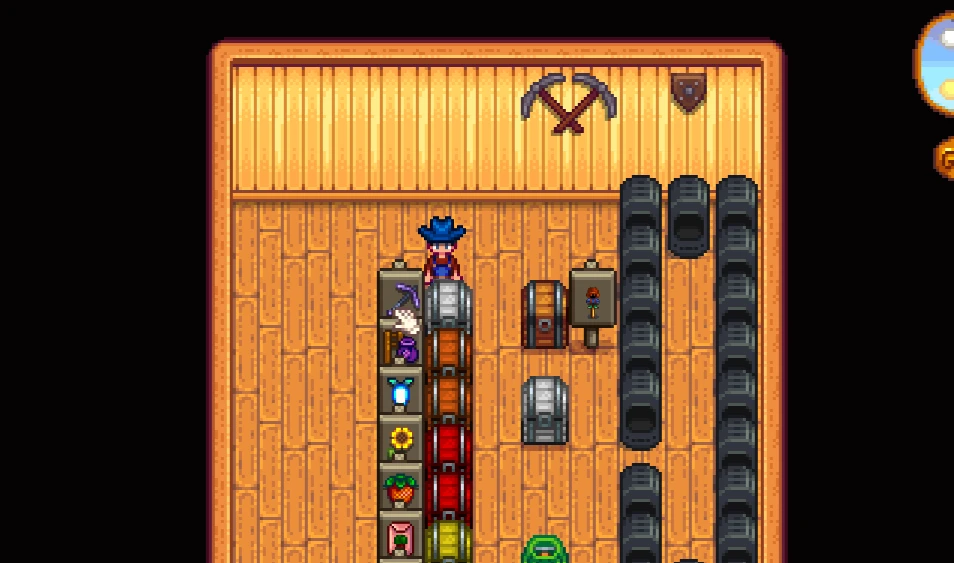
🔍 Analysis
- 👍 0.3% endorsement rate
- 🏆 #13 of 130 Miscellaneous mods in this game by downloads
📋 About This Mod
Better Signs - Lock Your Signs to Prevent Accidental Changes
Stop accidentally erasing your carefully organized farm signs! Better Signs prevents you from accidentally changing sign text or displayed items when you click on them.
The Problem This Solves
Have you ever:
-
[]Accidentally cleared a chest label you spent time writing?[/]
[]Lost track of what crops are planted in each area because you clicked a sign by mistake?[/]
[]Overwritten your greenhouse organization system?[/]
[]Wasted time rewriting the same signs over and over?[/]
✨ How Better Signs Works
Signs are now LOCKED by default once you place them down. No more accidental changes
-
[]Place a sign and set the text/item[/]
[]The sign is automatically locked[/]
[]Click it all you want - nothing changes[/]
[]To edit: simply break and replace the sign[/]
-
[]Prevents accidentally overwriting existing Signs that display an item or text[/]
[]Right clicking on a sign will no longer replace the display item or prompt to change the text[/]
[]To change a sign, destroy and place it back down[/]
Compatibility
-
[]Stardew Valley: 1. 5 & 1. 6 Compatible[/]
[]SMAPI: 4. 1. 10+[/]
[]Multiplayer: Fully supported[/]
[]Other Mods: No known conflicts[/]
Frequently Asked Questions
Q: How do I edit a sign after placing it?
A: Break the sign and place it again. This prevents accidental changes while allowing intentional edits.
Q: Does this work with modded signs?
A: Yes! Works with vanilla signs and most modded sign variations.
Q: Will this affect my existing signs?
A: No! Signs you've already placed will gain protection immediately.
Q: Can I configure which signs are locked?
A: Currently all signs are locked by default. This ensures consistent behavior.
Q: Does this work in multiplayer?
A: Yes! Each player with the mod installed will have sign protection.
Other Mods by stebaker92
- []NPC Birthday Alerts - Never miss an NPC birthday with automatic reminders and gift suggestions[/]
A quality-of-life mod for Stardew Valley that locks signs to prevent accidental changes or overwrites. With 955 endorsements and 342,929 downloads, it's a popular utility for farmers who frequently misclick. Last updated July 2026, ensuring compatibility with recent game versions.
✨ Key Features
📊 Pros & Cons
✅ Pros
- Huge community trust (955 endorsements) — clearly a must-have for anyone tired of losing sign text
- Massive download count (342k+) shows it's proven across many farms
- Actively maintained (updated July 2026) — works with current Stardew versions
⚠️ Cons
- Only affects signs — if you wanted more sign customization, this isn't it
- Requires SMAPI (not stated but standard for Stardew mods) — adds a dependency if you don't have it
For Stardew Valley players who've accidentally changed signs while trying to place items or harvest. If you're a perfectionist who likes your farm organized, this mod saves you from frustrating mistakes. Skip if you rarely use signs or want gameplay overhauls.
💡 Beginner Tips
- Install SMAPI first — most Stardew mods need it, and this one is no exception
- After installing, test with a sign you don't care about to see how locking works
- Check the mod's page for any config options — you might be able to toggle locking behavior
📊 Mod Details
- Game
- Stardew Valley Mods
- Author
- stebaker92
- Version
- 4.1.0
- Downloads
- 342,929
- Endorsements
- 955
- Category
- Miscellaneous
- Created
- 1/3/2021
- Updated
- 7/15/2026
🔧 How to Install Stardew Valley Mods
Download from Nexus.
📖 Full step-by-step install guide for Stardew Valley →
Visit the official mod page for specific installation instructions for this mod.
🎮 Need cheat codes or console commands? Check ur gaming wiki for Stardew Valley commands, item IDs, and more.
Keep browsing — more Stardew Valley mods await