1.6 - Animal Crossing Digspot - Worm Replacement
🟠 Updated over a year ago⚠️ Install Order · 2 steps
Install in this order, then this mod last — most mods fail to load without their framework and dependencies in place.
Preview
🔍 Analysis
- 👍 3.2% endorsement rate — high engagement, a strong quality signal
- 🏆 #33 of 130 Miscellaneous mods in this game by downloads
📋 About This Mod
- []Updated it to work with the latest 1. 6
- []Feel free to take the art from this and make an updated mod, I'm not really doing the modding thing lately unfortunately.
- Updated it to work with Content Patcher. Please let me know if there's any problems.
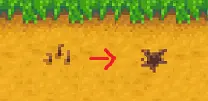
Replaces the worms with a Animal Crossing like digspot marker.
Installation
1. Install SMAPI and ContentPatcher.
2. Unzip the file into the \Steam\steamapps\common\Stardew Valley\Mods folder.
Installation
1. Backup your default files.
2. Unzip the file.
3. Place the "Cursors.xnb" file into your Stardew Valley\Content\LooseSprites folder, overwriting the old Cursors.xnb.
If you're using Steam, the default folder path is something like C:\Program Files\Steam\SteamApps\common\Stardew Valley\Content\LooseSprites.
If you're using another mod that edits Cursors.xnb (like a mod that edits the inventory screen pet heads), this will overwrite that mod. If you want to use both, let me know and I'll see what I can do.
Uninstallation:
1. Delete the file.
2. Restore the backup you made.
A simple cosmetic mod for Stardew Valley that replaces the game's worm dig spots with the Animal Crossing digspot marker. With over 3,300 endorsements and 104,000 downloads, it's a popular, lightweight visual tweak for fans of both games.
✨ Key Features
📊 Pros & Cons
✅ Pros
- Huge community approval (3,336 endorsements) — clearly a favorite among players
- Over 104,000 downloads shows it's been tried and tested by many
- Simple, clean visual swap that adds a touch of Animal Crossing charm
⚠️ Cons
- Only changes the dig spot texture — no other visual or gameplay alterations
- May not be updated for future game versions (last updated October 2024)
- Requires a mod manager or manual install, which might be a hurdle for new modders
For Stardew Valley players who love Animal Crossing and want a subtle crossover in their farming game. Also great for anyone looking for a tiny, safe cosmetic mod that won't break their save. Skip if you want more substantial content or gameplay changes.
💡 Beginner Tips
- If you're new to modding, use a mod manager like Vortex or SMAPI's mod folder to keep things organized.
- Make sure you have SMAPI installed if the mod requires it — check the mod page for dependencies.
- Since it's a texture replacement, it won't affect your save file, so you can uninstall it anytime without worry.
📊 Mod Details
- Game
- Stardew Valley Mods
- Author
- Lechet
- Version
- 1.6
- Downloads
- 104,655
- Endorsements
- 3,336
- Category
- Miscellaneous
- Created
- 3/8/2016
- Updated
- 10/25/2024
🔧 How to Install Stardew Valley Mods
Download from Nexus.
📖 Full step-by-step install guide for Stardew Valley →
Visit the official mod page for specific installation instructions for this mod.
🎮 Need cheat codes or console commands? Check ur gaming wiki for Stardew Valley commands, item IDs, and more.
Keep browsing — more Stardew Valley mods await