ReCleaned Menu
⚪ Last updated 2019⚠️ Install Order · 5 steps
Install in this order, then this mod last — most mods fail to load without their framework and dependencies in place.
Preview
🔍 Analysis
- 👍 1.1% endorsement rate — high engagement, a strong quality signal
- 🏆 #26 of 136 User Interface mods in this game by downloads
📋 About This Mod
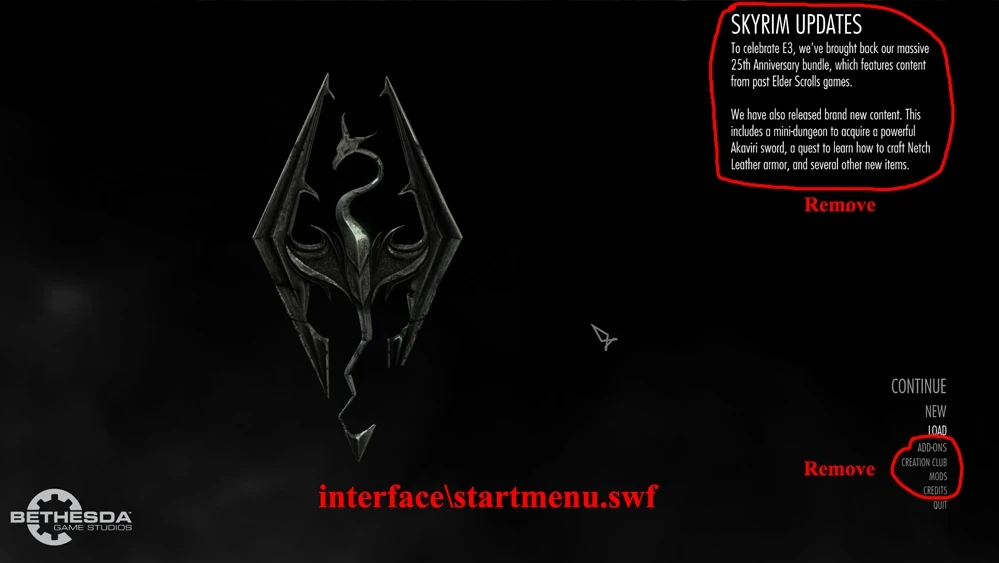
This is a very simple mod that removes most unnecessary buttons from Skyrim's menus.
Removed from the Main Menu:
-
[]Creation Club
[
]News Panel[]Add-Ons
[]Help
You can remove the MODS tab from the in-game pause menu as well. Add this to your Skyrim.ini: (under )
bModManagerMenuEnabled=0
This mod is intended to be an improved version of Clean Menu. I have cleaned the main menu using the method described by that mod's author (I did not use that mod's file). However, with Clean Menu, the slots from the buttons that have been removed are still there, allowing the user to scroll down using the keyboard to blank menu items. I have fixed that problem.
Compatibility:
This should be compatible with any version of Skyrim SE and any mods including SkyUI and anything that dosen't modify startmenu.swf (the main menu).
Installation:
Just extract the interface folder into your Data folder.
Thanks to:
- []Wirodeu for Clean Menu and instructions on how to decompile a flash file.
- Everyone behind JPEXS Free Flash Decompiler.
ReCleaned Menu is a simple Skyrim UI mod that removes unnecessary buttons from the game's menus, preventing accidental clicks on the mod manager or Creation Club. With over 4,300 endorsements and nearly 400,000 downloads, it's a popular quality-of-life tweak for players who find those buttons annoying.
✨ Key Features
📊 Pros & Cons
✅ Pros
- Huge community trust (4,326 endorsements) — this is a must-have for many players
- Nearly 400,000 downloads prove it's a go-to fix for accidental clicks
- Does exactly what it says — no bloat, just removes those annoying buttons
⚠️ Cons
- Last updated in 2019 — may not be compatible with the latest Skyrim version or mods
- Only removes buttons; doesn't offer any customization or options
- If you actually use the mod manager or Creation Club buttons, this mod isn't for you
For Skyrim players who are tired of accidentally opening the mod manager or Creation Club when navigating menus. If you want a cleaner UI without extra features, this is a solid pick. Skip if you actually use those buttons or want more UI customization.
💡 Beginner Tips
- Make sure to place the mod files in your Data folder or use a mod manager like Vortex or Mod Organizer 2.
- If you're using a mod manager, enable the mod after installing and check the in-game menus to confirm the buttons are gone.
- Since the mod is from 2019, test it with your current Skyrim version; if it doesn't work, look for a newer alternative.
📊 Mod Details
- Game
- Skyrim Mods
- Author
- Lewegee
- Version
- 1.1
- Downloads
- 399,231
- Endorsements
- 4,326
- Category
- User Interface
- Created
- 6/16/2019
- Updated
- 6/16/2019
🧩 Commonly Used Together
Users add these mods to the same collections — a real compatibility signal, not an AI guess.
🔧 How to Install Skyrim Mods
Download from Nexus.
📖 Full step-by-step install guide for Skyrim →
Visit the official mod page for specific installation instructions for this mod.
🎮 Need cheat codes or console commands? Check ur gaming wiki for Skyrim commands, item IDs, and more.
Keep browsing — more Skyrim mods await