MiniMap
⚪ Last updated 2021⚠️ Install Order · 5 steps
Install in this order, then this mod last — most mods fail to load without their framework and dependencies in place.
Preview
🔍 Analysis
- 👍 2.7% endorsement rate — high engagement, a strong quality signal
- 🏆 #96 of 136 User Interface mods in this game by downloads
📋 About This Mod
- Description
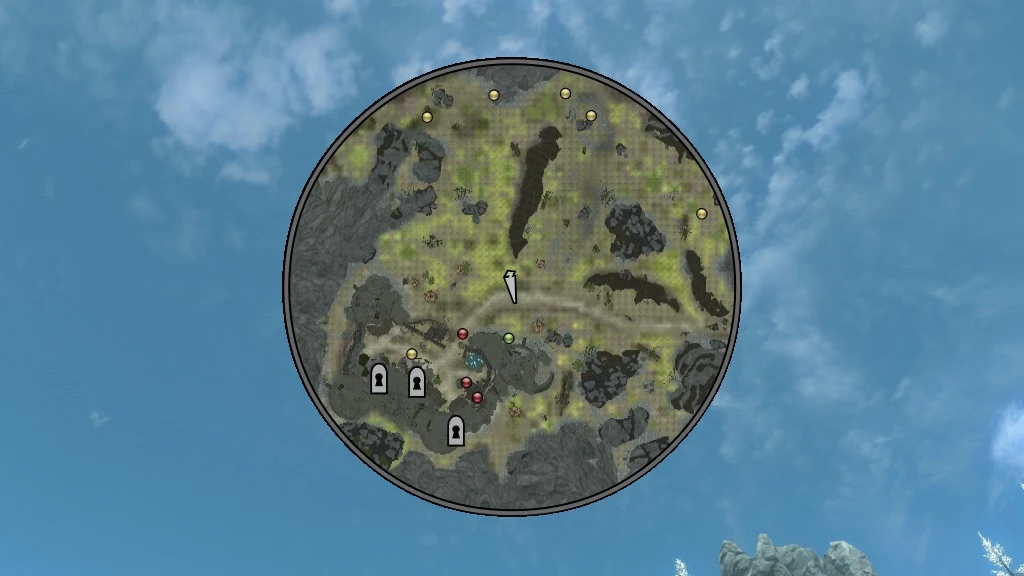
This mod adds a MiniMap. The terrain, doors, quests, and actors are displayed on the minimap. No ESP file.
- Requirement
Address Library for SKSE Plugins
You can open "MiniMap.ini" to change the settings.
FrameShape Frame shape can be set to rectangle or circle.
FrameColor Frame color.
HideFrame If set to true, the frame will be hidden.
Width Width of minimap.
Height Height of minimap.
Alpha Terrain opacity.
Align Alignment position of minimap.
OffsetX Horizontal offset of the minimap.
OffsetY Vertical offset of the minimap.
MarkerSize Marker size.
MinFrustumWidth Unknown.
ZoomPercent1 First zoom percentage.
ZoomPercent2 Second zoom percentage.
ToggleZoomKeyCode Key code to toggle between ZoomPercent1 and ZoomPercent2. It is set to "B" key by default.
ToggleVisibilityKeyCode Key code to toggle the visibility of the minimap. It is set to "N" key by default.
InitiallyHidden If set to true, the minimap will be hidden when the game starts.
FixWaterFlickering If set to true, the flickering water on the minimap will be fixed.
DisplayMarker You can select the marker to display from the door, quest, and actor(Dead, Follower, Hostile, Default).
- Credits
SKSE team for SKSE.
meh321 for Address Library for SKSE Plugins.
My Mods
LE | SE MiniMap
LE | SE Equipment Upgrades
LE | SE Armor Break
LE | SE Floating Damage V2
LE | SE Copy Character Appearance
LE | SE Attributes
LE | SE Floating Damage
LE | SE Equipment Durability System
LE | SE Display Enemy Level
LE | SE Locational Damage(SKSE Plugin)
LE | SE Difficulty Balance
LE | SE Animation Loading Fix
LE | SE Disable Follower Collision
LE | SE Additional Techniques
LE | SE Copy and Paste in Console
LE | SE Dynamic Animation Replacer
LE | SE Player Rotation in ShowRaceMenu
MiniMap is a lightweight UI mod that adds a minimap to the game, displaying terrain, doors, quests, and actors. It requires no ESP file, making it easy to install and remove. With over 7,800 endorsements and 287k downloads, it's a popular choice for players seeking better navigation.
✨ Key Features
📊 Pros & Cons
✅ Pros
- Huge community trust (7,812 endorsements) — this is a must-have for UI overhauls.
- No ESP file means it's clean and won't bloat your save or cause conflicts.
- Shows everything you need: terrain, doors, quests, and actors — perfect for exploration.
⚠️ Cons
- Last updated in 2021 — might be outdated for the latest game version, so check compatibility.
- Requires a mod manager for easy installation, which might be a hurdle for manual installers.
For players who get lost easily and want a constant map overlay without opening the full map. Also great for completionists who want to track quests and NPCs at a glance. Skip if you prefer a minimalist UI or if you're on the latest game version and worried about compatibility.
💡 Beginner Tips
- Use a mod manager like Vortex or MO2 to install and manage this mod easily.
- If you're on a newer game version, test the mod in a save you don't care about first.
- Check if the mod has an MCM menu or config file to tweak the minimap size and position.
📊 Mod Details
- Game
- Skyrim Mods
- Author
- Felisky
- Version
- 1.0.1
- Downloads
- 287,896
- Endorsements
- 7,812
- Category
- User Interface
- Created
- 5/5/2021
- Updated
- 5/6/2021
🧩 Commonly Used Together
Users add these mods to the same collections — a real compatibility signal, not an AI guess.
🔧 How to Install Skyrim Mods
Download from Nexus.
📖 Full step-by-step install guide for Skyrim →
Visit the official mod page for specific installation instructions for this mod.
🎮 Need cheat codes or console commands? Check ur gaming wiki for Skyrim commands, item IDs, and more.
Keep browsing — more Skyrim mods await