wz_Inventory
⚪ Last updated 2008⚠️ Install Order · 2 steps
Install in this order, then this mod last — most mods fail to load without their framework and dependencies in place.
Preview
🔍 Analysis
- 👍 2.7% endorsement rate — high engagement, a strong quality signal
- 🏆 #40 of 96 User Interfaces mods in this game by downloads
📋 About This Mod
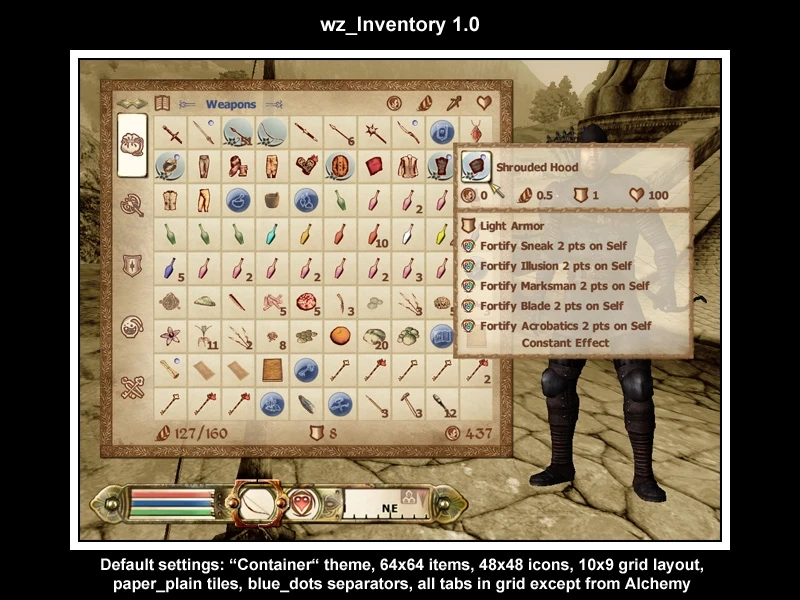
Once you exit the sewers, you start to mess with the clutter: Tons of keys, hundreds of ingredients, more potion than all apothecaries on Vvardenfell together. And only six visible slots! Of course, you can install an UI mod and get 16, or 20, but you want the real deal. Suddenly, you wish you had the Morrowind inventory back… Well - here you are! :) The fully featured interface mod wz_Inventory brings back the good old grid-based inventory. And fully configurable too! A whole bunch of config options make it easy for you to suit the inventory to your your likings. Among several style options such as transparencies, item sizes, row and column count, layout settings like horizontal or vertical grid, you can choose from two themes to use: The classical journal theme, which uses Oblivion\'s default journal looks but replaces the list with a grid view. The new and improved container theme, making better use of the screen layout, and providing cool features such as dynamic inventory resizing. Now even comes with Collapsing Categories to hide whole sections, for example the oh-so-cluttered keys. Customisation can further be archieved by using custom separator or grid images, easily adjustable in the config file, or using the bundled key file for the TweakOblivion GUI editor. But what if you run into a situation where the list view would come in handy? No problem, toggling between can be done in-game! And if you generally prefer the list view for one specific tab, e.g. Alchemy, you can mark it default.
wz_Inventory is a user interface mod for The Elder Scrolls IV: Oblivion that addresses inventory clutter by expanding the visible item slots beyond the default six. With 1,506 endorsements and 55,759 downloads, it remains a popular choice for players seeking a cleaner inventory management experience, though it was last updated in 2008.
✨ Key Features
📊 Pros & Cons
✅ Pros
- Community favorite with 1,506 endorsements and 55k+ downloads.
- Solves a real pain point—inventory clutter—without overhauling the entire UI.
- Lightweight and focused; no need for a full UI replacement.
⚠️ Cons
- Last updated in 2008—may be incompatible with modern Oblivion versions or mod setups.
- Only expands slots; doesn't add sorting or search features that newer UI mods offer.
For Oblivion players who are tired of scrolling through endless keys and potions and want a quick, no-frills fix to see more items at once. Skip if you're looking for a full UI overhaul with sorting, search, or modern features—this is a simple slot expansion.
💡 Beginner Tips
- Since this mod is from 2008, check if your Oblivion version is patched to the latest official update to avoid compatibility issues.
- If you use a mod manager like OBMM or Wrye Bash, install it through that to keep your load order clean.
- Test the mod early in the game (right after the sewers) to see if the extra slots work as expected with your other UI mods.
📊 Mod Details
- Game
- Oblivion Mods
- Author
- Unknown
- Version
- 1.6
- Downloads
- 55,759
- Endorsements
- 1,506
- Category
- User Interfaces
- Created
- 4/26/2006
- Updated
- 1/8/2008
🔧 How to Install Oblivion Mods
Download from Nexus.
📖 Full step-by-step install guide for Oblivion →
Visit the official mod page for specific installation instructions for this mod.
🎮 Need cheat codes or console commands? Check ur gaming wiki for Oblivion commands, item IDs, and more.
Keep browsing — more Oblivion mods await