Pick Me - lockpicking interface retexture
⚪ Last updated 2020⚠️ Install Order · 2 steps
Install in this order, then this mod last — most mods fail to load without their framework and dependencies in place.
Preview
🔍 Analysis
- 👍 0.7% endorsement rate
- 🏆 #6 of 96 User Interfaces mods in this game by downloads
📋 About This Mod
Pick Me!
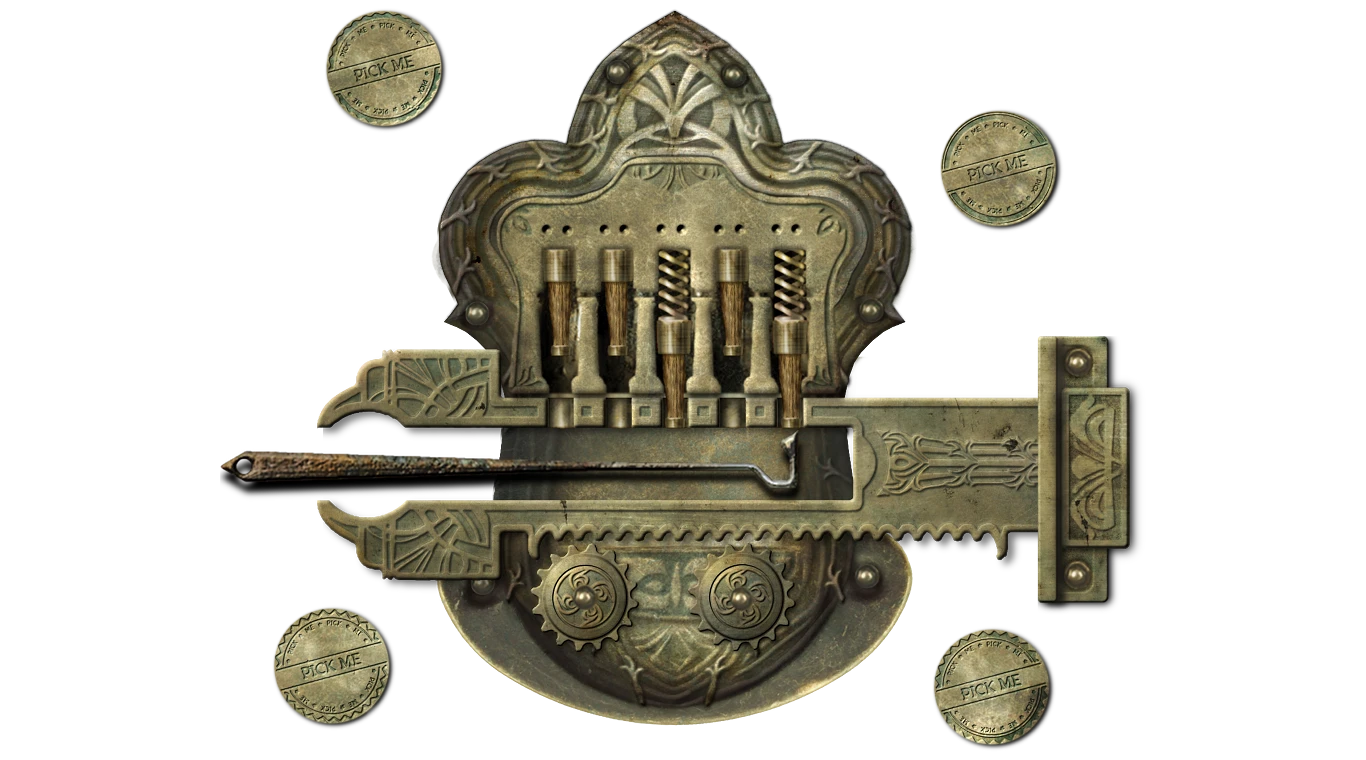
A pretty straightforward facelift of lockpicking interface.
I like the lockpicking minigame - it's challenging and immersive in its own way - but for a long time I had been avoiding it without fully realising why. I used various mods that skipped this minigame altogether, only to finally come to the conclusion that the actual reason for my lukewarm feelings towards it was the garish, cartoonish vanilla texture. So I decided to give it a more modern, kind of 3D look, and voilà - it feels soooo much better now. It's still almost the same vanilla design (it was actually rather nice, although utterly unrealistic - I'm feeling tempted to deal with it too - but the materials, resolution, and style are more up to date). I feel perfectly comfortable with it now, and I hope some of you will too.
Installation
As always I recommend Wrye Bash for installing this mod. Just add it to installers, move it down below other UI/texture mods and click Install. That's it.
You can also install it manually. Unpack the mod somewhere safe, and merge the contents with your Oblivion/Data folder.
Compatibility
My updated lockpick_menu.xml (included) is necessary for the right layout of the graphics (because they're twice the original resolution). By default this mod is compatible with DarNified UI, but can be used with vanilla UI as long as you download and install the optional menu file (it will overwrite DarN's lockpick_menu.xml with one based on vanilla interface). The optional menu should be copied to Oblivion/Data/Menus (if you use Wrye Bash, you don't have to think about it).
According to Vrugdush: "[...] vanilla menu version is also compatible with BTmod". Thanks for confirmation, fellow thief!
Jaikb says: Works fine with Dark Transparent UI as well.
Thanks, mate!
Enjoy! Happy burgling!
I've added an optional file with slab of wood in the background for those who liked to have it. Let me know if it's okay, or maybe it should be darker? (I used wood texture from http://www.babaimage.com/generate/related-posts-pink-wood-textures-free-high-res-wood-textures-grey-wood)
I've also added various metal tumblers (brass, iron, and vanilla) for these of you who think wooden tumblers are not realistic enough :) Just overwrite the old one with this.
I've noticed that previously (before 24 April 2018) vanilla style tumblers were one pixel too wide, resulting in just white square where tumblers should be. I uploaded a version with correct size for these of you who liked vanilla design better.
A stylish lockpicking interface retexture for Skyrim, endorsed by 1,918 users. It upgrades the lockpicking screen with a sophisticated look, appealing to thieves who value aesthetics. Last updated in 2020, it remains popular with over 291k downloads.
✨ Key Features
📊 Pros & Cons
✅ Pros
- Community favorite with 1,918 endorsements and nearly 300k downloads.
- Adds a touch of class to a common activity—perfect for role-players.
- Lightweight UI mod that doesn't affect gameplay mechanics.
⚠️ Cons
- Last updated in 2020—may not be compatible with the latest Skyrim version or mods.
- Only affects the lockpicking screen, so it's a minor visual change.
- No screenshots or detailed description provided, so you can't preview the look.
For Skyrim players who spend a lot of time lockpicking and want a more refined interface. Also for role-players who want their thief character to have a touch of class. Skip if you're looking for gameplay changes or if you're on the latest Skyrim version and worry about compatibility.
💡 Beginner Tips
- Since it's a UI retexture, use a mod manager like Vortex or MO2 to install and manage it easily.
- If you're on Skyrim Special Edition, check if the mod is compatible—it was last updated in 2020, so you might need to test it.
- Load order rarely matters for UI retextures, but place it after other UI mods to ensure it takes effect.
📊 Mod Details
- Game
- Oblivion Mods
- Author
- maczopikczo
- Version
- 1
- Downloads
- 291,587
- Endorsements
- 1,918
- Category
- User Interfaces
- Created
- 4/19/2018
- Updated
- 5/31/2020
🔧 How to Install Oblivion Mods
Download from Nexus.
📖 Full step-by-step install guide for Oblivion →
Visit the official mod page for specific installation instructions for this mod.
🎮 Need cheat codes or console commands? Check ur gaming wiki for Oblivion commands, item IDs, and more.
Keep browsing — more Oblivion mods await