MajorJims UI
⚪ Last updated 2008⚠️ Install Order · 2 steps
Install in this order, then this mod last — most mods fail to load without their framework and dependencies in place.
Preview
🔍 Analysis
- 👍 2.1% endorsement rate — high engagement, a strong quality signal
- 🏆 #41 of 96 User Interfaces mods in this game by downloads
📋 About This Mod
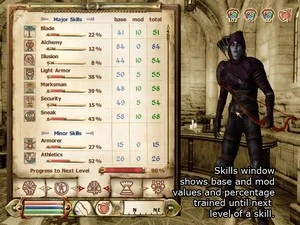
This is version 1. 12 of my UI mod. Check out the screenshots for an better idea of what has been changed. New in version 1. 12: Quick fix to the action icon not dissapearing when talking. I should perhaps test things out first before I release the next time New in version 1. 11: Includes the standard HUD Info menu as well as the centered version. Will let you enable/diable the crosshair when sneaking. Fixes some bugs + some minor new settings in mj_ui_config.xml From the readme file: Some of the main features over normal Oblivion are: More detailed Attribute and Skills status screens. Shows Base, Mod and Total values. Inventory window is larger and shows more items per page with less wasted space. Smaller font. Easier to see count number of each item. Magic window is larger and shows more items per page. Large world and local map views. Larger quest view window and smaller text. Containers and shop windows are larger and show more items. Repair/Ingredient/Spell buy windows show more items per page. HUD using smaller fonts and text shadows. Magic effect icons show only numbers, no bars. * HUD Info centered under the crosshair instead of in the lower right corner.
MajorJims UI is a user interface overhaul for Oblivion, last updated in 2008. It offers a quick fix for the action icon not disappearing during dialogue. With over 1,100 endorsements and 55k downloads, it's a popular but dated UI mod.
✨ Key Features
📊 Pros & Cons
✅ Pros
- Community favorite with 1,168 endorsements and 55k downloads.
- Fixes a specific UI bug (action icon persistence during dialogue).
- Lightweight and easy to install—just drop files in your Data folder.
⚠️ Cons
- Last updated in 2008—likely incompatible with modern Oblivion versions or mod setups.
- Author admits to not testing thoroughly before release, so expect potential quirks.
For Oblivion players who want a cleaner UI and are okay with an old mod that might need tweaking. Skip if you're on a modern setup or want a fully documented overhaul.
💡 Beginner Tips
- Since it's from 2008, check if you're using Oblivion with the latest patches—old mods can break with updates.
- Use a mod manager like OBMM or Wrye Bash to install and manage the files, even though it's just a drop-in.
- Test the action icon fix early in a conversation to ensure it works with your other UI mods.
📊 Mod Details
- Game
- Oblivion Mods
- Author
- Unknown
- Version
- 1.12
- Downloads
- 55,541
- Endorsements
- 1,168
- Category
- User Interfaces
- Created
- 6/4/2006
- Updated
- 1/8/2008
🔗 Required By 2 Mods
These mods list this mod as a dependency.
🔧 How to Install Oblivion Mods
Download from Nexus.
📖 Full step-by-step install guide for Oblivion →
Visit the official mod page for specific installation instructions for this mod.
🎮 Need cheat codes or console commands? Check ur gaming wiki for Oblivion commands, item IDs, and more.
Keep browsing — more Oblivion mods await