Fix Your Statue In Bruma
⚪ Last updated 2009⚠️ Install Order · 2 steps
Install in this order, then this mod last — most mods fail to load without their framework and dependencies in place.
Preview
🔍 Analysis
- 👍 4.8% endorsement rate — high engagement, a strong quality signal
- 🏆 #23 of 143 Miscellaneous mods in this game by downloads
📋 About This Mod
================================================================================
Fix Your Statue In Bruma
1. 0
A Oblivion plugin
For Oblivion
================================================================================
Excuse me for bad english.
================================================================================
Author: Visman
Russian version: http://alltes.ru/file/fix-your-statue-in-bruma/
================================================================================
Description:
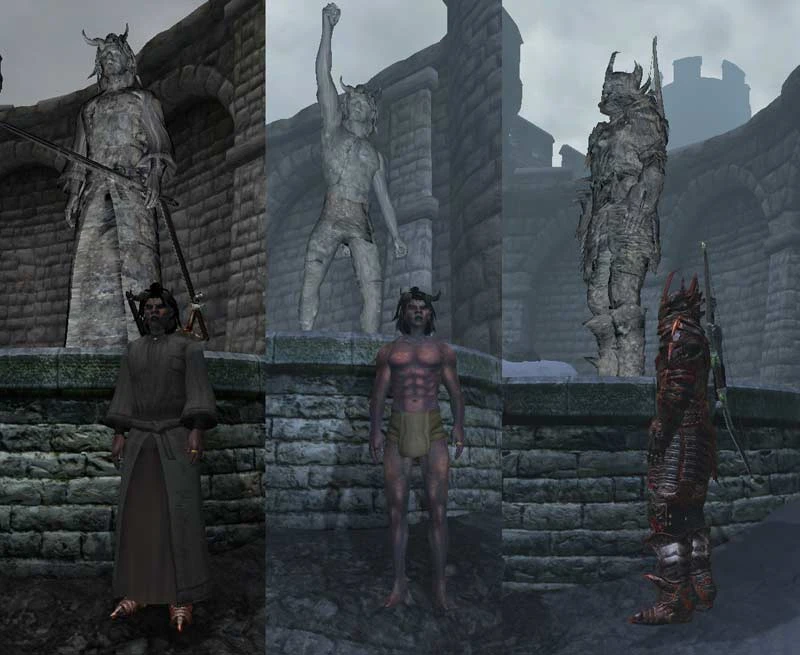
The plugin changes script MQ14StatueScript.
Each time when OnLoad, the statue is completely updated.
This is a preventative fix.
v 1. 0
Your statue is the stone.
OR
Your statue has colours.
================================================================================
Installation:
1. Extract this archive in directory ...\\Oblivion\\Data (file Oblivion.esm is found in this directory).
2. Start Oblivion (OblivionLauncher.exe).
In menu \"Files\" choose file \"sva_testFixBruma.esp\".
Press
Fix Your Statue In Bruma is a small Oblivion mod that updates the statue in Bruma every time it loads, preventing it from getting stuck in an outdated state. It's a preventative fix for a known quest-related issue, with 191 endorsements and last updated in 2009.
✨ Key Features
📊 Pros & Cons
✅ Pros
- Community-tested fix with 191 endorsements and nearly 4,000 downloads.
- Lightweight and straightforward—just drop it in and it works.
- Prevents a frustrating visual bug that can break immersion in Bruma.
⚠️ Cons
- Last updated in 2009—may not be compatible with newer Oblivion versions or mod setups.
- Only addresses the statue issue; no other fixes or features included.
- No documentation or install instructions provided by the author.
For Oblivion players who've encountered the statue in Bruma not updating correctly after the main quest. If you're a completionist or roleplayer who hates visual glitches, this is a quick fix. Skip if you're on a modern mod list and haven't seen the issue—might be unnecessary.
💡 Beginner Tips
- Place the .esp file in your Oblivion Data folder and enable it in the launcher or mod manager.
- Load order doesn't matter much for this simple script change, but keep it active.
- If you use a mod manager like Wrye Bash, just install and activate—no extra steps.
📊 Mod Details
- Game
- Oblivion Mods
- Author
- Visman
- Version
- 1.0
- Downloads
- 3,981
- Endorsements
- 191
- Category
- Miscellaneous
- Created
- 8/21/2009
- Updated
- 8/24/2009
🔧 How to Install Oblivion Mods
Download from Nexus.
📖 Full step-by-step install guide for Oblivion →
Visit the official mod page for specific installation instructions for this mod.
🎮 Need cheat codes or console commands? Check ur gaming wiki for Oblivion commands, item IDs, and more.
Keep browsing — more Oblivion mods await