BTmod
⚪ Last updated 2009⚠️ Install Order · 2 steps
Install in this order, then this mod last — most mods fail to load without their framework and dependencies in place.
Preview
🔍 Analysis
- 👍 1.5% endorsement rate — high engagement, a strong quality signal
- 🏆 #18 of 96 User Interfaces mods in this game by downloads
📋 About This Mod
Description and files have been reuploaded and renamed as appropriate.
Budddah
BTmod v2. 20
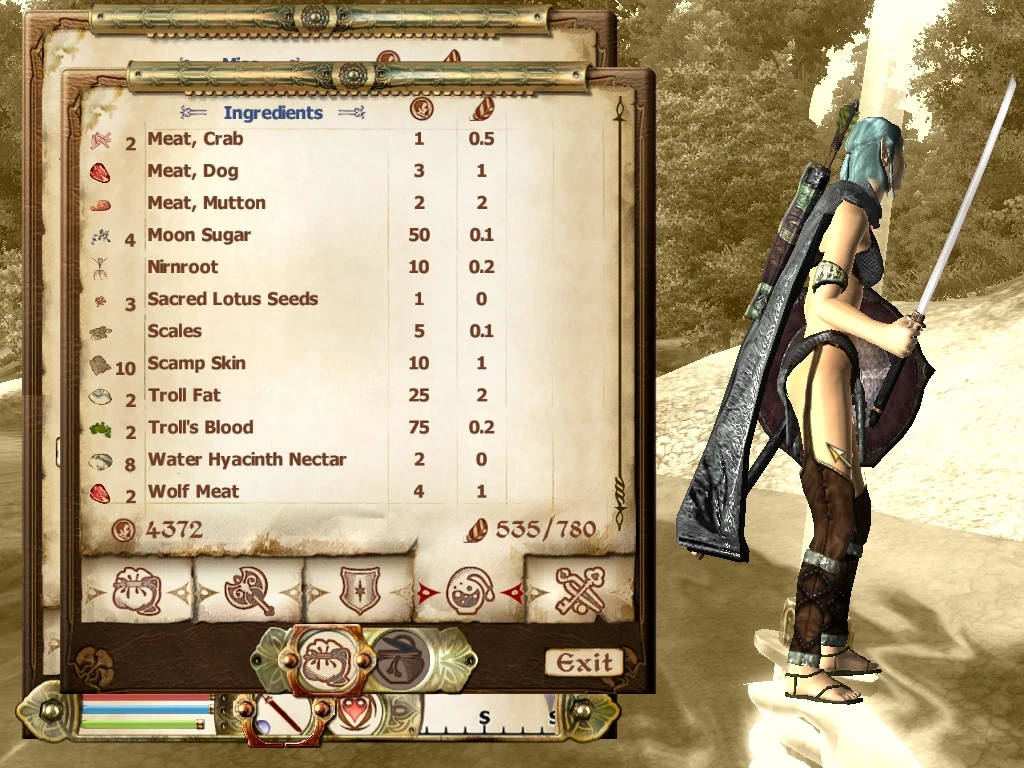
Improve many aspects of the stock Oblivion UI
• Increase the amount of the Inventory, Magic, Container(Looting), Repair and Alchemy Ingredients listings to 12 or higher
• Increased area to view Local and World Maps
• Increased area to view Quests and Journal
• Increased area to view Skills, Factions and Accomplishments
• Added percentage display to HP/MP/FA display †
• Added Durability status under the Weapon Icon on the Main Hud †
• Enabled and cleaned up Spell Effect durtation timers †
• During Custom Class Creation, increased the size of the enterable name
• Mapped Arrow Keys to various Menu buttons ‡
Support for removing Marker/POI icons from the Compass and Local/World Maps
• 3 ESP files to control MarkersPOI icons on the Compass
• Map Config entry to control the Quest Marker on Local/World Maps
Configuration files to tailor the UI to your personal tastes
• Each Menu has it's own file(s) to control layout of icons, windows, graphics and more
• Future releases can use your previously altered Config files to keep your settings
The amount of items able to fit on screen could depend on setup of alternate fonts
† These items can be toggled on and off with the Config Files
‡ Keys OTHER THAN the Arrow Keys ARE NOT AVAILABLE TO BE MAPPED
********************
INSTALLING THE PLUGIN - FOR THOSE NOT USING THE AUTO-INSTALL (We Recommend the Auto-Install)
********************
For Manual Install:
Just copy the menus folder within the archive to your obliviondata directory
Your folder path should look like:
Oblivion/Data/menus/main/inventory_menu.xml
BTmod is a user interface overhaul for Oblivion that improves many aspects of the stock UI. With 1,610 endorsements and over 104,000 downloads, it's a well-established mod from 2009, though it hasn't been updated since. Ideal for players seeking a cleaner, more functional interface without major overhauls.
✨ Key Features
📊 Pros & Cons
✅ Pros
- Community favorite with 1,610 endorsements and over 104k downloads – clearly a trusted UI upgrade
- Targets the stock UI, so it's likely a subtle improvement that doesn't overhaul the game's look
- Being from 2009, it's been battle-tested by thousands of players – if it was broken, you'd know
⚠️ Cons
- Last updated in 2009 – might have compatibility issues with newer Oblivion patches or mods
- No detailed feature list provided, so you're flying blind on what exactly it changes
- UI mods can conflict with other interface overhauls – you'll need to test carefully
For Oblivion players who want a cleaner, more functional UI without a complete overhaul. If you're tired of the clunky stock interface and want a community-approved fix, this is a solid pick. Skip if you're looking for a modern UI with fancy features – this is a classic, simple improvement.
💡 Beginner Tips
- Since it's a UI mod, make sure to install it after any other UI mods to avoid overwriting changes.
- Check the mod's readme or forum comments for any known conflicts with popular mods like Darnified UI.
- If you use a mod manager, install BTmod and then load your save to see if the UI appears correctly – if not, reinstall and check load order.
📊 Mod Details
- Game
- Oblivion Mods
- Author
- bieder
- Version
- 2.2
- Downloads
- 104,075
- Endorsements
- 1,610
- Category
- User Interfaces
- Created
- 3/24/2006
- Updated
- 12/26/2009
🔗 Required By 3 Mods
These mods list this mod as a dependency.
🔧 How to Install Oblivion Mods
Download from Nexus.
📖 Full step-by-step install guide for Oblivion →
Visit the official mod page for specific installation instructions for this mod.
🎮 Need cheat codes or console commands? Check ur gaming wiki for Oblivion commands, item IDs, and more.
Keep browsing — more Oblivion mods await