Satellite World Map
⚪ Last updated 2015⚠️ Install Order · 5 steps
Install in this order, then this mod last — most mods fail to load without their framework and dependencies in place.
Preview
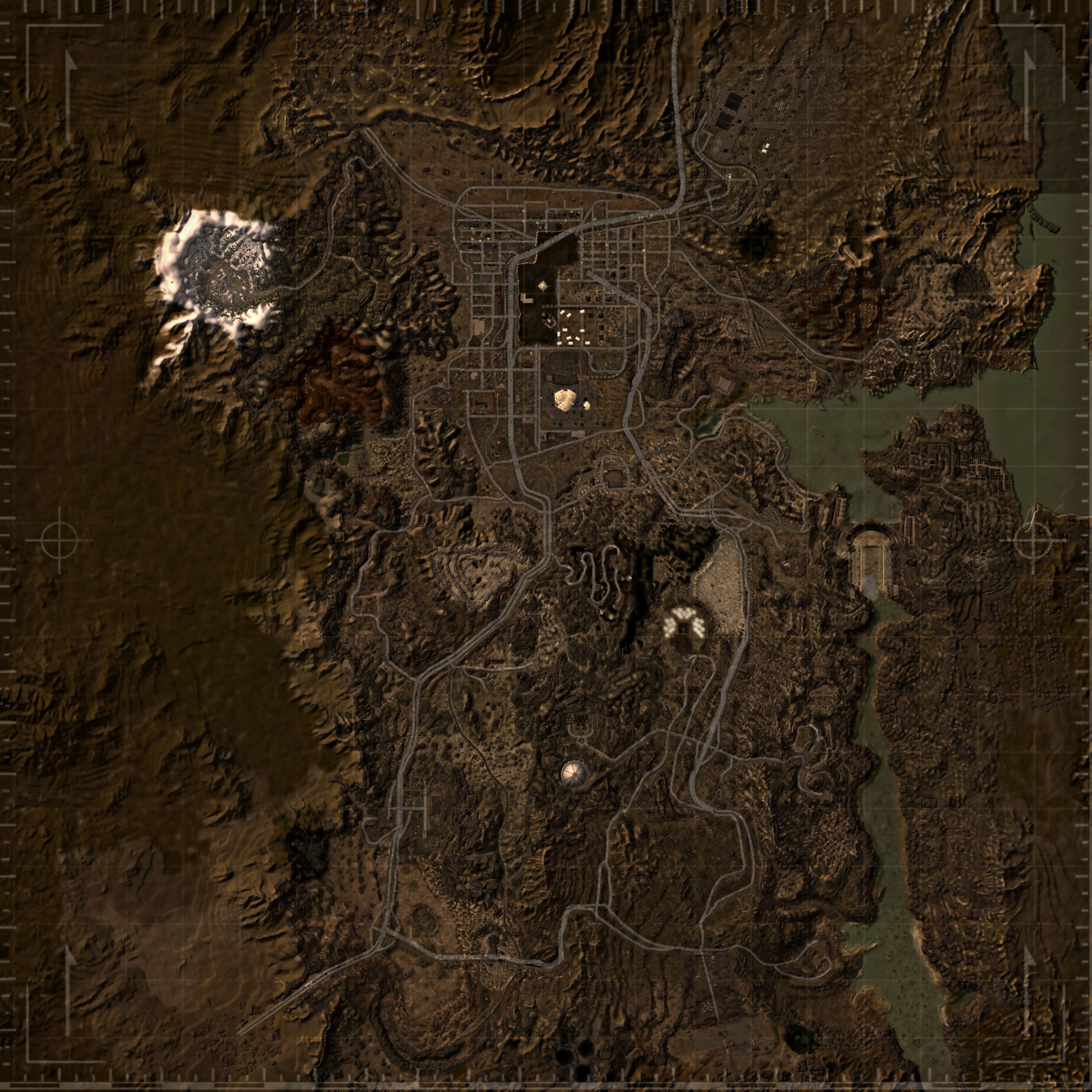
🔍 Analysis
- 👍 3.1% endorsement rate — high engagement, a strong quality signal
- 🏆 #128 of 173 User Interfaces mods in this game by downloads
📋 About This Mod
A high-res Satellite map for the Mojave Wasteland
The DLC maps are out! Satellite Maps DLC
Installation:
Manual 1.) Extract data folder from rar 2.) Drag Data folder into New Vegas Directory
Uninstall:
Manual 1.) Open \Data\Textures\interface\worldmap 2.) Delete wasteland_nv_1024_no_map.dds
Recommended Mods:
Shiloh DS - Clean Pipboy Screen (Removes map tinting and adjustable pipboy brightness)
Shiloh DS - Colored Map and Icons (For Icons and Better map zoom)
Mods in screenshot:
Official Pipboy Readius - New Vegas Edition Pipboy Readius Vegas Veteran Shiloh DS - Colored Map and Icons ENHANCED SHADERS - ENB
If you enjoy this mod or any others shown here please leave the author an endorsement
Satellite World Map is a high-resolution satellite-style map for the Mojave Wasteland in Fallout: New Vegas. It replaces the default map with a more detailed and realistic view, aimed at players who want better visual clarity and immersion. With over 3,300 endorsements and 105,000 downloads, it's a popular UI enhancement.
✨ Key Features
📊 Pros & Cons
✅ Pros
- Huge community trust (3,319 endorsements) — this is a proven map replacement
- Massive download count (105,859) means it's been tested by tons of players
- High-res satellite style gives a fresh, realistic look to the wasteland
⚠️ Cons
- Last updated in 2015 — may not be compatible with newer mod setups or game patches
- Purely cosmetic — doesn't add new locations or gameplay features
For Fallout: New Vegas players who want a more detailed and realistic world map without changing gameplay. If you're tired of the vanilla map's blurry look, this is a quick visual upgrade. Skip if you're looking for map markers or gameplay tweaks — this is purely a texture replacement.
💡 Beginner Tips
- Since it's a simple texture replacer, just drop the files into your Data folder and enable the .esp in your mod manager.
- If you use a mod manager like Nexus Mod Manager or Mod Organizer 2, install it through there to keep your load order clean.
- Check that no other map mods are overwriting this one — load order matters for texture replacers.
📊 Mod Details
- Game
- New Vegas Mods
- Author
- Primaryinsomnia
- Version
- 1.0
- Downloads
- 105,859
- Endorsements
- 3,319
- Category
- User Interfaces
- Created
- 4/2/2015
- Updated
- 4/6/2015
🧩 Commonly Used Together
Users add these mods to the same collections — a real compatibility signal, not an AI guess.
🔧 How to Install New Vegas Mods
Download from Nexus.
📖 Full step-by-step install guide for New Vegas →
Visit the official mod page for specific installation instructions for this mod.
🎮 Need cheat codes or console commands? Check ur gaming wiki for New Vegas commands, item IDs, and more.
Keep browsing — more New Vegas mods await